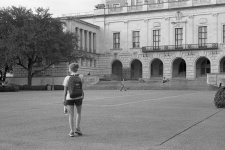
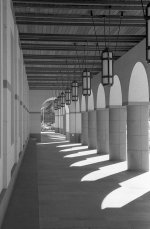
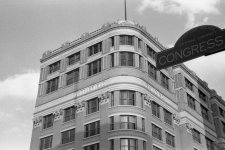
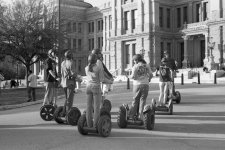
Are these negs underdeveloped? Tri-X in HC-110

gjlynx

Established
Local time
6:24 AM
Joined
Oct 22, 2007
Messages
57
Location
Austin, TX - USA
I am trying to get back into doing some B&W film after a long hiatus.
This is my first try with Tri-X at ISO 400 in HC-110 dilution H (1:63)
for 13 min at 68 deg F. I'm wondering if these images look to be underdeveloped?
Seems like I should be able to get better contrast. Should I go longer
than 13 min?

Thanks!
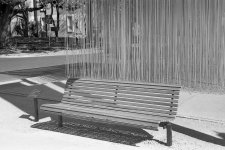
 

Attachments

  • UTBlanton020708001.jpg
    UTBlanton020708001.jpg
    288.4 KB · Views: 0
  • UTBlanton020708003.jpg
    UTBlanton020708003.jpg
    270.9 KB · Views: 0
  • UTBlantonPillars.jpg
    UTBlantonPillars.jpg
    215.1 KB · Views: 0
It's really hard to tell much on a computer screen. To me they look a bit underexposed. The shadows don't have a hint of detail. When Kodak first introduced HC-110 they suggested using Dilution A or Dilution B, both much stronger than what you're using. You might just have a situation where the developer is getting exhausted before it finishes developing. Try a stronger solution, perhaps 1:47, at the same time, but do it on as film with bracketed exposures.
 
Did you scan the negs, or are these scans of the actual prints? Scanned negs will and should always look flat - you'd have to do some post scanning work in PS to get the right contrast. If they are scans from negs without any manipulation in PS, then they are perfect.
 
Don't make any decisions until you print them (wet or digitally). You may have forgotten what a "good" neg looks like.

I agree completely with RF-Addict.

I scan film and print on an Epson. Every image requires a contrast increase with an image editor to look good. Years ago, I tried developing negs that required no image editor adjustment but the final prints didn't look so great.
 
RF-Addict said:
Did you scan the negs, or are these scans of the actual prints? Scanned negs will and should always look flat - you'd have to do some post scanning work in PS to get the right contrast. If they are scans from negs without any manipulation in PS, then they are perfect.
They are scanned with Epson V500 - no post processing. I did have the one with
the arches printed and the print looks washed out like on the screen. My old Plus-X negs with D76 (1:1) look better and scan better as well. I just thought I would try the Tri-X since it's cheap here ($3.03/roll at local grocery store) and the HC-110 syrup is easy to mix and dilute. I think the exposures are OK as a range of exposures on the same roll yielded negs with similar consistency. I also used exposure readings from Lumix DMC-FX12 as a guide for my IIIf + Summitar used for the film.
 
gjlynx, I develop TriX @ 250 for 11.5 minutes, 68 degrees F, HC-110h, 30 seconds agitation at first then 3 inversions each minute. My negatives are maybe a little over developed, but that is what works for me. You may have overdeveloped negatives and then when they are scanned the results look light or washed out. As everybody has said before, you can tell unless you/we see the negatives.
 
I just read your last post. HC-110 or TriX is not your problem. You need to look at other factors. You have many variables here: development time, is the dilution mixing correct, temp correct, scanner properly set up, did you use an unusual agitation, your post processing could be for PlusX and you are using the same for TriX. I'm sure there are more hidden variables.
 
a bit of "thinness" in the negative is not a bad thing for scanning, imho. i second the opinion that you can punch up the contrast post-scan.

why not have a go at it and repost for add'l comment?
 
Aaaah.... UT campus 🙂

Those look fine. If anything a bit over developed. Adjust contrast/brightness and they will be fine.
 
MCTuomey said:
a bit of "thinness" in the negative is not a bad thing for scanning, imho. i second the opinion that you can punch up the contrast post-scan.

why not have a go at it and repost for add'l comment?


I agree totally here ... sometimes when I hang a negative and it looks like I've nailed the exposure and development it scans badly. When they look a little thin they seem to scan really well.

I supect if ever I move to wet printing I'm going to have to rethink my developing totally because the requirements for scanning and wet printing appear to completely different. Those actually look quite good to me also and as said a contrast increase would make them even better! 🙂
 

Attachments

  • UTBlantonPillars.jpg
    UTBlantonPillars.jpg
    127 KB · Views: 0
These are going to print just fine. Do not change anything.

The first shows good shadow detail and bright but not blown highlights. Perfect.

The second is an overcast dull day. More development may help, but it screws up normal shots on the roll. Just use #3 paper.

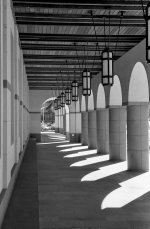
The last is exposed to get shadow detail and sacrafices some highlights to get it. Less development would help here in showing more detail in the bright areas.

If you are scanning, then make two scans of the last and combine the highlights from an overexposed scan with the shadows from the regular. If you are not comfortable with this, then you should have exposed for a darker main area and not let the highlights go so bright.
 
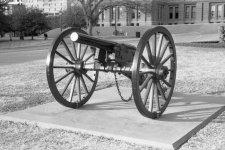
I tried developing another roll of Tri-X in HC-110 dilution H, this time increasing the time at 68 deg F from 13 to 17 minutes. I see an huge improvement in the contrast.
These are shot with IIIf + Summitar. What can I expect if I were to pull Tri-X down to ISO 200? Less grain? Contrast - more or less?

Thanks for all of the replies to my post yesterday!
 

Attachments

  • TexasCapGun.jpg
    TexasCapGun.jpg
    161.5 KB · Views: 0
  • LittlefieldCongress.jpg
    LittlefieldCongress.jpg
    138.3 KB · Views: 0
  • AustinSegwayTour.jpg
    AustinSegwayTour.jpg
    161.4 KB · Views: 0
Remember that film doesn't have a linear response to light levels. The "H&D curve" flattens out at the "toe" and "shoulder". All else being equal your shadows will move up onto the straight line portion and gain contrast while the brighter parts of the scene will be up and beyond the shoulder curve and flatten out. In general, dense B&W negatives look grainier.
 
Everybody's e.i. and development time differs. And what works for me certainly not be best for you.

I develop for 9 minutes in HC-110 Dil H shooting Neopan 400 (Tri X seems similar) at 320. The negs may look a bit on the thin side but scan great. And the scans look flat but after I do a contrast curve in PS, I end up being very happy with the prints. Tried many variations but this works best for me.

I used to make negs that "looked good" but the prints didn't.

glynx: are you still trying to make negs that look good with no adjustments in Photoshop? If so, to each his own. That just never made the best prints for me.
 
Lots of variables. Don't know how the scanner was set up. Are you camera speeds right on? Was your temperature accurate?
It'll be easier to post a scan of the neg next to another negative that looks good rather than see the positive from a scanned image.
 
When you use over development to gain contrast , instead of doing it with graded papers when printing, or increasing the contrast in PS, you are adding grain,removing sharpness,and will be blocking the highlights.
 
michaelging said:
When you use over development to gain contrast , instead of doing it with graded papers when printing, or increasing the contrast in PS, you are adding grain,removing sharpness,and will be blocking the highlights.
What do you mean by "over development"? If you mean extending development time to work with an original scene with tonal range, this is patently not true. Are you saying that the great photographers who used the Zone system didn't know what they were doing?

It's true that today's films do not respond in the same with as older emulsions, but with proper processing, you can still achieve control without sacrifices in grain, sharpness and highlight detail.

Temperature, agitation and wet time are bigger factors in grain and acutance characteristics.
 
Back
Top Bottom