Dimage Scan Dual IV

canetsbe

Well-known
Local time
1:59 PM
Joined
Oct 24, 2009
Messages
221
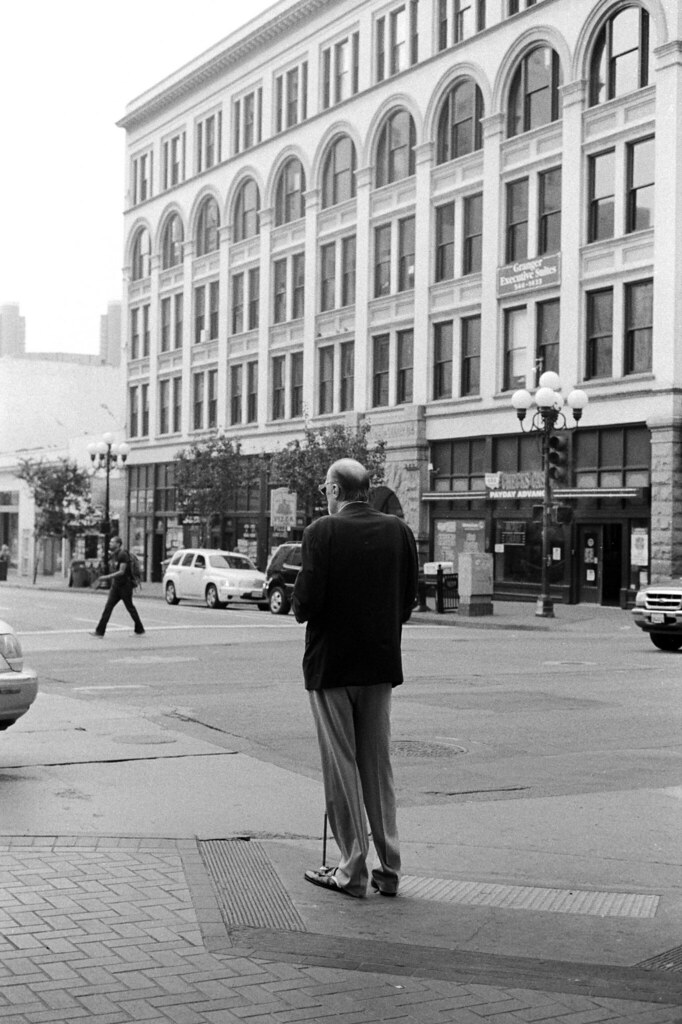
I've used this scanner before and never been happy with it for scanning black and white negatives. Is it broken or something? I got it on craigslist a few years ago for $30 so I wouldn't be surprised if it was.


minolta POS by .. glory fades, on Flickr

Anyway I normally use an epson V500 which gives decent tonal depth but I really wish I could get this thing to work for me as the scans are sharper (though the tonality looks like complete ass.) It's obvious "what's wrong with this picture" but I can't get anything better than that out of my Dual IV. So, I guess I'm asking, is it me or the scanner? I use the minolta software and scan at 16bit depth. I tried to pick a really flat negative (not a great photo) just to prove a point, otherwise the contrast is through the roof and there's no highlight or shadow detail. There's nothing but white, grey, pixely white-grey, really muddy grey and black in this scan. I've tried vuescan and silverfast demo software and it doesn't help. Any suggestions or insights?

-Cole
 
I think you may have a fault with the scanner . I have both the earlier dual III and the later 5400 and the dual III is a very capable little scanner with a good dynamic range , I think at least as good as the latest microteks in that respect . Wojteks advice sounds good and well worth a go but I suspect the clue was in the price . there are comp ya still repairing them but it prove more economic to find another one

Chris
 
I've used this scanner before and never been happy with it for scanning black and white negatives. Is it broken or something? ..................... So, I guess I'm asking, is it me or the scanner? .......................... Any suggestions or insights?

Cole, My $.02: based on the scan you show, it is not the scanner. The scanner really does one thing: it shines a tiny beam of light 2820 times per inch on each pass across the neg, and a sensor reads it as red, green, blue or none which is black (even scanning a b&w neg). It then sends this raw data back up the USB cable to the computer where the scanner driver software converts it to either a RGB or grayscale image which it then sizes and writes to a file in either 8 bit or 16 bit precision. A scanner either does this or it does not. It appears yours does.

Remember, all that tonality / greyscale is done by the scanner driver software, not the scanner. The fact that you have the same problems with three different scanner driver software packages would lead one to suspect the problem is either with the operator or improper negs.
 
Checked the mirror for dust? no

Yes it scans to TIFF files.

Bob: I would agree with you 100% if it wasn't for the fact that I can get much better scans from a V500 (in terms of tonality but not sharpness because it's a flatbed) with far less effort. The negatives are fine, it's not like I'm new to developing my own film and wet printing in a darkroom. I wish I could get the kinds of scans out of the Dual IV that I'm using with respect to tonality but after trying for so long I just don't think it's going to happen, either because it's broken or I'm doing it wrong.
 
Here's the V500 scan.


v500 by .. glory fades, on Flickr

It's a lot less sharp (fine for web) but also captured a lot more tonal detail especially in the blacks and midtones. And I didn't have to scan it as a positive and invert the curve in photoshop either.
 
........................... And I didn't have to scan it as a positive and invert the curve in photoshop either.

Why are you scanning as a positive and then inverting in Photoshop? I know that was the way some people proclaimed that as the secret trick ten years ago but I could never see it do anything good for me. I do know some of the early manufacturers software made some automatic behind the scene adjustments. That is one of the reasons I started using Vuescan back when my ScanDual III was new.

Are you evaluating your scan process by how good the scans look straight from the scanner before post processing? I strive for a flat looking scan file that just contains the most data (no clipped ends of the histogram) Those are the ones that give me the best looking prints once post processed but the TIF file from the scanner looks like crap.

But when all is said and done, you use the scanner you think gives you the best looking prints.
 
Why are you scanning as a positive and then inverting in Photoshop? I know that was the way some people proclaimed that as the secret trick ten years ago but I could never see it do anything good for me. I do know some of the early manufacturers software made some automatic behind the scene adjustments. That is one of the reasons I started using Vuescan back when my ScanDual III was new.

Are you evaluating your scan process by how good the scans look straight from the scanner before post processing? I strive for a flat looking scan file that just contains the most data (no clipped ends of the histogram) Those are the ones that give me the best looking prints once post processed but the TIF file from the scanner looks like crap.

But when all is said and done, you use the scanner you think gives you the best looking prints.

Bob,

You're totally right, I had never done the inversion before Wojtek had suggested trying it earlier. I've always tried to scan for as flat a file as possible in the past in the native b/w negative mode. The first image I posted is a "flat" b/w negative scan. As you can see it looks totally horrible. Post-processing it doesn't help a bit. It looks like there are maybe 32 different shades of grey (just a guess) which doesn't translate to a smooth-looking image at all..

Hence I think this is a hardware problem of some kind.
 
Back
Top Bottom