David Strachan
Member
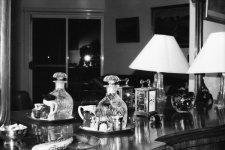
Here's an example using a cheap scanner, film and gorgeous old cameras again.
Camera Leica M6 with Summicron 50mm @ f16, used cheap thyristor flash.
Film Ilford FP4 iso 125
Develop Ilfotec LC29
scan Canoscan 9000f scan neg, base settings only set "unsharp Mask" on, rest OFF.
Photoshop CS4 using dodge and burn layer do local contrast, very little extra sharpening is needed using doge and burn layers.
Print to A4 using Epson R800...looks sharp enough,. I was very careful to sharpen with no haloes, only 75 and very low settings in "Unsharp Mask". I let Photoshop do the printing as well (also like Qimage), and that way get the shading and highlights I want in the final priint. The image looks really nice and plenty sharp enough in print.
It all seems to be working seamlessly...am I missing something?? The negs scan easily with huge recovery available in the shadows and highlights usinig levels or whateverin PS.
Any comments on film to print??
Anyone printing from their film scans??
Greatly enjoying film again
cheers Dave S 🙂
Camera Leica M6 with Summicron 50mm @ f16, used cheap thyristor flash.
Film Ilford FP4 iso 125
Develop Ilfotec LC29
scan Canoscan 9000f scan neg, base settings only set "unsharp Mask" on, rest OFF.
Photoshop CS4 using dodge and burn layer do local contrast, very little extra sharpening is needed using doge and burn layers.
Print to A4 using Epson R800...looks sharp enough,. I was very careful to sharpen with no haloes, only 75 and very low settings in "Unsharp Mask". I let Photoshop do the printing as well (also like Qimage), and that way get the shading and highlights I want in the final priint. The image looks really nice and plenty sharp enough in print.
It all seems to be working seamlessly...am I missing something?? The negs scan easily with huge recovery available in the shadows and highlights usinig levels or whateverin PS.
Any comments on film to print??
Anyone printing from their film scans??
Greatly enjoying film again
cheers Dave S 🙂