AusDLK
Famous Photographer
1. strange file open error
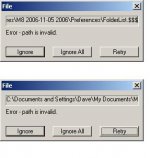
When I try to drag Leica M8 DNG files to the Capture One LE desktop icon I repeatedly get the error message shown in the first image below -- even when I subsequently try to open files in the file browser.
2. no grayscale thumbnails in file browser window
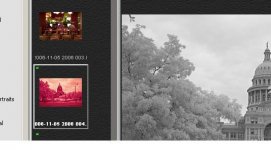
The software does not display images in the file browser window in grayscale. They were captured in black & white mode with a Leica M8 and show properly in grayscale in the edit window when selected as you can see in the second image below.
I opened support requests with Phase One on these.
Anyone in RFf land had similar issues? Any resolutions/work arounds?
When I try to drag Leica M8 DNG files to the Capture One LE desktop icon I repeatedly get the error message shown in the first image below -- even when I subsequently try to open files in the file browser.
2. no grayscale thumbnails in file browser window
The software does not display images in the file browser window in grayscale. They were captured in black & white mode with a Leica M8 and show properly in grayscale in the edit window when selected as you can see in the second image below.
I opened support requests with Phase One on these.
Anyone in RFf land had similar issues? Any resolutions/work arounds?