A grainy problem...

1. V700 with Epson scan, though I also have access to a Nikon 9000. I don't use it as much, since my OSX 10.8 does not do Nikon scan, and the Vuescan is "fiddly".

Definitely do not pass go without immediately scanning this stuff with the 9000 if you already have it. Setup Vuescan, save as raw+dng (enable "film raw" so it's not a negative when saved), 4k, 16-bit, turn off all noise reduction, corrections, etc. you want it as stupid as possible, and then use VueScan entirely. Don't waste time with Nikon scan.

The 9000 scan will be your "control."
 
Getting there...

Getting there...

Muuuuuuuch better !
Using the Nikon 9000 + Vuescan at 4000DPI made a 88MB file, which (amazingly) at 100% had LESS grain than the earlier ones.
Here's a much smaller crop of the same picture...

p1765333208-2.jpg
 
I have not chimed in for a while, I wanted to see what direction this was going first...
I like the samples the OP posted, though, I feel he get better grain still.
I also noticed that he "scanned-on-the-glass" of the V700 scanner... Why? it does not have any "focus Adjustment" on it... The V750 does. I think he should use the supplied carrier for the film. It raises the film to an optimum point to be in focus.

I use the V700 with the OEM 35mm carrier, and I shoot Tmax 400 developed in HC110b with minimum agitation. No problem with OOF centers because of the very slight curl.
I use the 16bit BW scan, and "Med" on the unsharp filter on my V700, I also adjust the levels before I scan. I use the supplied Epson Scan software also.
I also scan to get around a 60mb Tiff.

I wander if that bit of grain is because of scanning on the glass, and being very slightly OOF because it is "Just-out-of-the-DOF" of the scanner range used for the carriers....???

Here are a few overdeveloped by accident by a little over a minute... or a tad too much syrup (10ml in sted of 9ml for a 300ml mix)
The shadows are OK, but, could have better if not overdeveloped.


A walk in the Park: 6-14-2013 par Peter Arbib, on ipernity


A walk in the Park: 6-14-2013 par Peter Arbib, on ipernity


A walk in the Park: 6-14-2013 par Peter Arbib, on ipernity
 
That is REALLY SOFT for a high res scan!!!
It looks OOF, and her head is fairly large in the original post of this.

Personally, when using a 9000, I have the greatest luck scanning everything with the glass-holder. But the standard neg holders are adequate within reason. Chances are he's using the standard plastic carriers, but even then yeah, it should be a little bit sharper. However, we don't know anything without seeing the source negatives under a loupe.

Muuuuuuuch better !
Using the Nikon 9000 + Vuescan at 4000DPI made a 88MB file, which (amazingly) at 100% had LESS grain than the earlier ones.

Great. Make sure you're scanning at 16-bit as well. RAW+DNG with zero compression should be around this size using this formula (units in mm):

(h*w*((dpi/2.54)/10)^2*bits)/(8*1024^2) = sizeMB​


6x7, 16-bit grey would be around this many raw megabytes:

(60*70*((4000/2.54)/10)^2*16)/(8*1024^2)
198.66983093341186682372​


However, 8-bpp, with 5mm for the edges taken off is more like this:

(50*70*((4000/2.54)/10)^2*8)/(8*1024^2)
82.77909622225494450988​


You'll have fun when you scan color BTW:

(60*70*((4000/2.54)/10)^2*48)/(8*1024^2)
596.00949280023560047118​

You will get the hang of it though, and it's good to see that we weren't all crazy and this was actually a scanning process issue all along. A lot of people have their minds blown after going from a flat-bed to a dedicated film scanner and realizing just how much detail is actually there.


Also, in reference to the "underexposure increases grain" battle that was going on earlier. It doesn't really - just increasing exposure to compensate for underexposed negatives is what brings out more grain from the least exposed areas. For instance, the below shot is 35mm Acros 100, pushed to 1600 (4 stops), stand developed in XTOL. Massively underexposed, but there is no additional grain as a result, only heavy loss of shadow detail.

(the other crap in the frame is actually dust - these negs have a "funny" story behind them)


Acros Anomaly by kediwah, on Flickr
 
Sorry to be such a pest, but are they now visible ?
p1615426862-6.jpg

You're not a pest at all, we all just want to help🙂

I'd like to deal with this image first.
Looking at it it seems to have too much grain in the upper mid tones, especially for the film and developer combination; it is almost certain we are seeing a combination of issues here. I'm going to deal with them one at a time.

The scanning modus.
You scanner is a good one, capable of very good results with medium format as long as you keep it simple and obey a couple of rules.
I've worked out a scanning 101 with Epson scan if you care to read it here:
http://photo-utopia.blogspot.co.uk/2010/11/scanning-with-epson-v500.html
Scanning without sharpening and making sure we don't use auto anything is important, as is scanning in 16bit mode and scanning flat (contrast) as you shouldn't try to get it looking right in the scan import module.

Secondly I still feel exposure is a hair under, If you could please take an iPhone shot of the negative of the shot above I could give better advice.
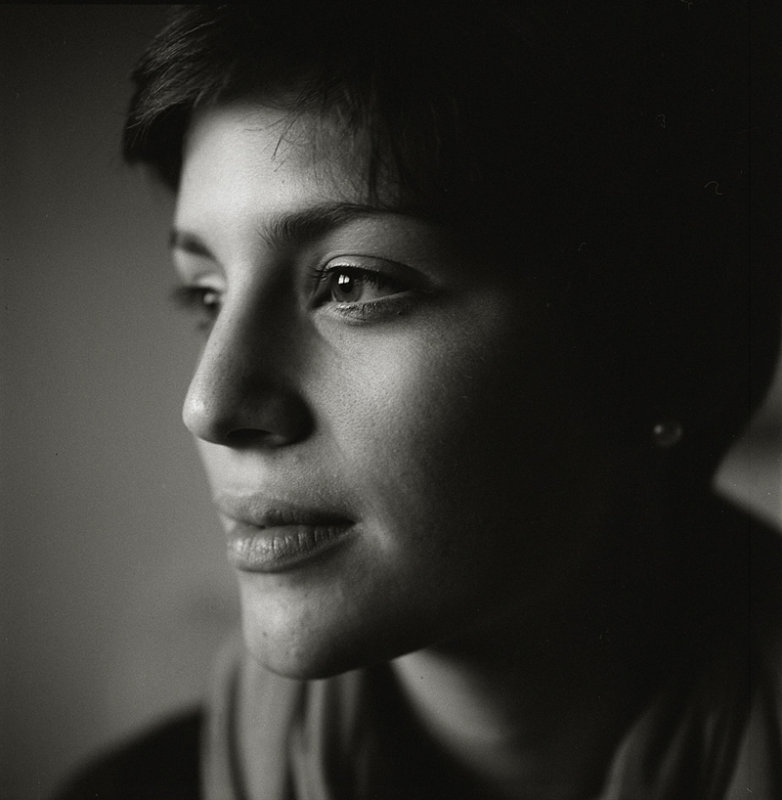
That said on my monitor at least the hair round the woman's face looks to lack a little detail, grain is showing where it shows most in the mid and upper tones-if you're happy with this level of grain we can pack up and go home now–you're Ok
Look at this shot HP5+ in Rodinal 1:100 the tones are all in the place where grain is going to show most.

144657340.jpg


Exposure was critical in this shot, I wanted some detail in the eyes but without blowing the highlights.

This shot is on Neopan 400 in Rodinal 1:50 a fast film with so called grainy developer.
144475677.jpg


In both cases correct exposure makes low grain possible, they were both scanned on the Epson as well.
I'd love to see your negatives still , you're getting there though so take heart.
I think you've probably seen enough of other peoples images to know that what you seek can certainly be found.
Try to stick with your favourite film and developer combo's, keep notes and make sure consistency rules; there is nothing more frustrating than getting it right some of the time.

 
I'm seeing underexposure, too. The lack of detail in the dark areas of the hair are a solid tip-off, as is "personality" of the tonal range, from too much of the critical shadows being placed on a flat part of the film's response curve.

A really good book for figuring out some of this stuff is The Craft of Photography, by David Vestal. He takes the reader through a set of tests that not only help arrive at a proper EI for your film/dev/equipment/methods, but explains a lot about how to use exposure to get the results you want. What I took away from the book and a workshop I took from him was a convenient rule of thumb that if the thinnest part of your negative is as thin (clear) as the border around the edge, you probably aren't giving enough exposure to get the best potential out of a scene. If you're seeing large areas in your photos that are black and devoid of detail, on a regular basis, something is wrong.
 
If the shot of the woman is underexposed, it's probably not more than half a stop. Look at the wrinkles in her top, and along the skin of her cheeks. That's not grain - that's posterization. That's what led me to question the scanning process, bit-depth, and other procedurals as it's not normal.
 
If the shot of the woman is underexposed, it's probably not more than half a stop. Look at the wrinkles in her top, and along the skin of her cheeks. That's not grain - that's posterization. That's what led me to question the scanning process, bit-depth, and other procedurals as it's not normal.

Certainly there are scanning issues too, but I don't think the image shows posterisation, looks more like the fabric:
150837301.jpg

If it did the tones to the upper right hand side would not be smooth; banding and other artefacts show with posterisation like a histogram with a 'comb' effect.

What I see is a lack of detail in the hair and a corresponding bunching of tones around zone VII and the flattening of highlights the results are quite characteristic of thinner negs IMHO.
It could be thinner negs and pushing in scan acquire emphasising grain, which would make sense; on the whole the negative seem tonally wrong pull them into PS and look at the histograms.
 
I'm certain the V700 isn't helping but honestly if you look at her top and the way the wrinkles of it and other smooth areas are, there's definite posterization going on.

Either way, if the OP normally has an LS-9000 available I'd be using that in a heartbeat for any negatives. I only use my V700 for print scans and 4x5.
 
Sory those soft areas aren't posterisation, that tends to look like banding within tones, that looks like a scan issue possibly localised focus, I noted the newtons rings in the first image he posted so there are many things at play here possibly he isn't using the holders? and the negs aren't totally flat?.
If you take the image into PSCS and look at it at 100% you'll see the classic 'grain aliasing' cross hatching effect over the face, now look at the histogram, it's solid with no 'comb gaps' as per classic posterisation.
Posterisation will group tones in a comb effect, I can't see it in his images, I see a global tilt in overall tonality especially in zones V-VII and very little above that.
The images are tonally compressed which could be scanning, or exposure or a combination of both.
What we are seeing is a combination of aliasing and exposure, I too would scan with the Nikon as the V series can give the aliasing very easily.
 
Just some further help to visualise what's happening:
150837846.jpg


The frame on the left is taken from the image of the lady and shows smooth tones with lots of noise; very little of that is actual film grain.

The histogram A (whole image) shows no comb effect but also notice the way the image is mainly made up of pixels that are mainly on the left, which is classic underexposure either during scanning (not setting black and white points) or during film exposure; possibly a combination.
The circled part 'C' is a 200% blow up of the aliasing you can clearly see diagonal artefacts.
The picture B is taken from and deliberately processed in order to posterise the image content (notice the 'comb' gaps in the histogram where the tones are bunching)
Also note the effect on the apperance of the highlight and the overall increase in apparent noise (although the noise is the same the tonal values have bunched)

So in prognosis it's probable the OP has several issues, one with exposure, probably not during processing of the film (although possible) and certainly with scanning, either setting scanner exposure (black and white points) and aliasing giving the look of a noisier image.

[joke]Buy a cold cathode enlarger[/joke] 🙂
 
Wow !
I've previously witnessed others being helped with various issues, here on RFF, but am very humbled by the help everyone has given me with my "Grainy" problem. Not only has it been very instructive for me (and threatens to improve my photography related skills), but it has also made me realize how many very knowledge people there are on RFF, and how willing they are to pitch in, just for the asking. I've considered myself reasonably familiar with shooting/developing/scanning skills, but never quite grasped how much more there was to this. I wish to thank all, but particularly Clayne, Photo_Smith, and redisburning, and am very grateful for their time and effort.

Even tho' I enjoyed film developing, the last few years, I had lost interest in it as the final results were never quite satisfying. At the same time I marveled at some of the images I came across here, and wondered how to develop those skills. I was gradually drifting over to the dark side (NO pun intended !), but am now excited about trying it again, and may save myself $6950 in the near future. I have also ordered the David Vestal book to learn more, and will try Chris C's instructions. I'm hoping that all this will make some discernible change in the results I can achieve.
So, to all, thanks again.
 
Subhash, glad you're seeing some improvements.

Just a suggestion, why not take it all the way to darkroom printing?
Then scanning would not be the only way for you to get a final product that you can be proud of.
 
Will, I'd like that, and in fact have a Leica enlarger in storage. Unfortunately, apartment living does not allow me that space, at least for now. However, I'm hopeful, and thhus not selling the enlarger...
 
Back
Top Bottom