
"Additional Information" in Gallery photos?

W

Way

Guest
In the Gallery, I see that some members have an "Additional Information" below their photo where they are able to list the camera, lens, film, exposure and location. Is this available to everyone? I don't see how to put it on my photos.
 
Yes sure. Just hit the "edit" button and you should have access to all the "blank" boxes to fill in.
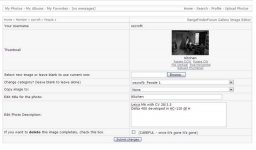
Nope, the only things I can change when I try to Edit a photo are...

"Your Username"
"Thumbnail"
"Select new image or leave blank to use current one:"
"Change category? (leave blank to leave alone)"
"Copy image to:"
"Edit title for the photo:"
"Edit Photo Description:"
"If you want to delete this image completely, check this box"

I don't get any access to the "Additional Info" fields, and have always had to use the Photo Description to add info about camera/lens/film.
 
The only other thing I can think of is that your image is not in the root gallery???
Yep, that's it! If I upload a photo to my root gallery I can subsequently edit the Additional Info just fine, but if I upload to one of my individual albums I can't (the Additional Info boxes are there in the upload form, but not in the subsequent Edit form). Thanks for your help.
 
I've just tried moving a photo from an album to my root gallery, edited it to add the Additional Info (which worked fine), and then moved it back. But as soon as I moved it back the Additional Info disappeared again. So it looks like the bottom line is simply that you can't have "Additional Info" if your photo is in an individual album (even though the "Additional Info" heading does appear).
 
Back
Top Bottom