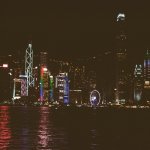
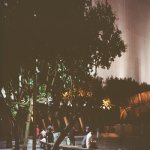
Brown photos (mamiya super 23) (portra 160)

jusxusfanatic

Well-known
Local time
5:57 AM
Joined
Aug 1, 2016
Messages
638
Location
Hong Kong
I don't know why but by photos turned out brown. It's my first time using it (super 23) but I don't think that's the case. I was using the portra 160 at night (kinda stupid), but yea. Any help would be appreciated~ thanks! 🙂

(Photos will look weird due to the 500x500 dimension requirement)
 

Attachments

  • 01280001500x500.jpg
    01280001500x500.jpg
    161.3 KB · Views: 0
  • 01280003500x500.jpg
    01280003500x500.jpg
    148.4 KB · Views: 0
That looks more like a processing (or film) issue than anything camera related - is the film fresh, how did other films from the same batch turn out? If any, underexposure might have made the colour drift more visible - but again, that would be your metering technique rather than the camera.
 
That looks more like a processing (or film) issue than anything camera related - is the film fresh, how did other films from the same batch turn out? If any, underexposure might have made the colour drift more visible - but again, that would be your metering technique rather than the camera.

Dunno, the film is kept in a cool place, and no direct sunlight. Yea, it's probably because of my metering, since I used my phone... Anyways, thanks 🙂
 
It's simply that the scanner is stoopid. Your exposure is fine but film is scanned by some places with the scanner set to Auto and it tries to bring everything up to an average light level. You want the blacks black but it doesn't know that. Let the lab know and perhaps they will rescan without heading out for a coffee break and not giving a t#ss.
Pete
r.jpg
 
Back
Top Bottom