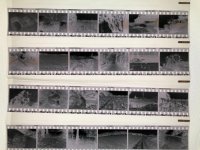
Brown stains on negs processed in Cinestill Df96

geoffnik

Member
Local time
1:46 PM
Joined
Oct 26, 2011
Messages
34
The last two rolls Ive developed in Df96 have had this brown stain which bleeds across the frame - on certain frame sections. Processed at the correct temp and time 27/3mins(6mins for the Delta) and constant agitation. Any idea what they are and why? Thanks
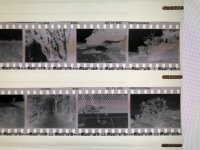
 

Attachments

  • Df96b.jpg
    Df96b.jpg
    252.8 KB · Views: 1
  • Df96a.jpg
    Df96a.jpg
    287.7 KB · Views: 1
Possibly "bromide drag?" or improper fixing? I noticed this on some test rolls of film that I processed last year with this particular developer. IIRC, this happened after processing several rolls, giving the recommended 15 second increase in time for each additional roll, etc.

FWIW, I stopped using this developer and returned to more "conventional" products and have to this date not seen this problem again.
 
Thanks to you both. It is freshly opened Df96. These were the first two rolls. I have noticed it before with this developer so may try traditional developing!
 
Try extending the time and increasing the agitation. Like others have said, it is a fixing issue.

Traditional developing is easy. You only need developer and fixer. Pretty simple.
 
I've had great results with DF96. I haven't seen the brown marks on any of my own negatives.

You can't really over-develop with DF96...push with higher temp, pull with lower temp. I'd suggest constant agitation while pouring dev in, and leave in the solution a minute longer. That might solve the under-fixed issue.

This is Acros II developed in DF96 at 27C...

San Juan-6 by David Manning, on Flickr
 
Back
Top Bottom