Clarity issue

cosmonaut

Well-known
Local time
3:32 AM
Joined
Nov 29, 2006
Messages
1,212
Location
North Georgia
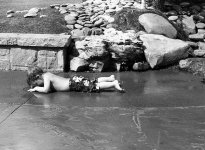
I have never gotten he sharpness and clarity I want with my DIY developing. No matter what camera or lens I use my shots just lack the clarity I want. I developed this with Txax and scanned it with a Epson V500. 2400 dpi and then resized. But the resize is pretty much the same as the original. Do I need a higher quality scanner or could it be me developing skills. Maybe not fixing it right or washing it? This is HP5. Any ideas?
By the way my color shots always come out well. Sharp and clear.
 

Attachments

  • cooling-off.jpg
    cooling-off.jpg
    62.4 KB · Views: 0
HP5+ and Tmax could be a good combination so i do not think this is an issue. A bit more grain then an iso 100 film but it should be sharp.

For a comparision a scan from my V500 Epson on 2400dpi resized with Rollei Retro 100 TONAL film developed in AM74 1+9.

I think your scanner is maybe out of focus so within the USM limits it can be a problem.
Hopefully this picture can give you more information.

4646779241_5522a05db6_b.jpg
 
Check that you scan WITHOUT digital ICE. ICE is not working with silver B/W film and causes all sorts of weird problems. Since your color negs are fine, I guess that could be the issue.
 
Thanks. Can you calibrate a V500? I know the digital ice doesn't work on B&W. I seem to feel it is in my developing. Maybe fixing wrong times or not washing enough. There are times when it is sharper than others. i never have issues with color film so I know it is not in the equipment or me missing focus.
 
Well, I am using the holders from Doug, http://www.betterscanning.com which indeed can be calibrated in height. So you bring your negative in max. focus of the scanner.

The difference is slightly sharper and the whole negative is sharper in the corners with these holders.

When you're slightly out of focus the USM parameter can be adjusted by software but this is also sharpening the negative. But I am not a scanning specialist, I am printing via classical wet print, however I can tell you everything about film development.

1) By diluting a developer the negative will be sharper.
2) Fix time = 2x clear time for classical cubical films (like HP5+) and 3x clear time for Tgrain type films (Tmax, Delta).
3) Wash time = about 15 minutes. Then one minute a wetting agent to prevent stripes and drying marks.

A higher iso rate is more grain and less resolution. An ortho (pan) film has always a much higher resolution, same like micro films.
With a V500 you can get good scans for medium format around 2400dpi, for 35mm 3200dpi or more however a V500 over 4000dpi produces only more data not a better scan.

My question: How is a print from your (B&W) negative when you're going to scan it?

About selecting for films and developers: Rodinal, Beutler are high acutance developers so they give the impression of a very sharp negative. But they pronounce grain. Fine grain developers will give some speed loss but very fine grain, however here sharpness is a bit lacking.
So when you want the highest acutance and sharpness use Rodinal and HP5+ . When wanting fine grain use HP5+ (iso 200) and Perceptol. By diluting Perceptol you can control a bit the sharpness: More dilution is less Sodiumsulfite which means more sharpness but a bit more grain.

When using Rodinal, 1+25 will give less sharpness then the 1+50 dilution. Rodinal is a Para Amino Phenol developer in fact best suitable for slow and medium speed classical (cubical type) films. But in medium format you can use it for iso 400 films too.
It's a liquid concentrate and the stuff keeps remarkable well (>10 years is not a problem). It's a one shot developer.

But if you're not sure about your negatives, sent me one in, I will have a look to it and then we know it's a scan problem or a film problem.

Best regards,

Robert

 
Well, I am using the holders from Doug, http://www.betterscanning.com which indeed can be calibrated in height. So you bring your negative in max. focus of the scanner.

The difference is slightly sharper and the whole negative is sharper in the corners with these holders.

When you're slightly out of focus the USM parameter can be adjusted by software but this is also sharpening the negative. But I am not a scanning specialist, I am printing via classical wet print, however I can tell you everything about film development.

1) By diluting a developer the negative will be sharper.
2) Fix time = 2x clear time for classical cubical films (like HP5+) and 3x clear time for Tgrain type films (Tmax, Delta).
3) Wash time = about 15 minutes. Then one minute a wetting agent to prevent stripes and drying marks.

A higher iso rate is more grain and less resolution. An ortho (pan) film has always a much higher resolution, same like micro films.
With a V500 you can get good scans for medium format around 2400dpi, for 35mm 3200dpi or more however a V500 over 4000dpi produces only more data not a better scan.

My question: How is a print from your (B&W) negative when you're going to scan it?

About selecting for films and developers: Rodinal, Beutler are high acutance developers so they give the impression of a very sharp negative. But they pronounce grain. Fine grain developers will give some speed loss but very fine grain, however here sharpness is a bit lacking.
So when you want the highest acutance and sharpness use Rodinal and HP5+ . When wanting fine grain use HP5+ (iso 200) and Perceptol. By diluting Perceptol you can control a bit the sharpness: More dilution is less Sodiumsulfite which means more sharpness but a bit more grain.

When using Rodinal, 1+25 will give less sharpness then the 1+50 dilution. Rodinal is a Para Amino Phenol developer in fact best suitable for slow and medium speed classical (cubical type) films. But in medium format you can use it for iso 400 films too.
It's a liquid concentrate and the stuff keeps remarkable well (>10 years is not a problem). It's a one shot developer.

But if you're not sure about your negatives, sent me one in, I will have a look to it and then we know it's a scan problem or a film problem.

Best regards,

Robert


Well I don't understand your fixing times. I fix mine 5 min on a first run and 7 min on a second run and never use fixer a third time. I use the Kodak powdered fixer. I only wash 5min. I guess I mess up there. I am thinking I am doing something wrong during the fixing, washing phase. and yes I use a wetting agent. Please explain your fixing times.
 
Diafine is a 2 bath (pushing) developer.
http://www.fotohuisrovo.nl/documentatie/Diafine-data.pdf

To determine the right fixer time for a film:
Put a small snap of film (e.g. the leader) in the fixer and measure the time till the film is fully clear. THIS is the clearing time. While your fix time is going into depletion fix time = 2x clear time.

To check if your fixer is saturated (for PE/RC papers and film fix) 2 grams/ltr. is the limit for Ag+ ions tested with a fix tester (Potassium Ioded) e.g. X10 Amaloco which means in practice 6-8 films in 500ml fix 1+4 working solution.

You can also count off the amount of films given in the data sheet of the fixer.

For washing you can also use the Ilford washing method. Fill the tank, inverse 5x wait a minute and refresh water, again inverse 10x etc. again 20x etc. again 40x and finish wash. Washing out fixer is going by diffusion so this method is effective and saves some water too.

Greetz,

Robert
 
Here a 35mm example for comparision:
Leica M7+Summicron 2,0/50mm
Retro 100 TONAL E.I. 50 in CG512/RLS 1+4 14:00 minutes at 24 degrees C. CG512 is an ultra fine grain developer which means speed loss (hence E.I. 50) and less acutance.
Same V500 scanner now on 3200dpi.

4679023332_3aedf26ee1_b.jpg
 
The first one is out of focus. You must address that with the scanner if the the neg is sharp. Check with a loupe or reversed 50 mm lens.

The clarity you refer to is mid range contrast. Put an S curve in the film scan with your photo editing software. As a last resort, do it with the Epson soft ware.

When scanning, get it sharp, no clipping highlights or shadows, get density & color balance correct. Leave everything else to photoshop or whatever you use. Save this a the main or original file. Make a photoshop or correted version and save that. Make all final JPEGS from that master photoshop file.

Lastly sharpening is your friend always. You need to sharpen all digi files whether from a camera or scanner. You will need to recover the lost sharpness as first step in processing and then again at final size and resolution. It is a black art to do it right and results need to be done by looking at a final print, not computer screen if it is a printed image.

http://www.ronbigelow.com/articles/articles.htm. Read his articles on scanning.

Real World sharpening by Jeff Schewe and Bruce Frazer will also help.

This whole thing is not a shake and bake process just like an analog darkroom. There is no magic formula.

Your developing has nothing to do with the issues you have.
 
Yes thanks all, this is some great info. I am glad to know the Summicron 50mm is that sharp since it is on my want list for this fall. I have an enlarger and the perfect room for a darkroom I should try some wet prints on my own. Maybe this fall I can get that done as well. I think slowing down and doing things at a higher quality and making sure I take no short cuts will help too.
 
Back
Top Bottom