POINT OF VIEW
Established
When using a factory coded lens and the M8 settings are on, lens detection on, you will see a start up screen like the picture below.

With a factory coded lens shooting in raw, you will also see a description of the lens you are using in Capture One software. There is a box for lens description and other information, when you right click on the photo.
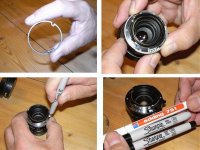
I do not get any of the above when I use a self coded lens. Below are a couple photos of my marking method. I used a factory coded lens to make my template. Everything appears dead on. Either I’m doing something very wrong or all of this self coding is a waste of time.


The big question is, has any one actually verified their self coded lens? When the camera is turned on, does the lens description display on the monitor? Does the description show up in your software? I would suggest using the Capture One software. I know this works because it does verify my factory lens. I really would like to know if this is just a hit and miss art and a huge waste of time? Bill
With a factory coded lens shooting in raw, you will also see a description of the lens you are using in Capture One software. There is a box for lens description and other information, when you right click on the photo.
I do not get any of the above when I use a self coded lens. Below are a couple photos of my marking method. I used a factory coded lens to make my template. Everything appears dead on. Either I’m doing something very wrong or all of this self coding is a waste of time.
The big question is, has any one actually verified their self coded lens? When the camera is turned on, does the lens description display on the monitor? Does the description show up in your software? I would suggest using the Capture One software. I know this works because it does verify my factory lens. I really would like to know if this is just a hit and miss art and a huge waste of time? Bill