CRY FOR HELP (with image processing)

Bill Pierce

Well-known
Local time
9:39 PM
Joined
Sep 26, 2007
Messages
1,407
In the days when there was only film, photographers chose developers much like the digital photographer chooses image processing programs. (Even with rotary and drum processors for do-it-yourself color, this selection process was essentially limited to black-and-white processing.) Kodak D-76 and Ilford ID-11, two similar developers, were the popular standards. Somewhat in the same league were HC-110, TMax and XTol. But there was D-23 for lower contrast with little loss of speed (a commercial lab favorite), Microdol X for softened, less obvious “fine grain” appearance, dilute Microdol-X or dilute Rodinal for high acutance, Acufine and Diafine for increased effective film speed and probably a zillion others ranging from pyro for the Edward Weston fans to Caffenol for those truly on the edge.

The digital popular standards, perhaps the digital 76 and HC-110, are Photoshop/Lightroom and Capture One. But there are PhotoNinja, Affinity, Luminar, DxO, X6, Iridient, Affinity, ON1 and Photoshop Elements - and that is just the tip of the commercially available iceberg. Thee are free programs like Darktable, Gimp and Raw Therapee, plus programs furnished by the digital camera makers for just their brand.

I’ve played with many of the programs - emphasis on play. I’m really not a knowledgable user. However, I have used Photoshop, Lightroom and Capture One since very early in their releases. And I still can not choose which is best between Photoshop/Lightroom and Capture One except for certain specific minor tasks.

So, it’s time to turn to the expertise of the forum. Beyond PS/LR vs C1, among the many programs available, have you found a program which offers a real advantage beyond those two very popular ones? (Oh yes, and can anyone tell me which is best - PS/LR or C1?
 
I feel like I have spent too much time going over the same raw files often not happy with the results. I like to use Raw Therapee , DXO and Luminar for color rendering and quick edits but have recently realized that mastering curves and local adjustments is the key to get better results which keeps bringing me to lightroom. Hence I have decided to focus on learning Lightroom more but also discovered that Darktable gives me nice organic results but will need to delve into luminosity masks for better output.
 
Bill Pierce:
... Beyond PS/LR vs C1, among the many programs available, have you found a program which offers a real advantage beyond those two very popular ones?...

Image processing, or rendering of digital image data, has much more to do with how you use the tools versus what tools you use compared to film image processing. It's all mathematics, not the fundamental interactions of different chemistry.

I regularly test new and updated image processing applications. I rarely see anything out of one system that I cannot also do with any of the other applications. What I do see all the time is differences and elaborations on the user interface by which you control how the applications do their job.

So my take on this question is that anyone is much better off picking whichever one of the available image processing applications they find usable and effective, learn how to use it to best advantage for whatever intent you have in mind, and then go forth and practice using it to develop your skill and vision further.

I use LR Classic presently, as well as Apple's raw conversion libraries with the RAW Power application driving it, and get the results I want. Whatever else is out there, well, I've likely used it but didn't see much value in departing from what I have already.

G
 
I catalog with LR6 and do most of my processing there. Nice in that it is basically the standard so very easy to find info if needed.

I also use a few other programs for processing.

DXO PhotoLab 4 with the Filmpack and Viewpoint options and the DXO/NIK plug ins. This programs is fantastic for any sort of geometric/perspective corrects and if you are doing any sort of high iso shooting its DXO Prime noise reduction is the best I have tried. It also has some very nice processing options and its clear view function can be handy for some pictures. More limited in the cameras it supports though.

I occasionally use Afinity when I want more layer based processing but don't use it often.

The other two I use are Iridient Developer and Raw Photo Processor 64. Iridient has great sharpening routines and some nice monochrome modes. RPP64 has a wacky interface but it produces wonderful colors and its film looks are very good too. You have to go to their support forum to download the latest versions, they never update their website. Mac only though.

Shawn
 
As I ponder Bill's questions, I keep asking myself; Did Hemingway and Steinbeck every discuss which typewriter was best a Royal or an Olympic? Did Picasso and Matisse ever argue about the way one brand of brush felt in their hand vs. another. I seriously doubt it. Developers, papers, film and raw processing programs are simply photographer's tools, as is their camera.
These tools are as personal as our art. We all find our own way to achieve that art. What works well for some may not do well for others. Asking "...which is best?" depends on the user, their intent their need, and their approach to a subject. One man's five-pound sledge is another man's tacking hammer. They are just tools. Photographer's problems only arise when you ignore good advice like; "You can't use a hammer when you need a screwdriver."
 
I use PSE for my film processing. I don't need anything more sophisticated, but for digital RAW processing I use two programs: Raw Therapee and ColorPerfect. Color Perfect you convert your RAW file to a Tiff file (through Make TIFF) which is completely striped of camera or processing information. This TIFF file looks very dark and strange, but when you put it in Color Perfects Perfect RAW it is magic. I almost don't have to do anything else. Raw Therapee is great for exposure, color temperature, highlight compression and shadow control, micro sharpening, in fact it has too much stuff you have to learn what NOT to use.
 
Years ago when I was using Photoshop as my editor, one day when I was interstate for some weeks on business the laptop crashed. I needed it for work and I had no way of restoring the lost Photoshop program (my installation files were on a disk in another state) but I found a trial version of Corel Paintshop Pro (PSP) on the internet. I tried it, and found it was really quite similar to Photoshop Elements which even then was actually not bad for photographers and in my view much easier to use than the full version of Photoshop. Also the price for a licensed version is much cheaper than full PS - about the same or a bit cheaper than Elements (made even cheaper by Corel's habit of offering annual upgrades cheaply to existing users). The other advantage is that unlike Photoshop (which was really optimized for graphic designers not photographers - not sure these days if that is still so) PSP had quite a few tools especially designed to meet the needs of photographers. Also PSP supported most if not all PS compliant plugins which made it attractive on that score.

So I bought a license and have been using (and upgrading) Corel PSP ever since. PSP has one other advantage these days. It is still available as a stand alone version - you pay once and not monthly. I prefer this to the Adobe model of paying forever. Also back then (10 years ago or more) Photoshop was powerful but difficult to master. Because PSP has modules and tools especially for photographers it was much easier to work with and master.

These days I still use PSP but I have changed how I use it. Today my main image editor of choice is Lightroom (also a stand alone version) . It is quicker to work with when processing a large number of images. Also it has some pretty good capabilities in some respects (e.g. its highlight recover tool is the best I have found). So I now run PSP as a plugin to Lightroom. Then when I need some kind of special image processing that PSP has but Lightroom does not (such as Layers) or a tool that I prefer (such as its perspective correction tool) I drop into PSP, make that edit, then save the resulting edit(s) back into Lightroom. (Lightroom is set up to work in this way with plugins - you can move between them easily). The other editing suite I use as a plugin is Nik Efex.

I like how this system works - by combining the capabilities of several pieces of software I get the best capabilities over all.
 
As I ponder Bill's questions, I keep asking myself; Did Hemingway and Steinbeck every discuss which typewriter was best a Royal or an Olympic? Did Picasso and Matisse ever argue about the way one brand of brush felt in their hand vs. another. I seriously doubt it. Developers, papers, film and raw processing programs are simply photographer's tools, as is their camera.
These tools are as personal as our art. We all find our own way to achieve that art. What works well for some may not do well for others. Asking "...which is best?" depends on the user, their intent their need, and their approach to a subject. One man's five-pound sledge is another man's tacking hammer. They are just tools. Photographer's problems only arise when you ignore good advice like; "You can't use a hammer when you need a screwdriver."

I would second this opinion.

PS, LR, RAW and all the others are just tools.
To find out what tool fits to your own needs is a process that took me years.
It depends on the result you want and so you choose the fitting tool.

For me thats all GIMP. For me.
But my workflows in GIMP wouldn´t fit to anyone else I guess.
 
My first processing program was JASC Paint Shop Pro. I liked it but it's no longer JASC and it doesn't work on Macs--at least it didn't the last time I looked--so it's history for me. Tried PS Elements on 2 or 3 occasions and never felt comfortable with it. Used Picasa for quite a while, along with the proprietary programs that came with my cameras. It was simple (like me) and I liked that but it had too many toys and lacked a good number of essentials. Eventually I went to Lightroom even though Adobe's Elements had been disappointing. I really clicked with Lightroom and I'm still using Lightroom 6 and hope I can continue using it in perpetuity. Fat chance of that, right?

I've also tried Gimp but didn't delve too deeply into it. I have Luminar 3 on my computer but it doesn't impress me. I downloaded the trial sample of Capture One and it crashed every time I tried to open it so it's a no-go for me.

Just my experiences. YMMV.
 
As mentioned in other posts, I'm running a 12 year old Mac that's on it's last legs, but I haven't figured out a photo processing solution for a new computer. I've been using Apple's Aperture since the beginning and Photoshop 4 up thru CS6 (the last stand alone), and the original version of SilverEfex Pro, and finally Photo Mechanic for work.

I've held off on buying a new Mac because I can't see myself ever being okay with the subscription model of software, so Photoshop & Lightroom are off the table. I'm not aware of what has happened to SilverEfex Pro and who owns it now and if there even is a current version that will run on the new Macs. Apple's Aperture is long dead and won't run on new machines. I do believe that Photo Mechanic will run on the current Apple operating system.

So I've been looking around for some time, might see if the last pre-subscription version of Photoshop Elements runs on the new operating system, but I haven't looked at that software since it's origins in 2001, so not sure how the user interface stacks up.

Wish there was a way to update the hardware, without having to update the software, so I could keep using what I am comfortable with. Old Man Problems. Ha!!!

Best,
-Tim
 
current processing with the Sigma SD9 x3f files that I like,with the MacBook Air (2020) catalina 8 mb ram.
spp 6.7 output 16-bit ProPhoto to RawTherapee and then 16-bit ProPhoto to the GIMP if masking/layer is required.

d3c458e580f9428ba4073d2c21a631ef
 
If we are to take your analogy, then how does in-camera JPEG or in-camera RAW development correspond? I don't simply ask to be difficult; I actually find myself using RAW development a lot in the Ricoh GR III. Most of my GR III photos don't really need the enhanced power of a desktop RAW processor, maybe landscapes with lots of dynamic range, but I don't take those everyday.
 
pse can be bought as a stand alone product...no subscription.

Haven't used PSE in nearly 20 years. What is the interface like? I remember back in the day there was Photoshop Lite, which was the same interface as regular PS but with less features. And the original version of Photoshop Elements was similar to Lite, with just a little jazzing up of the interface, so it wasn't that different from PS interface. What is it like these days? The reason I'm interested in PSE (besides the non-subscription model) is that I really don't need 80% of what PS can do, for the work I'm doing.

Best,
-Tim
 
As mentioned in other posts, I'm running a 12 year old Mac that's on it's last legs, but I haven't figured out a photo processing solution for a new computer. I've been using Apple's Aperture since the beginning and Photoshop 4 up thru CS6 (the last stand alone), and the original version of SilverEfex Pro, and finally Photo Mechanic for work.

I've held off on buying a new Mac because I can't see myself ever being okay with the subscription model of software, so Photoshop & Lightroom are off the table. I'm not aware of what has happened to SilverEfex Pro and who owns it now and if there even is a current version that will run on the new Macs. Apple's Aperture is long dead and won't run on new machines. I do believe that Photo Mechanic will run on the current Apple operating system.

So I've been looking around for some time, might see if the last pre-subscription version of Photoshop Elements runs on the new operating system, but I haven't looked at that software since it's origins in 2001, so not sure how the user interface stacks up.

Wish there was a way to update the hardware, without having to update the software, so I could keep using what I am comfortable with. Old Man Problems. Ha!!!


The current generation of Photos coupled with RAW Power does a pretty good job, and the price is very reasonable. Apple's raw conversion framework produces very nice results. Photos itself has some interesting subtleties in it, and RAW Power opens up a lot of the calls that Photos uses behind the scenes to direct user accessibility.

I bought into LR Classic when I upgraded to macOS Catalina. I'm not happy with the monthly payment, or with Adobe in general, but it was the path of least resistance to get a big project done at the time I did the upgrade. The way I have my image libraries organized was set up to specifically make it "easy" to move to other tools when the need arose.

Since the LR Classic monthly tax is not really burdensome at present, I've been lazy and have just kept using it, but in the meanwhile I am learning how to get what I want done efficiently with Hasselblad's Phocus, RAW Power, and Photos. The real problem is that LR Classic really is quite good and I know it very very well ... That's what makes it hard to move away, my long familiarity and skill with LR's operation and workflow.

G
 
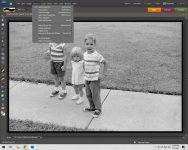
Thanks John. So from your screenshot it looks like a slimmed down Photoshop. Am I reading that correctly?

And that is the stand alone, perpetual license version of Photoshop Elements, correct?

Best,
-Tim
 
I think 'yes' to both questions. Although I have never used PS. Elements has Layers and a whole array of filters which I've never used. For B&W negatives I use levels and unmask sharp, brightness, and healing tool. It does have a RAW converter that pops up if you load a RAW file.

I would check about the newer versions to be sure that they are stand alone.
 
Thanks John. Just purchased PSE 21 (perpetual license for $69) as a stand alone and it is supposed to work with Mac OS 11 (Big Sur) so it should be good for whichever Mac I decide on.

Thanks again to everyone for the help.

Best,
-Tim
 
Looking at Gentlemen Coders RAW Power 3.0, it looks like a possible replacement for Apple's now retired Aperture software, sort of a competition with Lightroom, and looks to be oriented to organizing as well as processing photo files. Am I reading that right?

Best,
-Tim
 
Back
Top Bottom