
film "noise"? bad processing? blue streaks like child drawing!

yelofngr

international homelessing
Local time
5:38 AM
Joined
Jun 28, 2010
Messages
47
Location
fukuoka, japan (houston, TX, USA originally)
hello all-

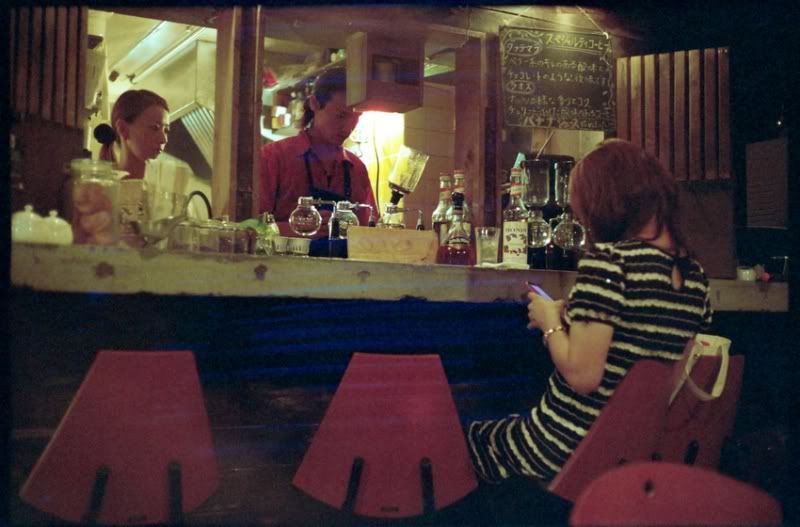
i recently got two rolls of film developed at my local store, each shot with a different camera. on the first roll i got two shots where in the black areas you can see blue streaks as if a child just started drawing on the picture with a pencil.

this is the worst of the first roll
grainnner.jpg


i went to the store to ask them about it and they told me it was because the shots were underexposed and that the squiggly streaking is a characteristic of "film noise." i asked him how come i didnt see this on any of my other shots in the same lighting taken at the same time he couldn't explain it. further more, on the second roll, completely different camera, different film, i got more blue streaks in the black areas on a shot that is definitely properly exposed.

has anyone had experience with this kind of noise?

what is the problem here, and how can i avoid this in the future?

thanks
 
oh also, i am scanning these directly from negatives with an epson v750m. i cleaned the glass on both top and bottom. scanned the negatives from different film holder slots to see if there was any difference, digital ICE on/off. i get these identical streaks on these handful of shots only. this one above is so bad that you can see the streaks on the store index print, so i dont believe it to be a scanner issue.

any wisdom would be much appreciated!
 
the guy explained to me that they did rotary tube processing and was saying how its standardized like they just run it through the machine. could it be the processing though? what did they do wrong?

flip- i went to kitamura kamera, i'm sure you have those as well in kobe?
when yodobashi told you it was the film age/ heat, did you believe them?

as for me, these rolls of film are well within expiration date, probably a week to a month off the shelf. and when i get home i put them in the fridge if i'll shoot within a month, freezer otherwise.
 
In my case, the film was in the camera a while. It was a less used camera and high speed color film. So, it seemed plausible.
 
This is mearly a postulation, but if they do film in rotary tubes, could there not be a pinhole light leak in their tank? causing streaks as the film "rolls" past, leaving those streaks?

so it would be worse on the frames nearing the end/start of a roll as they would be on the outer wind. like i said mearly putting this out there as a suggestion.

It looks too soft edged to be something like dirt/effluent in the tank dragging or anything along those lines to me though.
 
Any labs scans with a lot of dark area will be full of digital noise because the machine set on auto thinks that there is underexposure. This is not that, but something else.
 
nimcod -

yeah, these lines are not hard scratched damage into the negative so its probably not dirt. when you look up through the light you don't see anything wrong.

thats interesting that you say that, because on both rolls actually, the worst affected shot is around frame #6. i thought it was an odd coincidence. the other affected shots are frame 1, and 4.

can you explain to me how commercial processing works?
how does a rotary tube work?

is the film coiled in a tank like home darkroom developing, then agitated from left to right, potentially creating these zigzags if a pinhole is present?

maybe i can go back and explain it to them if they will listen.
i think i will switch shops but at least i'd like to warn them if their equipment is failing for other customers cause getting a roll back with real gems and finding these scribbles on them would be so disappointing.
 
i work in a minilab in the uk, but we use a noritsu machine, which is not rotary, but the film fed through rollers through a series of tanks, going down to the bottom of each tank then rising out pulled by the rollers.

im afraid i dont know what the commercial rotary processing method would be, i mearly assume its like a jobo rotary tank but on a commercial large scale. but i do not know for definite. the film is put onto reels in the normal jobos, but i have not used one in years and am having a blank on wether there was an option or version which rotated fully or only rolled back and forth, hopefully someone with a better memory can chime in on that.
 
Just had a quick browse on the jobo troubleshooting website now this is listed from making prints in the jobo rotary tanks, but i fail to see how it could not be translated to film also.

Print has light colored stripes...

• Processor is not level, or drum is floating in the water bath. Check the processor with level. If drum is floating, lower the water level.

• Insufficient chemical amount. As a minimum, use either the amount recommended by JOBO or by the chemical manufacturer, whichever is greater.


Print has stripes from end nearest motor head to end farthest from motor head...

• Use 1 minute pre-rinse. Position drum on processor more rapidly after turning horizontal (if using the magnet drive).

• Be sure that the drum and lid are dry before placing paper to start a process. Be sure to remove the beaker or funnel, and dry them with the lid, before using for the next process.

Light spots in print...

• Bleach-Fix contamination. Clean drum and cap assembly carefully.

• If using a JOBO Lift, run water through the lift after processing, or before the next process.
 
Man in Fukuoka you should be able to find an awesome Pro Lab. We have one left in Okinawa that's great and this is a small country-bumkin island. Quit short changing your development at minilabs.
 
That is just "strange".

I've seen this from light leaks, and from scratches. Closest to this was a shutter on a Contax not capping during the winding cycle, only occurred at 500 and 1000. That took a while to catch.
 
if its on the lab print and its on your scan then it must be on the negative. curoius that the lines aren't parallel to film length so it looks like a handling error to me unless you have rotated the image so its not level. If you have done that then I'd say it could have been scratching from film canister but if not then it couldn't be that.

Or possibly someone squeegeed the film to help with drying.
 
Last edited:
tlitody, i havent rotated the image.

i find it interesting that very experienced and wise people on this forum are also stumped by this. can it be that rare?

also, if it is a squeegee, canister, or physical damage, wouldnt that be visible when you put the negative up to the light?
when i look through it with a light as backsource, the weird thing is nothing can be seen. its only when its scanned or printed that these lines are noticeable.

and i was thinking, if it is "noise" how come the lines extend pass the underexposed black areas, and into even the white counter area as blue lines?
 
it must be on the film even if you can't see it by eye. Its probably squeegee marks. Or it could be a film imperfection. i.e. its not on the surface. I'd just carry on as normal and put it down as a UFO (Unidentifiable Film Oddity). If it continues to happen then chnage labs and see if it disappears.
 
That is just "strange".

I've seen this from light leaks, and from scratches. Closest to this was a shutter on a Contax not capping during the winding cycle, only occurred at 500 and 1000. That took a while to catch.

I also kind of wonder if the seam in the shutter curtain has lost integrity.
 
Back
Top Bottom