Help my negatives look terrible!

click

Established
Local time
3:08 PM
Joined
Jan 14, 2010
Messages
127
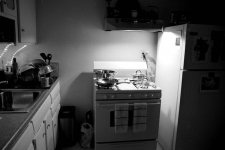
My negatives look terrible. Normal contrast situations look flat and grey, the grain is clumpy and sad looking. I've included a picture that illustrates this as to provide some visual clue as to what's gone wrong.

I'm using Tmax 400 Tmy-2 Developing at 70 degrees for five minutes and 30 seconds.

I read a book about developing film and I follow the instructions, moreover I used to have a home darkroom and used to get excellent results developing myself. I put all of my chemicals in a cooler filled with water that is 70 degrees. I use a good thermometer and I've tried everything I can think of to produce good results to no avail.

So here's my question: could it be the tap water I'm using? I live in Hot Springs Arkansas where the water is a little different. I believe it has a high concentration of Magnesium, or maybe I'm just making mistakes.

Thank you for your help.

 

Attachments

  • PICT0330.jpg
    PICT0330.jpg
    16.8 KB · Views: 0
To me it almost looks like the film got fogged....any chance that could've happened? How many rolls has it happened for? Maybe the develop tank you're using or bag you're taking the film out in isn't 100% light tight?
 
Is this the first time you've used the local tap water? Is the problem just with this roll or have you had similar results in other sessions? If you've read up, followed the directions and have some previous experience with developing, it sounds like the tap water could be the problem. Maybe try using distilled water to mix your next batch of chemicals. Good luck with it.
 
It's possible that my light bag is not 100 percent light tight. This has happened to almost but not every single frame I've shot. If it is the water then I'm going to have to dump all my chemicals that I've mixed up and remake them with distilled water. I mix 1.5 ounces of Tmax RS developer unreplenished with six ounces of water, Does that sound right to you. I have a single reel tank and 7.5 ounces of fluid just covers the reel.

I last developed film about twelve years ago, with great success as evident by the quality of this meaningless shot. All of my negs looked great.
 

Attachments

  • Nissan Frontier.jpg
    Nissan Frontier.jpg
    46.7 KB · Views: 0
I'm using Tmax 400 Tmy-2 Developing at 70 degrees for five minutes and 30 seconds.

I suspect yours is a case of underdevelopment. According to the Massive Development Chart you should be aiming for around 6.5 to 7 minutes (1+4 Dilution @ 21 degrees celsius = 70 degrees fahrenheit) for TMax developer.

Try shooting a test roll and develop it for 7 min and then see if the results are more contrasty. Use a final wash bath with distilled water and photo flo to combat those nasty water marks.

Best Regards
Kevin
 
If the problem is not uniform throughout the roll then fogging may indeed be the culprit. Maybe take your changing bag in a dark closet next time you're loading the reel. The process of elimination could save you from dumping your chemicals. That 12-year-old shot looks fine so you know what you're doing. BTW, are you bulk loading your film? If so, that's something else to check.
 
hi, i didn't get an image as foggy as yours, I got a roll of images which would be described as "milky". I finally traced the problem to my fixer. I over exhausted my fixer which I reused 20 times where 5 - 8 was the safe limit. sorry to confuse you further.
 
I also think you underdeveloped. I doubt it's the water quality.Tap water in various locations may produce slightly different results, but I doubt anywhere in America would ruin the film. It's not like you live in Chernobyl.

If you want to make sure it's not the water, try a more time forgiving film and developer, like Tri-X in D-76.
 
Can I say how much I like the title of this thread! Although no one has actually answered the question, of how we help your negatives look terrible.

As a punctuation set-piece it rivals eats, shoots and leaves!
 
Can I say how much I like the title of this thread! Although no one has actually answered the question, of how we help your negatives look terrible.

As a punctuation set-piece it rivals eats, shoots and leaves!

Having screwed up myself when typing headers, I wasn't going to mention it. But since you have...

Use outdated film; over-expose by at least two stops, or under-expose by one; develop it in the wrong developer for the wrong time; under-fix it; don't wash it enough; dry it somewhere nice and dusty; store it rolled up in the film canister, cinching it good and tight for maximum scratching; and eat something nice and greasy just before you print the negatives, so the fingerprints are big and fat and juicy.

(Sorry, Click. Take it in good heart. I managed to mis-spell a header about spelling. Not deliberately. But it wasn't worth changing.)

Cheers,

R.
 
No disrespect meant, click. And I'm glad there are people better equipped than me to answer your query. But really, I just wanted to say thanks for giving me a chuckle on a Friday morning...
 
Yes I left out a comma, I never did like comma's anyway. I think they're fascist.

Everything I'm using is new and I'm using developer unreplenished. I got my developing time from a Kodak publication dated October 2007 and I checked again for RS developer it states 5.5 minutes. But I'm going to try pushing it much further. The next roll I'll try 6.5 and see what that does.

I am also using Kodak Rapid fixer at 1:4, does this sound right to you?

Here's another ugly shot for your consideration.

Thanks and I'm happy to provide Friday morning chuckles!
 

Attachments

  • PICT0212.jpg
    PICT0212.jpg
    22.3 KB · Views: 0
Note the above shot is probably the only thing that has come out of my developing tank that look remotely like a photograph.

My negatives are uniform in their crappy development.
 
As others here have correctly pointed out, this could also be a result of old or falsely diluted fixer. Are you positive you mixed it for negatives and not for paper? Dilution for paper is much weaker than for negatives.
 
How are you scanning (I'm assuming you scanned the negative)? I'll assume it's not a scanning issue with the contrast, but it could be.

If you think it's the water, go buy a $1 jug of distilled water at the grocery store and mix up your developer with that. At least eliminate that one variable.

If the negatives look milky, it's the fixing.

Your times, dilutions, and temperatures sound ok. How do you agitate?
 
I followed the instructions for films for my fixer but I divided it in half to conserve it. The container did leak a bit until I siliconed the spout. Perhaps the ingredients settled and something important leaked out.

I'm about to develop another roll. Cross your fingers!
 
Did you put in half the amount of fixer into your tank or did you prepare its dilution at half the recommend strength? If your negs aren't completely submerged in fixer for the alloted time then this could be one source of your problem.

I have developed TMax 400 in TMax developer before and if I remember correctly the recommended time was off by at least 1 stop. After pushing development times +1 to +2 I got much better results.

So try both: extend development to 7 minutes (or even longer) and, when fixing, completely submerge the negatives in properly diluted fixer.
 
Last edited:
I have an Ion Film2SD scanner which is a very cheap negative scanner. The negatives don't look right at all on a light table. The Kodak writing on the edges of the film does not look right.

I agitate based on a video I found on UTube where I twist and invert at the same time. I do it for five inversions at thirty second intervals. I pour in the dev, rap it on the counter, start the timer and invert five times to start.

I'm drying a roll that I developed for six minutes as we type. They do look better but the proof is in the pudding.
 
Back
Top Bottom