

You are using an out of date browser. It may not display this or other websites correctly.
You should upgrade or use an alternative browser.
You should upgrade or use an alternative browser.
LEICA M9 samples
- Thread starter kevinceasar
- Start date
- Latest activity Latest activity:
- Replies 33
- Views 9K

kevinceasar
Member




elshaneo
Panographer
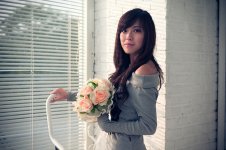
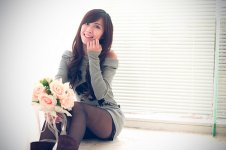
Well my friend, the samples you're showing us is too small to judge image output qualities, do you have the much higher original 18megapixels resolution samples?!
Please also indicate which lens was used, thanks 🙂
Please also indicate which lens was used, thanks 🙂

Pherdinand
the snow must go on
the images would be nice esp. no. 5 but in this form it's not a m9 (technical) quality.
Colors are weird, sharpness can't be judged, everything seems to be on the same (un)sharpness level, lots of flare (or simply very low contrast?) and some overexposure.
It also does not work as high-key because for that, the background is not overexposed enough.
I would not buy an m9 based on these images. Sorry if i sound harsh.
Colors are weird, sharpness can't be judged, everything seems to be on the same (un)sharpness level, lots of flare (or simply very low contrast?) and some overexposure.
It also does not work as high-key because for that, the background is not overexposed enough.
I would not buy an m9 based on these images. Sorry if i sound harsh.
nyx
Established
I've seen those few days ago on flickr.
Is it straight from camera? Colors seem altered to me. Wouldn't it be possible to get at least one as DNG? I'm downloading any DNGs I can find from web, but so far I haven't found any with at least some skin color.
Is it straight from camera? Colors seem altered to me. Wouldn't it be possible to get at least one as DNG? I'm downloading any DNGs I can find from web, but so far I haven't found any with at least some skin color.

Dave Wilkinson
Veteran
So far - in the digital saga, I have seen nothing to make me hugely dissatisfied with the results from my humble D40! - except perhaps, the occasional large print from a friends digital Hasselblad! - could be - as I age, I'm more easily pleased, or my eyes are not what they were! 🙂
Dave.
Dave.
Pickett Wilson
Veteran
Dave, I think we've simply reached the point where the real world difference between a photo shot with your D40 and one shot with an M9 is small. As much as people seem to want to believe that the M9 has magic qualities (as they did the M8 before the M9 was released), there is little to be wowed by image wise. It just comes back to whether you want the rangefinder experience in a digital camera enough to pay $7,000 for it.
I have a Canon Xti, a 50D, a couple of 5D's, and now a couple of 5DII's, and for most of the real world photos I shoot, the real difference doesn't matter, although the resolution and price difference is significant among the cameras.
Just getting very hard to wow us old guys. 😉
I have a Canon Xti, a 50D, a couple of 5D's, and now a couple of 5DII's, and for most of the real world photos I shoot, the real difference doesn't matter, although the resolution and price difference is significant among the cameras.
Just getting very hard to wow us old guys. 😉

drewflorida
Drew in Florida
M9 Shots as requested
M9 Shots as requested
Here are a few shots from the M9 if you're still interested in seeing some. Other than converting the last two to black and white, these were how they came out of the camera, no color processing (except those last 2 black and whites0 other than uploading from a Mac to a mobile me gallery. Unfortunately, Mac converts them from a DNG to 3.5-8 meg Jpeg and limits file dimension to maximum 1024 pixels for some reason. Original dimension example is 5200 × 3456 and 36.4 megs each as DNG Uncompressed raw files. I'd be happy to provide these as a DNG if someone wants to host them on their server. Just send me a private message with your email and I'll send them over as a DNG original file to the first guy willing to host 'em for others reading this thread to see.
This is not a composition test, nor a photography critique, these shots suck, however hopefully you'll be able to see what you're looking for with regards to picture quality out of the M9. Please grade the camera, not my photography skills from these test shots. I tried picking a few different backgrounds, textures, lighting and indoor/outdoor just to snap some different types of material and levels of detail and got lucky with a super foggy day on the golf course that just begged to be black and white. You can actually pick out the golfer and a cart through the fog on the right side of the last photo.
All photos were taken with a Summilux f/1.4 50mm on an M9 and looks like ISO was at 200 the whole time.
Hope this helps!


Crap......as I'm sitting here typing this, it is dark out, so here's one more which should give a quick idea of low-light. This is a 3 second exposure at ISO 200 with 28mm f/2.8 ASPH 6-bit lens. Again, we're not judging content or composition here, just trying to quickly give some "what the camera does" shots to help answer question asked above.

and here's a less-than optimum light, but not low light taken just after sundown today, forgot I took this. The 28mm arrived this afternoon and was playing with it out in front of a restaurant and shot this while looking at the frame lines vs. photo taken. Again, ISO 200.

M9 Shots as requested
Here are a few shots from the M9 if you're still interested in seeing some. Other than converting the last two to black and white, these were how they came out of the camera, no color processing (except those last 2 black and whites0 other than uploading from a Mac to a mobile me gallery. Unfortunately, Mac converts them from a DNG to 3.5-8 meg Jpeg and limits file dimension to maximum 1024 pixels for some reason. Original dimension example is 5200 × 3456 and 36.4 megs each as DNG Uncompressed raw files. I'd be happy to provide these as a DNG if someone wants to host them on their server. Just send me a private message with your email and I'll send them over as a DNG original file to the first guy willing to host 'em for others reading this thread to see.
This is not a composition test, nor a photography critique, these shots suck, however hopefully you'll be able to see what you're looking for with regards to picture quality out of the M9. Please grade the camera, not my photography skills from these test shots. I tried picking a few different backgrounds, textures, lighting and indoor/outdoor just to snap some different types of material and levels of detail and got lucky with a super foggy day on the golf course that just begged to be black and white. You can actually pick out the golfer and a cart through the fog on the right side of the last photo.
All photos were taken with a Summilux f/1.4 50mm on an M9 and looks like ISO was at 200 the whole time.
Hope this helps!
Crap......as I'm sitting here typing this, it is dark out, so here's one more which should give a quick idea of low-light. This is a 3 second exposure at ISO 200 with 28mm f/2.8 ASPH 6-bit lens. Again, we're not judging content or composition here, just trying to quickly give some "what the camera does" shots to help answer question asked above.
and here's a less-than optimum light, but not low light taken just after sundown today, forgot I took this. The 28mm arrived this afternoon and was playing with it out in front of a restaurant and shot this while looking at the frame lines vs. photo taken. Again, ISO 200.
Last edited:

Vince Lupo
Whatever
Drew - so if you convert the RAW file to an RGB TIFF, how big is the file? Have you tried that?
drewflorida
Drew in Florida
RGB Converted TIFF
RGB Converted TIFF
No problem. Here's what happens ....this is on the 4th picture down in the samples above of the trees showing street and lamp post .
Dimension: 5200 × 3456
Device Make : Leica Camera AG
Device Model : M9 Digital Camera
Color Space :RGB
Color Profile: Adobe RGB (1998)
Kind: TIFF Image
Size: 53.9MB on disk
RGB Converted TIFF
No problem. Here's what happens ....this is on the 4th picture down in the samples above of the trees showing street and lamp post .
Dimension: 5200 × 3456
Device Make : Leica Camera AG
Device Model : M9 Digital Camera
Color Space :RGB
Color Profile: Adobe RGB (1998)
Kind: TIFF Image
Size: 53.9MB on disk
Vince Lupo
Whatever
53mb? That's the full size? Hmm - don't know if it matters, but that's about 20mb smaller than what my D700 delivers. Interesting...
drewflorida
Drew in Florida
DNG File Samples
DNG File Samples
Figured out how to share a few of the photos as DNG files using MobileMe....just had to put them in a public iDisk rather than a gallery...duh..... they are here at the links below if you'd like to download a few of them, they will auto-expire after 7 days. Again, these were taken at ISO 200. Hope this helps!
http://files.me.com/beltfed/rnao9e
http://files.me.com/beltfed/vegnhh
http://files.me.com/beltfed/k8cjrm
http://files.me.com/beltfed/urcd21
http://files.me.com/beltfed/w9km2w
http://files.me.com/beltfed/sd1wk4
http://files.me.com/beltfed/wi6aoc
DNG File Samples
Figured out how to share a few of the photos as DNG files using MobileMe....just had to put them in a public iDisk rather than a gallery...duh..... they are here at the links below if you'd like to download a few of them, they will auto-expire after 7 days. Again, these were taken at ISO 200. Hope this helps!
http://files.me.com/beltfed/rnao9e
http://files.me.com/beltfed/vegnhh
http://files.me.com/beltfed/k8cjrm
http://files.me.com/beltfed/urcd21
http://files.me.com/beltfed/w9km2w
http://files.me.com/beltfed/sd1wk4
http://files.me.com/beltfed/wi6aoc
drewflorida
Drew in Florida
D700
D700
Really? Is that after color correction and saving with layers? I have a D700 as well and out of CS4 saving as RGB TIFF with no layers from a random photo from a friend's wedding, the TIFF file (no layers or color adjustments) originally shot as RAW was 15.7 megs. I tried another one taken with the 10.5mm fisheye which typically grabs a bit of extra data and file size on my D700 and it was only 15.8 megs. Now, when I took that same photo, did quick color correction, saved as TIFF with layers, the file size jumps to 46.6 megs.
When I do the same thing with my H3DII-50 the original .fff raw file is about 60-70 megs, saved as TIFF it goes to about 90meg and as color corrected TIFF with layers can range from 250meg to 1.6 Gig depending on how much work it gets.
Did I do something wrong or am I missing something?
D700
53mb? That's the full size? Hmm - don't know if it matters, but that's about 20mb smaller than what my D700 delivers. Interesting...
Really? Is that after color correction and saving with layers? I have a D700 as well and out of CS4 saving as RGB TIFF with no layers from a random photo from a friend's wedding, the TIFF file (no layers or color adjustments) originally shot as RAW was 15.7 megs. I tried another one taken with the 10.5mm fisheye which typically grabs a bit of extra data and file size on my D700 and it was only 15.8 megs. Now, when I took that same photo, did quick color correction, saved as TIFF with layers, the file size jumps to 46.6 megs.
When I do the same thing with my H3DII-50 the original .fff raw file is about 60-70 megs, saved as TIFF it goes to about 90meg and as color corrected TIFF with layers can range from 250meg to 1.6 Gig depending on how much work it gets.
Did I do something wrong or am I missing something?
Ronald M
Veteran
I am sure my D40 Nikon could do it.
To be honest, nobody can compare images on a monitor from one camera to another.
One you start with 10/12 MP raw and a 16/24mm sensor minimum, they are all going to look the same unless you start cropping.
To be honest, nobody can compare images on a monitor from one camera to another.
One you start with 10/12 MP raw and a 16/24mm sensor minimum, they are all going to look the same unless you start cropping.

Rob-F
Likes Leicas
Looks to me like Kevin is a fine photographer--and would be no matter what camera he uses!
Vince Lupo
Whatever
Really? Is that after color correction and saving with layers? I have a D700 as well and out of CS4 saving as RGB TIFF with no layers from a random photo from a friend's wedding, the TIFF file (no layers or color adjustments) originally shot as RAW was 15.7 megs. I tried another one taken with the 10.5mm fisheye which typically grabs a bit of extra data and file size on my D700 and it was only 15.8 megs. Now, when I took that same photo, did quick color correction, saved as TIFF with layers, the file size jumps to 46.6 megs.
When I do the same thing with my H3DII-50 the original .fff raw file is about 60-70 megs, saved as TIFF it goes to about 90meg and as color corrected TIFF with layers can range from 250meg to 1.6 Gig depending on how much work it gets.
Did I do something wrong or am I missing something?
Shot in RAW, converted to an RGB TIFF, I get 72mb, and my D200 gives the same thing. And I'm using CS3.
Last edited:
drewflorida
Drew in Florida
Shot in RAW, converted to an RGB TIFF, I get 72mb, and my D200 gives the same thing. And I'm using CS3.
Weird, is that WITH LAYERS or without?
Vince Lupo
Whatever
Weird, is that WITH LAYERS or without?
No layers, just a straight RAW (NEF) shot to TIFF. When I open the RAW file in CS3, it opens in that RAW preview section where all the images that you chose line up vertically down the left side. You make your adjustments (fill light, contrast, colour balance, curves, saturation, hue etc etc), then you make sure that the image size at the bottom of the middle of the screen is set to its highest (I think it's 25MP or something), then you can either open the image in Photoshop, or save it as is as a TIFF. After it's saved as a TIFF, open it up in Photoshop, check what the image size is - it will be about 14"x20" @ 300dpi, or about 72mb, 8 bit, RGB. As a CMYK, it will be even higher.
Nothing magic about it - pretty straightforward. I think as a RAW file it's about 15mb or so.

Gabriel M.A.
My Red Dot Glows For You
53mb? That's the full size? Hmm - don't know if it matters, but that's about 20mb smaller than what my D700 delivers. Interesting...
"But my Nikon SLR..."
Never fails.

jaapv
RFF Sponsoring Member.
Och well
Och well
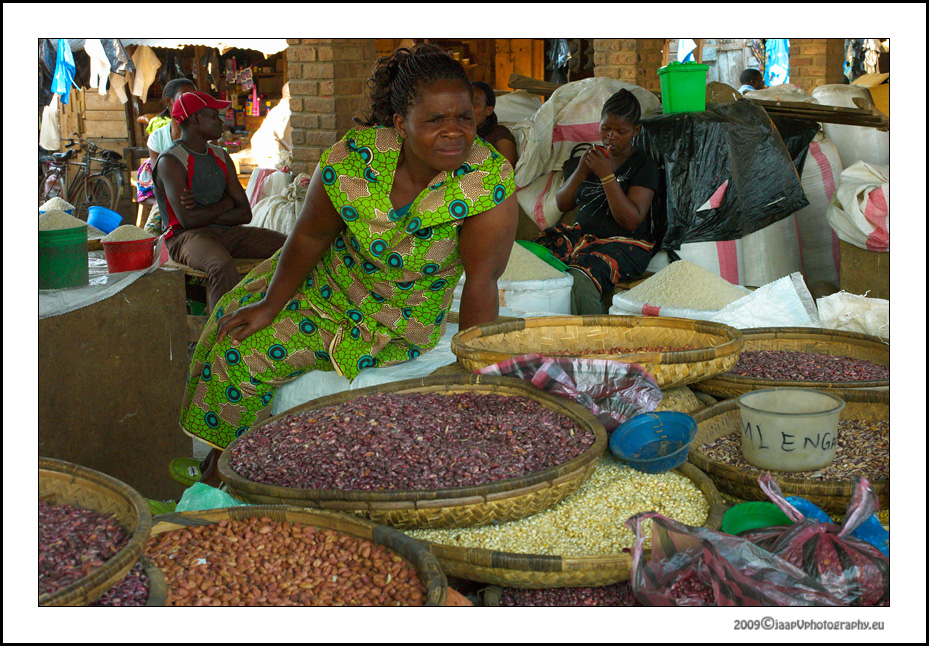
Let's have one:
Summilux 50 asph:
Och well
Let's have one:
Summilux 50 asph:
Similar threads


- Replies
- 62
- Views
- 2K
- Replies
- 242
- Views
- 15K
