M2 frame line issue?

Ccoppola82

Well-known
Local time
9:59 PM
Joined
Nov 25, 2016
Messages
641
Location
Buffalo, NY
curious if anyone can help me out here. When I have a 50mm mounted on my M2, the 50mm frame comes up along with JUST the left most 90mm frame line. Anyone know why or if there’s a quick fix for this? It’s not a big deal but it’s a bit annoying. Thanks ahead of time.
IMG_3295.jpeg
 
Quite common, the frame line mechanism is likely gummed up. Exercising the frame line preview lever sometimes will clear it up, but most likely camera needs a cleaning
 
It’s an easy thing for a tech if the camera doesn’t need full service. If the camera is working in every other way just live with the annoyance. 😁
 
1. Try a different 50 mm lens—preferably a Leica lens.
If the issue disappears, it’s most likely a tolerance issue with the non‑Leica lens. You can also try gently twisting the lens back and forth to see if the problem changes.

2. If the issue persists, do the following:
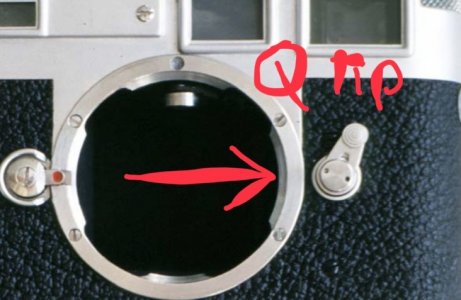
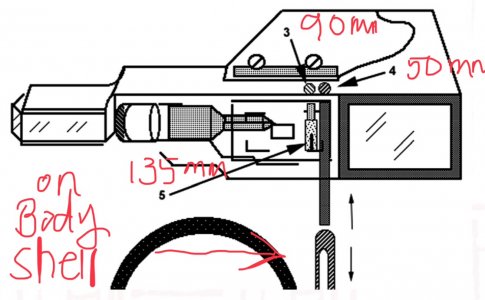
Use a Q‑tip lightly moistened with lighter fluid. Move the viewfinder selector and look at the arrow area (see attached photo). You’ll notice one metal piece moving up and down against another. Use a Q-tip dampened with lighter fluid clean these two metal surfaces by moving the selector back and forth. Do not pour any liquid into the mechanism—only use the dampened Q‑tip.

3. If none of the above resolves the problem, your M2 is likely due for a CLA.

 

Attachments

  • IMG_3202.jpeg
    IMG_3202.jpeg
    76 KB · Views: 16
  • IMG_3201.jpeg
    IMG_3201.jpeg
    140.5 KB · Views: 16
  • IMG_3200.jpeg
    IMG_3200.jpeg
    161.7 KB · Views: 16
Last edited:
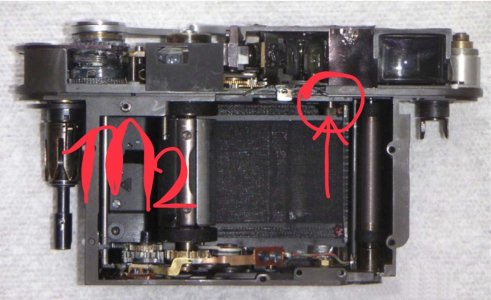
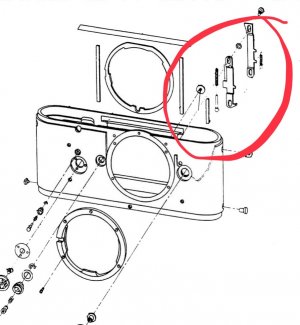
The body shell can be pulled out without taking off top plate but it is not for everyone
 

Attachments

  • IMG_3203.jpeg
    IMG_3203.jpeg
    123 KB · Views: 8
Last edited:
Back
Top Bottom