
My RFF-inspired camera app

bensyverson

Well-known
Local time
3:52 AM
Joined
Apr 19, 2007
Messages
627
Location
Chicago
I don't want to run afoul of the anti-spamming rules on RFF, but I just had to offer a heartfelt THANK YOU to the entire community. It's because of RFF that I became interested in (okay, obsessed with) rangefinders and classic compacts such as the Hexar, and eventually came to write an app based on them.

About 18 months ago, I started thinking about what a camera app in the RFF spirit would look like, and after over a year of tweaking, I finally released it yesterday. I really think of it as a product of this community, so I must reiterate my deep thanks for the inspiration.

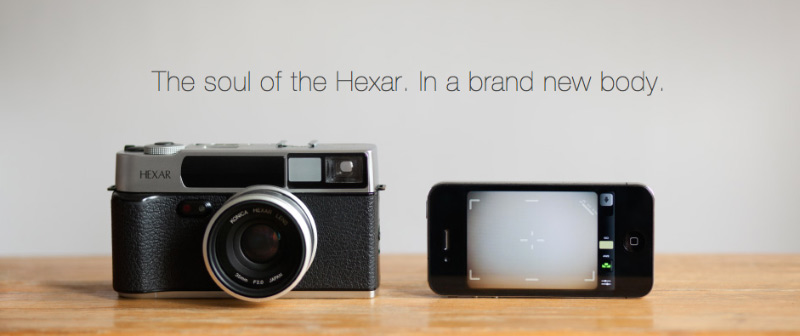
I won't link to it directly, but it's called Mattebox, and the image below sums it up:
hexar.jpg
 
ok - I'm game, from one Chicago RFF'er to another. I bought it. I will report back tomorrow. first impression - it's much cheaper than a Leica
 
ok - I tried it and took a couple of indoor shots.
The slider to lock (exposure/focus ?) then shoot is ok but takes some getting used to and will not be as quick as a button - I'd suggest adding a shutter button or using the volume controls for a shutter for those times when the 2 stage method is not needed.
the AWB control works well and is useful
the ISO control didn't do much - didn't see any value or ability to set the ISO
the viewfinder rectangle and reticule are great
the edit functions are good - looks like hue, exposure , saturation , curves, and the last one I couldn't figure out.
it would be nice if the editing were able scroll through previous shots by swiping, this is available via a control on the bottom - but adds a step
I have to play with the filters and effects more - it looks very promising

congrats on your new app
 
ok - I tried it and took a couple of indoor shots.
The slider to lock (exposure/focus ?) then shoot is ok but takes some getting used to and will not be as quick as a button - I'd suggest adding a shutter button or using the volume controls for a shutter for those times when the 2 stage method is not needed.
the AWB control works well and is useful
the ISO control didn't do much - didn't see any value or ability to set the ISO
the viewfinder rectangle and reticule are great
the edit functions are good - looks like hue, exposure , saturation , curves, and the last one I couldn't figure out.
it would be nice if the editing were able scroll through previous shots by swiping, this is available via a control on the bottom - but adds a step
I have to play with the filters and effects more - it looks very promising

congrats on your new app
Woah, thanks for the feedback! The shutter control is maybe not as fast as a single tap, although you can get pretty quick at swiping that short distance. The key is to use the tried-and-true P+S technique of half pressing, waiting for the shot, and then full pressing.

The last control is vignette 🙂

Right now, the shutter ISO and focus display the settings of the most recently taken shot. I developed a mode that shows you that information when you half-press, but it generated a shutter sound. So when you took a shot, you'd hear two shutter sounds. I figured that would just confuse people so I took it out, but I'm going to contact Apple to see if it's possible to silence it.
 
About 18 months ago, I started thinking about what a camera app in the RFF spirit would look like, and after over a year of tweaking, I finally released it yesterday. I really think of it as a product of this community, so I must reiterate my deep thanks for the inspiration.

Not a knock on your app (congratulations, BTW) but I just had to laugh when immediately after reading your message on RFF (and seeing the image of the Hexar), the next thing I read was the following line from the app's review on All Things D:

"But what if you’re just a regular camera user looking for a mobile app that mimics the DSLR experience? Then you may want to check out Mattebox, which just became available in the App Store."

Oh well!
 
Not a knock on your app (congratulations, BTW) but I just had to laugh when immediately after reading your message on RFF (and seeing the image of the Hexar), the next thing I read was the following line from the app's review on All Things D:

"But what if you’re just a regular camera user looking for a mobile app that mimics the DSLR experience? Then you may want to check out Mattebox, which just became available in the App Store."

Oh well!
Haha! Yeah, I'm happy they reviewed it, but I have to admit the word DSLR made me cringe. 😀
 
Interesting... Thanks! There's probably something minor I need to fix on my end, and knowing it has to do with Location helps narrow it down.
 
Can you try turning on Location Services and making sure that Mattebox has Location Services enabled in the Settings app?

Looking at my code, I think I may not be handling it well when Location Services is off. I'm testing a fix, and if it looks good, I'll submit it tonight as an update!
 
Yeah Ben, turning on Location Services on my 4s fixed the crash over here. The app looks cool so far, but I was a little deep in the wine when I downloaded it last night. I'll try it out some more today and tomorrow and get back to you.
 
If I could take a shot using the volume button I would be interested. Would be excellent if you could launch it using the shortcut on the lock screen, too - doubt it's possible to change that though.
 
ped, I'll look into using the volume button. It does remove the ability to lock exposure and focus, but I think some people will want it. Personally, using the volume button has always seemed upside-down to me! When I shoot that way, my hand is always blocking the lens.
 
From what I've seen it looks ingenious! Congratulations for this brilliant work. I have owned the Hexar before. Your app really makes me think of buying an iPhone!
 
Back
Top Bottom