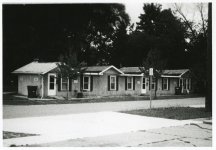
Orca 110 BW 110 film. Anyone try it?

kdemas

Enjoy Life.
Local time
5:37 AM
Joined
Jan 5, 2005
Messages
3,680
Just got my mint GAF 20/20 110 camera off of eBay and I'll be shooting a roll of the new Lomo Orca 110 film this weekend. Anyone tried this true BW film or shot 110 recently?

It's always funk snag a camera for under $10 🙂
 
I've been trying Lomos new films lately. I find the Orca really nice film, even if it is from China. My enlarger will only make a 5X7 (need a 35mm lens), but they look good. I've been developing in Microphen, about six minutes at 68deg. The first run had no backing paper, so you had to keep track of exposures manually. I understand the second run now has backing paper.
I've also tried the Color Tiger, and found that to be good. I'm having fun using my 110 cameras again. Just for 'snapshot' type use, but lots of fun.
 

Attachments

  • motel-3.jpg
    motel-3.jpg
    37.6 KB · Views: 0
I've been trying Lomos new films lately. I find the Orca really nice film, even if it is from China. My enlarger will only make a 5X7 (need a 35mm lens), but they look good. I've been developing in Microphen, about six minutes at 68deg. The first run had no backing paper, so you had to keep track of exposures manually. I understand the second run now has backing paper.
I've also tried the Color Tiger, and found that to be good. I'm having fun using my 110 cameras again. Just for 'snapshot' type use, but lots of fun.

Excellent, fun to pull out the old cameras again. 110 was popular when I was a kid so it brings back some memories when I take out that tiny cassette.
 
I only developed one roll so far. Going by that, it is good enough - probably worse than what we can get in 135, but in practice, the poor planarity of 110 (even in the Pentax) is a much bigger issue than the film grain.
 
I only developed one roll so far. Going by that, it is good enough - probably worse than what we can get in 135, but in practice, the poor planarity of 110 (even in the Pentax) is a much bigger issue than the film grain.

Interesting. I had never thought about the film flatness with 110 but that makes sense given the cartridge construction.
 
Taken on Lomography Orca with a Pentax 110 SLR:
8588368374_3f587357c9.jpg
 
Bagged myself a full Pentax 110 kit a few months back; wanted the lenses to play around with on the Q. Spotted the Orca film an thought I'd give it a try as I had the 110 outfit. Got the scans back and they seem great. Nice contrast and slightly grainy. I'll post some up later.
 
I've been drawn to get a little 110 camera now that this B&W film is available. The cost gives me pause. Even with Lomo's 20% sale on film right now 10 rolls with shipping would work out to about 26 cents for each frame. I can run my Minolta 16II for 3~5 cents per frame, that is calculated on buying 35mm film in 100 ft. bulk and slitting it down as I go. Of course the 110 frame is about 13X18mm, a lot larger than the Minolta's 10X14mm format size. However, one can still find the Minolta 16MGs or QT models that have a larger 12X17mm frame size.
 
I've shot a roll on my pentax auto, but I have yet to develop it. I use Xtol and would like to use stock solution but I can only find the time for 1+1 - isn't that likely to give somewhat more grainy results?

I got the 110 film holder for scanning from lomo as well. Good results with that from old negatives on my epson v700.
 
If I did try the Orca 110 film I would save the cartridges and backing paper to see if they can be disassembled and reloaded, that is for the cameras that don't need the index hole in the film.
 
I'm anxious to give it a go. Just ordered some film and the 110 holders. Plus, they have a discount on the film right now (as of 3/26/2013).
 
How are people scanning (and cutting the developed roll for scanning) these?

I've got an Epson 4180 - so 35mm and 120 holders available.
 
How are people scanning (and cutting the developed roll for scanning) these?

I've got an Epson 4180 - so 35mm and 120 holders available.


there's a trick to this. but i only know how to do it via canon's software.

(in this case a 9000f) i specify the scan area and hold the 110 film down using a 120 holder. (being careful with it as well, the 110 film tended to curl up really quickly) then i use my imaging editor to cut and save each individual scan.
 
there's a trick to this. but i only know how to do it via canon's software.

(in this case a 9000f) i specify the scan area and hold the 110 film down using a 120 holder. (being careful with it as well, the 110 film tended to curl up really quickly) then i use my imaging editor to cut and save each individual scan.

Interesting - so the 120 holder essentially holds the film down?
 
Interesting - so the 120 holder essentially holds the film down?

Any glass holder will be good for anything from its nominal size down - there may be side issues with the masking (having bits of blank glass in the scan area will usually cause the scanner to adjust for that as the white point, wasting much of the dynamic range). I scan on a Nikon 9000 with the glass 120 holder. I have to scan as 6x9, and crop from that, and have to cover the blank glass areas to both sides of the film strip with black masking film for the above reason - but apart from that it is straightforward.
 
Back
Top Bottom