Painting a camera

T_om

Well-known
Local time
5:56 AM
Joined
Mar 25, 2005
Messages
701
Location
NE Florida
In a recent thread in the Russian Camera forum, painting and paint touch-up was "touched" upon, so to speak.

I have quite a bit of paint experience with automotive and boat finishes. I would even feel comfortable (and have the necessary equipment), spraying two-part isocyanate paints that are beyond most hobbyists. No problem.

However, after looking at all the (very informative) camera painting links, I found almost all the info I needed... except for one small thing. :bang:

How are the painted engravings done? Getting a perfect overall spray job is a piece of cake. But how does one get an equally professional fill-in on painted engraving?

A puzzle.

If anyone has any info on this I would appreciate it. Links to explanatory site would be especially helpful.

TIA,

Tom
 
I've read that a "paint stick" is used. It is like a crayon and the script fill-in paint is rubbed into the engraving and the excess is wiped off. It is therefore important that the over-all paint job is not applied too thickly, as this will fill in the engravings and prevent the paint stick from working well.
 
Piant

Piant

I had the same question.

I don't have your experience in painting, but decided to take the plunge anyway.

After getting a nice black finish I tried to paint the engravings with a Sakura Pen-Touch Paint pen. DON'T DO THAT!

It ate through 3 layers of baked on finish! I email Jim Blazik, who has a great site re: this subject, and he recommended Lacquer Stick. I also saw many other recommendations for this product on the www.

http://www.micro-tools.com/Merchant2/merchant.mvc?Screen=PROD&Store_Code=MT&Product_Code=L51120

So, I've got a Red, White, and Black stick coming to finish up my FED-2 project.

Good luck!

Randy
 
greyhoundman said:
I use a sharpened toothpick and a large magnifier. I then carefully fill in the engraving, with whatever color I want.


I've tried doing it that way before. The problem is that I could never get the "transition area" between the fill and base color to have the smooth, uninterrupted look I was trying to achieve. It always left some jaggies, no matter how I tried to prevent it.

I'm looking for something that appears to have that 'poured in' look with sharp, clear differentiation between the base and fill.

I'll try the pencils recommended above and see what happens.

Tom
 
I don't know if this would work on a camera, but there's some stuff called "liquid frisket" that you can buy at any store that handles watercolor supplies. It's essentially a rubbery white or beige liquid meant to seal surfaces away from paint. You'd paint on the first finish, then carefully paint around the engraving with the frisket, paint the engraving, and then, when the engraving is dry, rub the frisket off. It's essentially a liquid paint-on mask. Uh...something tells me you may already know this, but I'll send it along anyway.

JC
 
Tom,

I've used the lacquer paint crayons that Randy mentioned from micro-tools.com.

It is simple to use. Treat it like a crayon. Rub it in the engraviving. For smaller width engravings, use a toothpick to push it in. To finish, remove the excess with a soft cloth.

https://www.micro-tools.com/store/productdetails/LS-KIT.aspx

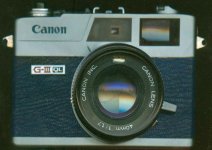
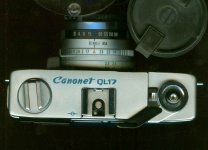
Here are a couple of pictures of my Canonet that I "repainted" all the engravings on. I also changed the black to blue to match the new leather. Please excuse the quality of the images. I used my paper scanner.

I have also used them to freshen up the engravings on a couple of my Canon F1Ns. It has not harmed the original paint.

-Lance
 

Attachments

  • canonet blue front.jpg
    canonet blue front.jpg
    75.5 KB · Views: 0
  • canonet blue top.jpg
    canonet blue top.jpg
    83 KB · Views: 0
Just a thought, never tried it though, how about beeswax?
Paint the engraving first. Cover with the wax, remove the excess and paint.

Heating after the paint is dry should allow you to remove the wax easily.
 
Back
Top Bottom