dmr
Registered Abuser
These came from a FOAF by way of our mutual friend. The FOAF now runs the photo lab at a local Wally World, and I can imagine this guy as a real stickler for quality control. He did admit that he knows of other labs which are not very meticulous in the process.
They use Fuji Frontier equipment and do a daily QA on the machines to test the chemistry and the overall results of processing.
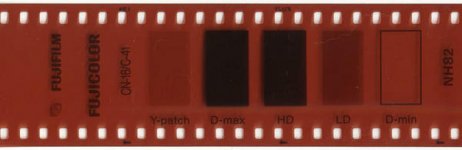
The one on the left is a pre-exposed negative control strip. This is run through the negative processor before any customer jobs are done each day and it's then checked with a densitometer. The D-min and D-max should be obvious as to purpose. The HD and LD are high and low test points to verify the linearity of the processing. I'm not real clear on the Y-patch. He said something about this showing residual silver and that chemistry that's going bad will show up on this one.
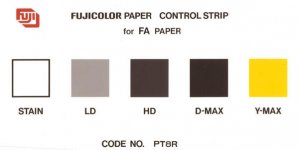
The one on the right is a paper control strip, and again it's (supposed to be) checked with a densitometer although he said that some labs just eyeball-check it. The "stain" square is supposed to be totally white and the D-max totally black, with LD and HD being certain shades of grey with no color cast. I'm not really sure about the Y-max, but it appears to be a solid yellow. (Anybody know? Class?) 🙂
I thought that the gang here would find this of interest. I did. 🙂
They use Fuji Frontier equipment and do a daily QA on the machines to test the chemistry and the overall results of processing.
The one on the left is a pre-exposed negative control strip. This is run through the negative processor before any customer jobs are done each day and it's then checked with a densitometer. The D-min and D-max should be obvious as to purpose. The HD and LD are high and low test points to verify the linearity of the processing. I'm not real clear on the Y-patch. He said something about this showing residual silver and that chemistry that's going bad will show up on this one.
The one on the right is a paper control strip, and again it's (supposed to be) checked with a densitometer although he said that some labs just eyeball-check it. The "stain" square is supposed to be totally white and the D-max totally black, with LD and HD being certain shades of grey with no color cast. I'm not really sure about the Y-max, but it appears to be a solid yellow. (Anybody know? Class?) 🙂
I thought that the gang here would find this of interest. I did. 🙂