Question about developing B&W

Local time
10:43 PM
Joined
Jan 21, 2013
Messages
22
Location
Chicago
tumblr_mhe5djMJeH1rv4mkjo2_1280.jpg


Hello forum. I have recently begun to develop my own film.
Ilford Pan 400, with

D-76 (1:1) - 13 minutes,
Water as Stop bath,
Ilford rapid fixer - 4 minutes.

When i finished drying the film, and scanned them using a normal scanner,
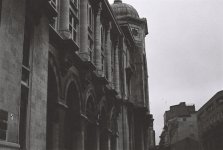
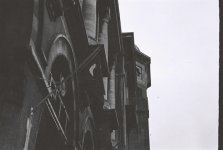
I got those vertical lines all over the scanned image. Can anyone help find the reason why? I scanned at 2400 dpi with HP C4380 all-in-one.

Thank you in advance
 
The bigger blobs seem to be air bubbles, the scratches seem to be done by a squeege, and the crude at the bottom seems poorly diluted developer or sand in the water. Plus it looks like you have scanned everything through your shirt.

To Sum up:

Make sure, the developer and water is clean, best to use demineralized water for this step, and if unsure, filter the developer through a coffee filter.

Dislodge the bubbles at the beginning and after each agitation by banging the tank 3 times against a hard surface.

Avoid using any kind of stop or water bath in the middle.

After washing, use last rinse bath in demineralized water with a drop of wetting agent, then hang to dry without squeeging with anything - pull the film away from vertical for a minute after hanging, it will help the fluid flow away along the borders.

I am not sure 4 minutes is enough for fixing - put a piece of cut off film leader in your fixer solution, and see how long it will take for it to become completely clear. You should fix twice as long.

Put your shirt away when scanning.

 
The lines downward look like scanner artefacts, normally caused by dust. the blobs could be from the stabiliser,
they normally are on the base (shiny side) and can be removed with 'huff' and a small lint fee rag.
Although I respect the previous poster I don't think they are scratches as the go from side to side (East to west) on the 35mm frame where the squeegee would go down (north to south) , but I can echo his advice of using distilled water and a slightly longer fixer time as they seem to have silver retention. re fix them for another 3-4 mins then wash for 5-6 more a drop of wetting agent in a final distilled water wash then natural dry will be better (no squeegee just bin it)
 
Thank you for your replies.
mfogiel, as photo smith said, the vertical lines couldn't have been caused by the squeege as it ran perpendicular to the lines.

You said void using stop bath, so will I pour in developer, pour it out, and pour in the fixer?
but i thought stop bath was vital?

Ilford rapid fixer fact sheets recommneded 4-5 minutes for using with 35mm film, but i will try 8 minutes next time


photo smith,
if they are scanner artifacts caused by dust, would it be removed simply by cleaning the surface of the scanner and the film? Would it help if i scan at lower resolution, ie 1200 rather than 2400?
 
You said avoid using stop bath, so will I pour in developer, pour it out, and pour in the fixer?
but i thought stop bath was vital?

Use a plain water wash, i haven't used a stop for 30 years!

Clean your scanner with a computer screen wipe, dust in the calibration area can cause lines, if in doubt re fix and wash, send to a minilab to see if they can print and scan better...
 
Use a plain water wash, i haven't used a stop for 30 years!

Clean your scanner with a computer screen wipe, dust in the calibration area can cause lines, if in doubt re fix and wash, send to a minilab to see if they can print and scan better...

Oh sorry, I use water, as mentioned in original post. mfogiel suggested me to

"Avoid using any kind of stop or water bath in the middle."

I can't find a lab near my house, one of the main reason why I needed to develop it myself
 
The last few rolls I developed I skipped using water as a stop bath, I poured the fixer in after I poured the developer out and I didn't notice a difference really. No idea about the scanning artifacts though... are they on the original negative?
 
The stop bath is irrelevant if you use fresh fixer and if your developing times are not critically short, like 3 or 4 minutes. Moreover, some think that stop bath can accentuate the grain. As to the artifacts, perhaps the solution of your problem is in the scanning. It almost looks like you have scanned this on a flatbed with the white lid on?
 
The vertical lines in the image (as we see it) are scanner artifacts caused by the scanner, not dust, not processing, just the scanner. The black spots and crud looks to me like dust in the camera that has fallen onto the film before it was exposed, is it an old camera?
 
While stopbath isn't needed I wouldn't put the fix straight in after the developer as it will impede the absorption rate of the gelatine where areas have localised pH of less than the isoelectric point of the gelatine (pH 4.9)
This will cause local areas of positive charge within the gelatin to form argentothiosulfate ions more commonly seen as discolouration and brown staining.
Not normally a big problem if you use fresh fixer every time but can worsen with a few re-uses and with some super hardened gelatines like those used in TMax films.

Fresh water rinse between baths will help reduce both staining and extend the life of fixer solutions.
 
Try to contact fellow RFF member in Istanbul, his user name is Taylan.
I remember he has a darkroom, so you can at least get a second opinion from a person who can see the negative along with you.

Scanners that are targeted for office use are not equipped to light the negative from the back, thus giving you dark and murky scans.
 
Will is correct - trying to use a general-purpose scanner like this HP will never give you satisfactory results when scanning film. There are plenty of affordable film-capable scanners from Canon, Epson, Plustek and others which will give you very good results.
 
Thank you all for your help.
I found a local lab who offers scanning service.

turns out it was not developing issue,
but just scanner artifacts.

Does anyone here get negatives scanned at lab?
how much do you pay per 36 exposure roll?

they asked for 11 bucks for 44 exposures, and I'm pretty sure i overpaid.
 

Attachments

  • 000030.jpg
    000030.jpg
    33.4 KB · Views: 0
Thank you all for your help.
I found a local lab who offers scanning service.

turns out it was not developing issue,
but just scanner artifacts.

Does anyone here get negatives scanned at lab?
how much do you pay per 36 exposure roll?

they asked for 11 bucks for 44 exposures, and I'm pretty sure i overpaid.

Depends on the quality and size of the scans, if you paid $11 for 44 1800x1200 pixel scans then you paid too much but if you're getting scans that are 4000+ pixels on the long size then I'd say $11was a great price for 44 exposures.
 
Back
Top Bottom