RSS Feeds

Mike Richards

Well-known
Local time
12:04 PM
Joined
Aug 31, 2003
Messages
201
Location
Preveza, Greece
Just upgraded to Mac/Tiger and the Really Simple Syndication (RSS) feeds are really neat. Photo.net uses them, allowing for very fast review of postings. Any chance of this forum implementing RSS?

 
I second that, too! (Well, not the part about the Mac.)
 
back alley said:
cool!

what does it do?

😉
RSS (Really Simple Syndication) allows software that is able to read it to display text and links as they are added. In the case of RFF as new threads are added an entry is added to the feed. I can bookmark the RSS if a new thread is added it shows up on in my feed.

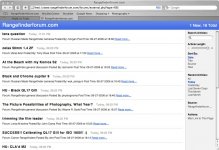
The feed on Safari on the Mac looks like this:
 

Attachments

  • feed.jpg
    feed.jpg
    131.6 KB · Views: 0
If you are using Firefox it's pretty easy.

Here is ONE option:

a) Install SAGE (http://sage.mozdev.org/)

b) Learn to use it (takes 2 minutes). More help at http://sage.wikia.com/wiki/Main_Page

c) Start adding RSS feeds!
(Most all sites have an orange 'radio wave' icon at the end of the URL string when using Firefox - you just click on it and it's added). Another way to add with SAGE is to click search and it picks up the available feed and it can be added.

So now you got photo.net, RFF and leica-forum added as RSS' (what now??)
Well, by one click you can now get a window showing all new threads you haven't read yet and you can read by clicking on them from that window.

Note: There are a LOT of RSS feed readers out there..this is just ONE option..
 
Last edited by a moderator:
MacDaddy said:
So how do you set it up on your Mac with Safari? (Never DID learn this while I was working!)
Safari on Tiger:
1. If you look at the location bar at the top of the brower (the part that will shows http://www.rangefinderforum.com) on the right hand side of that bar will be the letters RSS.
Click on that and bookmark it.

OR

2. click here
 
back alley said:
how would i access this rss wonder?
Firefox supports RSS feeds natively, without having to install add-ons such as SAGE.

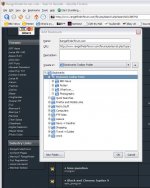
On websites with RSS feeds, Firefox shows an orange icon at the foot of the browser window (see attachment 1). If you click on this, Firefox's bookmark manager appears (see attachment 2) - you can add the bookmark wherever you want (I've added it to the Bookmarks Toolbar Folder).

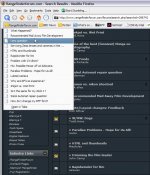
Now, when I click on the orange RFF folder icon, I get a list of all the new posts since I last visited RFF (see attachment 3), and clicking on a post takes me that post on the RFF website.
 

Attachments

  • Clipboard0.jpg
    Clipboard0.jpg
    15.2 KB · Views: 0
  • Clipboard1.jpg
    Clipboard1.jpg
    85.3 KB · Views: 0
  • Clipboard2.jpg
    Clipboard2.jpg
    82.2 KB · Views: 0
RichC said:
Firefox supports RSS feeds natively, without having to install add-ons such as SAGE.

I agree, that works fine - I just personally prefer the look and options that comes with SAGE (and it's free so no fee to pay).

🙂
 
Back
Top Bottom