Scanning negatives -> Help please

Michael M

Member
Local time
5:34 AM
Joined
Dec 27, 2006
Messages
14
Hi guys !

I am contemplating a scanner to set up a hybrid workflow for my negatives. I have never scanned film before and i'm not sure what quality to expect. I was thinking of the nikon coolscan v.

Can anyone post their opinions about the coolscan v ? Scanning samples would be greatly apreciated !! How large do you print your scans on inkjet printers ?


Thanks in advance !

Mike
 
I have a Canon Lide 600F its no Coolscan but was also MUCH cheaper!

Had this printed today at 8 x 10 and it looks ok (to me)! Film is HP5.

1429780763_e578955af7.jpg


Non resized crop

1437754440_490e4e1560_o.jpg


Think I chose a resolution of 3200, note that I am still learning to process my own film (this is my third attempt), and the scanner is new so I am learning to use that properly as well!
 
This was home processed and scanned this past weekend.
Agfa APX400, Ilfordsol (1+9 @ 9min)
Scanned by my new Epson 4490 flatbed. I just got the scanner and am still playing with the settings. This was 16bit grayscale @ 3200. Not sure about printing as I have not done any yet.

1429656462_4e36884416_o.jpg


Cheers,
Brandon.
 
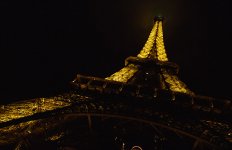
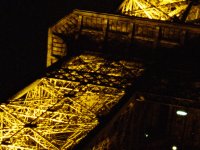
I recently got the Coolscan V, I am pretty happy with it, although I am not quite sure if i got all the settings right. here is my example scanned at 4000dpi. Film is Kodak Farbwelt 200.
 

Attachments

  • Aug07-CV25-023kl.jpg
    Aug07-CV25-023kl.jpg
    105.2 KB · Views: 0
  • Aug07-CV25-023crop.jpg
    Aug07-CV25-023crop.jpg
    251.7 KB · Views: 0
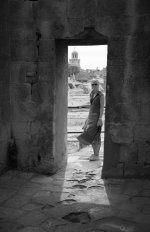
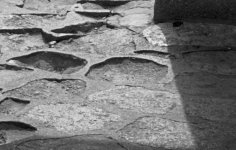
here is another one. BW400CN at 2000dpi.

By the way does 16bit really make a difference? I couldn't see any when I did a comparison scan.
 

Attachments

  • Aug07-arles-010kl.jpg
    Aug07-arles-010kl.jpg
    62.4 KB · Views: 0
  • Aug07-arles-010crop.jpg
    Aug07-arles-010crop.jpg
    175.8 KB · Views: 0
I scan (slides and B&W, mainly chromogenic for easy) and since a few weeks print on HP 9180B. B&W is (at least seems me!) very good on matt paper. Bad on glossy paper (because pigmented ink have difficulties to penetrate in it, said in a few primitive words). Actually I m looking and starting experimenting on semi-matt or pearl paper, not yet done. I'm confident should be ok.
rob
 
Nice bridge photo, Erik.

I have the Coolscan V (LS-50), and I've just started to use it. I run it with Vuescan, which I'd used for a while with my Minolta Scan Multi. The combination works for me. I don't have an example image to show here, but the difference is great - not just the 4000dpi max resolution, but higher Dmax as well. And quick; compared to the Minolta, at least, the Nikon scans pretty swiftly.

I scan B&W film as 8-bit RGB and convert in PS using channel mixer; now I'm interested in seeing if 16-bit gray performs any better.

Not to hijack the thread, but I have a related question for those saving their B&W scans with embedded profiles: which do you usually use? sRGB is one standard for JPEGs, of course, but what about the 1.8 and 2.2 gamma profiles? Are these the "right" way to profile B&W images?

Thanks, if anyone's got an opinion.


Cheers,
--joe.
 
lubitel said:
ICE seems to work on BW c41 film, just not on real B&W

That's generally the case (although I note that another poster above noted that it seems to work for him; not sure what's going on there.)

The reason it has trouble with silver-based b&w is that these ICE-type automated dust removal systems are based on an infrared scan of the film.

Think about it: If you just scan the film for visible light, the scanner would have no way of knowing whether that tiny dark speck was a fleck of dust or a small, very bright object in the actual image (such as a candle flame.)

But since chromogenic films form their image from dyes, which are designed to allow IR light to pass through (so they don't heat up during enlarging or projection) using an IR scan makes it easy to tell the difference. IR will go right through the dyes forming the image of the candle flame, but the dust speck (being essentially a tiny "rock") is opaque to IR, allowing the dust-removal software to tell the difference.

The problem with silver-based films is that since the image is formed of metallic particles, these also block infrared very efficiently; there's no way for the dust-removal system to distinguish between an IR-opaque dust speck and an IR-opaque dense highlight in the image.

It may be that some of the dust-removal systems now also try to distinguish dust from image by shape recognition or other means, but I think you'll find that even those that sort of work with silver-based b&w still work better with chromogenic films.

If anyone knows different, I'd be very interested to hear the theory behind it...

 
I'm a little worried now about the B&W scanning performance of the coolscan v, would i yield better results using an epson flatbed ? Since i'm shooting b&w mostly this is an issue of much concern for me .....
 
Don't worry, it will give you great B&W scans (but does enhance the grain, specially when scanning on Vuescan with the grain reduction off). I am extremely happy with my LS-4000 (which is basically identical to the Coolscan V). Slide scans are jaw-dropping. 🙂 And the D-MAX is much better than my old Epson 4490 flatbed, which means it can punch through dense highlights. The Epson liked thinner negs. The D-MAX of the Nikon is at least on par with the D-MAX on a Fuji Frontier scanner, I've seen both extract a noisy but recognizable image from a 5-stop overexposed negative which was almost black when held towards light.
 
I've found that scanning B&W negs as colour positives really helps - just reverse and desaturate in post. The B&W neg profiles for Nikon scanners tend to create a lot of noise and posterisation in shadow detail - telling its a positive avoids that. Works for me because I do curves adjustment in Photoshop as well, doesn't work for everyone but the extra steps involved for me are worth it to avoid posterised shadows.
 
How do the tones hold up when you convert in PS ? Any difference to scanning b&w ? I'm doing adjustments in ps anyway so that wouldn't be an issue. How much does grain increase when scanning b&w, is it really bad or acceptable ? Does it still look like film grain or more like digital noise ?
 
Michael M said:
How do the tones hold up when you convert in PS ? Any difference to scanning b&w ? I'm doing adjustments in ps anyway so that wouldn't be an issue. How much does grain increase when scanning b&w, is it really bad or acceptable ? Does it still look like film grain or more like digital noise ?

I run vuescan on minolta 5400 to scan B&W film, at 5400 dpi, 16-bit, noise reduction off, using the profile of Ilford XP2. I tried the above suggestion of scanning them as positive and convert them in PS, but the Ilford XP2 profile works better for me.

The tones hold up very well. The scan seems to pick up all highlight and shadow details. Amplified grain is more of an issue - the scan on the screen looks more grainy than 11x14 prints from the darkroom, although the fair comparison should be inkjet prints from scan vs darkroom prints of the same size (which I haven't done).

I don't use noise reduction on vuescan to avoid detail loss, and if it is needed, Noise Ninja in PS always work better.
 
I have an Epson 4490, and I am very happy with the way it scans my Medium Format film: colour, B&W, negative, positive, chromogenic, not.

1444050196_f413265739.jpg

Agfa APX100

1444114600_f384850747.jpg

Fuji Superia 100

1331808676_f766b54367.jpg

Fuji RDP 2 Positive

1443217673_a5b4680dfd.jpg

Neopan 400

I am less enchanted with the 35mm scans, but I have a Minolta DualScan that I need to learn to use for the little negs....
 
mascarenhas said:
Don't worry, it will give you great B&W scans (but does enhance the grain, specially when scanning on Vuescan with the grain reduction off). I am extremely happy with my LS-4000 (which is basically identical to the Coolscan V). Slide scans are jaw-dropping. 🙂 And the D-MAX is much better than my old Epson 4490 flatbed, which means it can punch through dense highlights. The Epson liked thinner negs. The D-MAX of the Nikon is at least on par with the D-MAX on a Fuji Frontier scanner, I've seen both extract a noisy but recognizable image from a 5-stop overexposed negative which was almost black when held towards light.

You mean something like this? from a Frotier, unedited. God knows how many stops overexposed this frame was 🙂 I'd say at least five from what I can recall. Film was Reala.
 

Attachments

  • B22169_1As.jpg
    B22169_1As.jpg
    189.7 KB · Views: 0
Back
Top Bottom