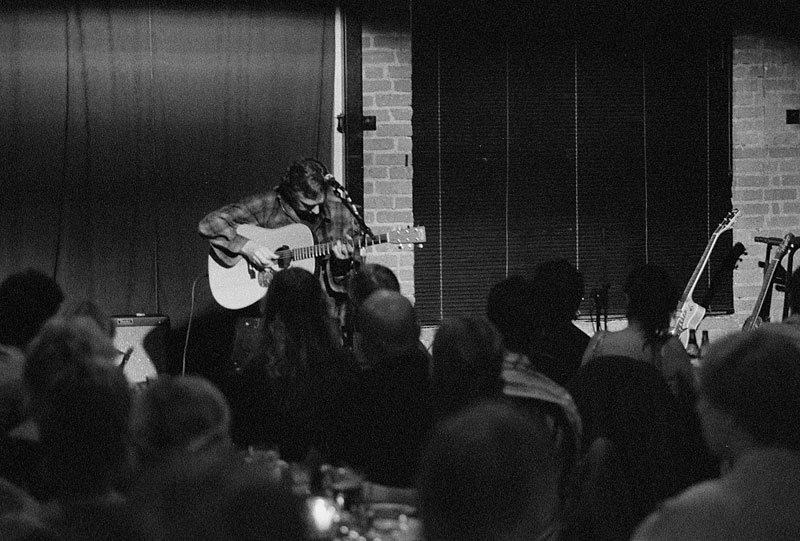
Some negs scanned, first time; pls take a look

Pherdinand

the snow must go on
Local time
9:51 PM
Joined
Jul 26, 2004
Messages
7,869
Location
by the river called the Gender
Hi. I have got access to a flatbed w neg adapter, and scanned some delta3200 negative frames. They are here:
one
two
three

(Made w the former contax IIIa + zeiss 50/1.5 sonnar). Almost full-frame. Could you comment on it please, mostly as scanning quality-wise(but anythoing else's welcome too)?

Scanner details: HP 4070 "Photosmart", scanned at 2400dpi (supposedly the highest res of the scanner), 16bpp (transformed to 8bpp in PS). Unsharp masking, some "curves" and resize. I noticed that scanning as slide and reversing colours works better on the highlights than scanning as BW negative, i wonder why.

Thanks
 
That's not bad at all for a flatbed scanner! 🙂 Of course the on-line image on the monitor at 72dpi won't show detail like a good print at a higher resolution.

My guess is that there's something nonlinear in the overall system if you get better highlights (darks on the negatives) doing the reversal after the scan. I don't know what it would be, however. 🙂
 
Looks very good for a super fast film! How did you managed the grain? My Delta 3200 scans are always very grainy to the point that it looks like a charcoal sketch!
 
Looks good??Hm, that was unexpected to hear! Seriously, there's no real "grain" visible at this magnification but there's alot of "noise" or whatever it would be, in the gray areas, resolution combined with grain i guess. Here I attach a magnification of approx. 42 times of one of the frames...taken through a microscope with a digital camera and then reversing colours. You can see the grain clearly. However, the sharpness on this seems to be much better, as well as the tonality/details both in the shadows and the highlights. I was hoping for such details with the scanner too, just on smaller magnification of course...but nope.

Any tricks with flatbed film scanners that a beginner can try?
 
Yea they look pretty good Pherdi, as you say there's a bit of noise but if your software has the "grain dissolver" function it can take care of that. After it you need to use sharpen or unsharp mask in your photo-edit software. The other thing is to erase the dust; your photo-edit software should have a tool for that too.
 
I like the "emotion" in one and two....... the musicians are obviously into their "work" and you've captured that quite well. On a technical level, your scans are fine.

Picture three in it's full frame leaves me cold.... nothing......... no feeling. Then you give us a cropped image from that frame that, IMO, is outstanding! It's an excellent illustration of how a well-cropped image can turn a ho-hum picture into something special.

Just my opinion, of course.

Walker
 
Well, I beg to differ - while the pics look good, the scans suck - lots of noise in the dark areas, a common problem with extra-contrasty negs and flatbeds or cheap neg scanners (You wanna know from where I know that? Look at some of the terrible TMax 32oo-Scans in my gallery, like the concert pics.)
I'm always amazed at some of the great neg scans in the gallery (Todd.Hanz pictures come to mind immediately), I only get such results when scanning from prints (but then, my scanners - Umax flatbed and Mediax 1800 neg scanner - only cover the last two parts in 'The Good, the Bad and the Ugly').

Roman
 
let's see some from a different setting.. the noise probably won't be as apparent with images that have a wider tonal range.. less darks, essentially
 
Roman said:
Well, I beg to differ - while the pics look good, the scans suck - lots of noise in the dark areas, a common problem with extra-contrasty negs and flatbeds or cheap neg scanners (You wanna know from where I know that? Look at some of the terrible TMax 32oo-Scans in my gallery, like the concert pics.) Roman

Roman, could you explain what you mean by "noise"? I'm not sure I'm seeing on my monitor what you're seeing on yours. In the dark areas where I can see detail, I observe some grain but that's to be expected in exposures like these. Or, should the film's grain not show at all?

Here's a picture I took yesterday on Arista Pro-400 film (HP-5) and developed in straight D-76. Scanned at 3200dpi and reduced to 100dpi. I see some grain in it or am I mistaking "noise" for grain? What do you see? Maybe I'm looking at my scans/pictures all wrong.

Walker
 
Well, I'm not an expert, but there is a difference between what I see on your pic and the examples above (of course, the light was very different, too): In your picture I see what I presume to be grain (though it is pretty huge for HP5+, unless you used Rodinal; also, sometimes 'grain' from scanning B&W negs are just scanner artifacts, maybe from sharpening too much, too - the white line around the bill of the guy'y cap is a clear evidence of sharpening - maybe your scanner has tha as an automatic setting?).

In Pherdinand's pics, it is a bit different: black areas are not solid black, as they would be when making a 'real' print from the neg, but they are mottled with white dots, and that's what I presume to be 'noise' - artifacts from the scanner not being able to really read shadow detail.

Roman
 
that's the same thing I was noticing.. I'll often get that with my scans if I mess with the levels too much to try and bring out detail
 
Pherdinand said:
Hi. I have got access to a flatbed w neg adapter, and scanned some delta3200 negative frames. They are here:
one
two
three

(Made w the former contax IIIa + zeiss 50/1.5 sonnar). Almost full-frame. Could you comment on it please, mostly as scanning quality-wise(but anythoing else's welcome too)?

Scanner details: HP 4070 "Photosmart", scanned at 2400dpi (supposedly the highest res of the scanner), 16bpp (transformed to 8bpp in PS). Unsharp masking, some "curves" and resize. I noticed that scanning as slide and reversing colours works better on the highlights than scanning as BW negative, i wonder why.

Thanks


I know from experience how hard it is to get TMZ3200 scanned decently with a flatbed and so I'd say you've done a real good job !!

Regards,
Bertram
 
Roman said:
sometimes 'grain' from scanning B&W negs are just scanner artifacts,

I'm slowly beginning to suspect this myself. Even the Neopan 100SS I dunked in HC110 was really grainy - until I got a print made - albeit of one of my better shots, with bright bright full sun. I think my scanner and underexposure were ganging up on me.
 
I've had another look at the three pictures and I do see a little of what you're describing although I'm beginning to think your monitor may be better than mine as it's not as plain as I think you're seeing. Thanks for describing it.

I did manipulate the image I posted, including sharpening it. Many of the pictures I took yesterday - as with this one - were taken against the light or in shadow with a much brighter background. I try to raise the contrast level and sharpen the image. Sharpening often accentuates the grain, especially on "fast" film. The lens used also makes a difference.

Walker
 
I am with Roman here: the photos are perfectly good, but the scans look like they could use some work. Believe me, I can't get it right either. I think that the "grain in the shadows" is both a consequence of the film and the scanner. Scanners have a lot of difficulties getting shadow detail in general (trying scanning a Velvia slide that is underexposed a little bit...). I think that the Delta 3200 and similar films are pretty easy to fog, which could account for the "grain noise" in your shadows. Another possibility (and a likely one from looking at your scans) is that they are partially JPEG artifacts. I know that when I have a picture that has no shadow detail in a large area of the picture, then it is easy to get JPEG artifacts (little gray blocks in the black shadow area). In any case, to make you feel better, here is a similar photo to yours -- Delta 3200 in DDX, and it is scanned on a Minolta Scan Multi-Pro. The scanner is very good, and I have had a decent amount of experience scanning, and it still looks like arse. Sometimes it is just easier to drag your but to the darkroom and make yourself a print.

kj-phelps4.jpg


For my part, I have decided to do my best to make do with Tri-x in Diafine (ISO 1250). I find that the results are worlds better than what I could get with Delta 3200 rated at 3200.
 
Phew, thanks guys, interesting discussion!
Yes, Roman, i agree with you, that's what I was asking about,t he apparent grain in the gray/dark areas. I CAN of course make the scan pitch black in the dark areas - but then the shadow details are all gone forever. By the way the "grains" (artifacts,whatever) are there on the 16bpp TIFF version too, not only these shrinked jpeg's, so i guess it's not JPEG artifact.
I also agree that it's a bit extreme to try it with delta3200 in a difficult lighting like the above. Here's one from another Delta3200 roll, exposed mid-day, scanned the same way. This image's tonalities are far better, and the "grain" is indeed looking more like grain. There was also some possibility to play with the contrast/tones of the image.

(It's Paris, Luxembourg park, in case you wonder.)

PS: StuartR - thanks, you have just saved me a few hundred $ 🙂 I was heavily thinking that i should buy a good neg scanner but if you say the big-bucks 'multi pro' still can't cope with the delta3200 then maybe i should give up low-light photography instead🙂
 
Pherdinand said:
I was heavily thinking that i should buy a good neg scanner but if you say the big-bucks 'multi pro' still can't cope with the delta3200 then maybe i should give up low-light photography instead🙂

Here's 2 from a Canon FS4000US scanner (discontinued now dammit!) which
I have been having wonderful results from for about 3 years. These are Delta3200 in Microphen @ 1600ISO. I'm pretty happy with them (from a processing point of view). Not from my rangefinder though, EOS-30, 50mm/1.4

With scanning you have to be really careful with the contrast. Thin negs scan the best.

James
 
Back
Top Bottom