Understanding Leica DNG Files

I've downloaded five of those DNG files from the M10 proof of performance page. Are there any where the photographer stopped down enough to create a sharp image across the frame? The out of focus areas are great to evaluate noise, but I'd like to evaluate resolution as well. The image of the man with two fish on his back walking on the sand is especially annoying. 1/3000s in daylight, his arm is in focus up to his shoulder, but his face is not. Pixel-peeping these hasn't been rewarding.
 
Camera calibration profiles 'tune' the raw conversion algorithm and enable an out-of-camera raw file of a reference exposure to match the reference's color characteristics. They operate at a lower level in the raw processing chain and have a wider range of adjustment than other rendering adjustment controls.

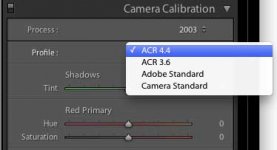
In Lightroom, available camera calibration profiles are presented in the Develop module's "Camera Calibration" panel along with the Process Version choices and some fine tuning controls for Tint and RGB primary values. You can also create your own camera calibration profiles by downloading the DNG Profile Editor from Adobe along with its targets and instructions for use.

Godfrey

Thanks for this very useful information. I never noticed this. I found the place in LR4 in the attached file for others to see.

This means that I can take the M10 profile from Adobe and add it to my old version of LR (which are LR4 and LR2 for my Laptop and PowerMac, respectively) correct?

Now, a good software question would be, what does an old version of Lightroom do, when it encounters a file from a camera that it can not know (like my old version of LR with this new M10)? Does it simply apply a "generic" profile?

Cheers to all, John

PS-Also very useful but a completely different topic is the possibility for B&W film scans. Up to now, I have been using an invert curve preset, but it is not always stable (maybe 0.5% of the time, I have to reimport an image and re-apply). Making a profile for this function probably would be much more stable. I will figure out how and make a separate post.
 

Attachments

  • LR4-camera-profile-selection.jpg
    LR4-camera-profile-selection.jpg
    33.3 KB · Views: 0
They look flat and boring because of the large dynamic range. They need to be edited to improve. This is valid for all large DR files. So the fact that they look the way they do proves that theya re unedited, not the other way around.

Yup, because the user is meant to edit the files using all the info that could be captured.
It's the same thing when I get my dev/film scanned at pro labs. The scans always look a little flat as they captured all the info available from the film. It's up to me to edit them to suit.

If someone wants a 'finalized' image straight out of the camera, then they should be shooting jpegs not RAW.
 
If LR does not "know' the camera it will not render its raw file.

Older versions of LR render M10 raw files because they are DNF files.

A completely different issue are the Camera Calibration Profiles.

I don't what you mean by "I can take the M10 profile from Adobe and add it to my old version of LR ". I speculate this happens automatically. If Leica supplies M10 Camera Calibration Profiles, then these should work with all versions of LR. Right now are there separate Camera Calibration Profiles for M8, M9, M9M, M240, M240M raw files?


The Adobe Standard profile was last updated in 2012. So older LR versions will render using the 2010 Adobe Standard profile. It looks as though you are using an even older version, 2003 Adobe Standard profile. The most recent version of Camera Raw is 9.6.1.

I understand how come some people do not upgrade LR. At the same time, in my experience, the 2012 Adobe Standard raw renderings are superior to the older Camera Raw renderings.
 
I tried DNG, making dups of my Canon RAW files.

Gave up DNG.

Canon raw works for me. It's probably due to my workflow started with Photoshop/Bridge before DNG was developed by Adobe.

I understand Adobes intention to have software that could be used by all camera manufacturers but Canon, Nikon and Sigma each still have their own. And I haven't had any problem using their software for RAW. I have Canon, Sigma and Fuji cameras and they all work for me.

The debate about whether to use proprietary raw files (Nikon, Canon, etc) vs DNG is not at issue here. Leica cameras produce raw files in DNG format directly from the camera, you don't have any other raw file format to choose.

G
 
...
Thanks for this very useful information. I never noticed this. I found the place in LR4 in the attached file for others to see.

This means that I can take the M10 profile from Adobe and add it to my old version of LR (which are LR4 and LR2 for my Laptop and PowerMac, respectively) correct?

Now, a good software question would be, what does an old version of Lightroom do, when it encounters a file from a camera that it can not know (like my old version of LR with this new M10)? Does it simply apply a "generic" profile?
...
PS-Also very useful but a completely different topic is the possibility for B&W film scans. Up to now, I have been using an invert curve preset, but it is not always stable (maybe 0.5% of the time, I have to reimport an image and re-apply). Making a profile for this function probably would be much more stable. I will figure out how and make a separate post.

If LR does not "know' the camera it will not render its raw file.
Older versions of LR render M10 raw files because they are DNG files.

A completely different issue are the Camera Calibration Profiles.

I don't what you mean by "I can take the M10 profile from Adobe and add it to my old version of LR ". I speculate this happens automatically. If Leica supplies M10 Camera Calibration Profiles, then these should work with all versions of LR. Right now are there separate Camera Calibration Profiles for M8, M9, M9M, M240, M240M raw files?

The Adobe Standard profile was last updated in 2012. So older LR versions will render using the 2010 Adobe Standard profile. It looks as though you are using an even older version, 2003 Adobe Standard profile. The most recent version of Camera Raw is 9.6.1.

I understand how come some people do not upgrade LR. At the same time, in my experience, the 2012 Adobe Standard raw renderings are superior to the older Camera Raw renderings.

"If LR does not "know' the camera it will not render its raw file." This is not true in the case of DNG raw files. Because properly formed DNG raw files are a standard, Lightroom will render any of them even if it doesn't have a 'good' camera calibration profile for the task.

"The Adobe Standard profile was last updated in 2012." This is not true. You're referring to the process version not the Adobe Standard camera calibration profile. The Adobe Standard camera calibration profile is updated with every release of Lightroom to include new and improved camera calibrations. It is a complex implementation which uses a master file that aggregates in specific camera profiles (stored in external files) depending on what kind of raw file has been opened. The process version is the set of underlying raw conversion engine algorithms that use parameters set in the camera calibration profile for rendering the files ... and there I agree with you 100%: the 2012 process version is FAR superior to the older 2003 and 2010 versions.

I know the Lightroom application bundle pretty well; I did a search through it (I've done this countless times for other purposes... ;-).

While there are camera calibration profiles in the Lightroom 6.8 application bundle for a host of different Leica models—including the M8, M9, M240, etc.—there is no camera calibration profile for the M10. These profiles are supplied by Adobe. I suspect this means that the LEICA M10 camera calibration profile is supplied by Leica embedded in the M10 DNG file, just as the "Embedded" profile is supplied in DNG files from other Leica cameras.

All DNG files that I've seen from any camera include an embedded default calibration profile; usually it's not all that well worked out, it's just a default color spec. Previous ones from my Leica X, X113, M-P240, and SL produce rather cartoonish oversaturation and other flaws. It looks like, from the sample M10 files I've pulled from the net, the one that Leica has made for the M10 and named "LEICA M10" actually does a good job.

So, the long and the short of all this is that if you open an M10 DNG file in an older version of Lightroom, IF the camera calibration profile is embedded in the DNG file and IF it is compatible with the parsing protocol used by older versions of Lightroom, it will simply be there and work. Exactly what it produces in output will depend on the process version that version of Lightroom supports in use.

"...a completely different topic is the possibility [of using camera calibration profiles] for B&W film scans..."

I have several camera calibration profiles (made with the Adobe DNG profile editor) that perform inversion and gamma correction (and mask removal for color negative film too) used when I scan film with a camera via a copy setup. They work very well and very reliably, with one particular issue: because the profile inverts the normal direction of the grayscale progression, all the controls that adjust tonal scale values in the LR UI operate inverted as well. I'm sure you've seen this if you use an inverted tonal curve preset. This presents a lot of difficulty when trying to make fine adjustments ... the controls just don't work the way they were designed to.. and they also can cause problems when applying other presets that are expecting tonal controls to work the normal way.

My strategy for using these pathological camera calibration profiles works this way:
  1. Import the raw file
  2. Apply the inversion camera profile
  3. Rough in adjustments to be 'close' but not hitting the limits of white and black point range
  4. Export and Import in place to 16bit-per-component TIFF files
What this leaves you with is a very editable TIFF file that has a normal—non-inverted—tonal scale. Use that for finish editing...

onwards!
G

 
So, the long and the short of all this is that if you open an M10 DNG file in an older version of Lightroom, IF the camera calibration profile is embedded in the DNG file and IF it is compatible with the parsing protocol used by older versions of Lightroom, it will simply be there and work. Exactly what it produces in output will depend on the process version that version of Lightroom supports in use.

This indeed seems to be the case. Thanks for clarifying above. This will help anybody who does not have the "newest" version of LR.


"...a completely different topic is the possibility [of using camera calibration profiles] for B&W film scans..."

I have several camera calibration profiles (made with the Adobe DNG profile editor) that perform inversion and gamma correction (and mask removal for color negative film too) used when I scan film with a camera via a copy setup. They work very well and very reliably, with one particular issue: because the profile inverts the normal direction of the grayscale progression, all the controls that adjust tonal scale values in the LR UI operate inverted as well. I'm sure you've seen this if you use an inverted tonal curve preset. This presents a lot of difficulty when trying to make fine adjustments ... the controls just don't work the way they were designed to.. and they also can cause problems when applying other presets that are expecting tonal controls to work the normal way.

Yes, I have the exact same issue using the invert image preset I created. The controllers are not intuitive use. I find however that the Process 2003 version of LR and the invert preset is quite good for black and white negatives once you get used to it. For color negatives on the other hand, I just scan as JPGs...

Thanks a lot Godfrey! Let me think about all this stuff!
 
It looks as though you are using an even older version, 2003 Adobe Standard profile.

Willie, yes, this shot is from LR4. But, I have the file set to Process 2003, even though Process 2010 and 2012 are available.

For the DNG files that VueScan puts out, I have not been able to tell a difference between the different process versions.

This could be different for camera raw files though. I just don't have the experience there to tell.
 
Willie, yes, this shot is from LR4. But, I have the file set to Process 2003, even though Process 2010 and 2012 are available.

For the DNG files that VueScan puts out, I have not been able to tell a difference between the different process versions.

This could be different for camera raw files though. I just don't have the experience there to tell.

That's because the DNG files generated by VueScan are of a different nature compared to DNG files containing raw data from a camera. They're actually
'DNG encapsulated TIFF' where the embedded TIFF data is a serial RGB stream, not mosaiced sensor data that must be deconvolved to extract RGB channel data. Most of the differences between the process versions have to do with how the demosaic algorithms operate, which is unnecessary for scanned data.
 
Back
Top Bottom