egor
Member
Question for those of you who use the *specific* combination of VueScan Pro (latest version) with a Plustek 7600i:
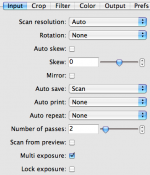
Is Vuescan's multi-exposure setting (NOT the multi pass setting) working correctly for you?
On my Macintosh (Mac Pro), it's definitely not working. It *looks* like it's working. That is, the first pass (which I watch in Vuescan) is at the 'normal' exposure, and the second pass uses a much longer exposure (as expected). The problem is, when Vuescan merges the two exposures, I end up with a TIFF file that's *exactly* the same as a single-exposure file. You can even overlay their histograms -- they're identical. It's like Vuescan is simply throwing away the second exposure, rather than merging the two.
This is a big problem with the Plustek 7600i since its D-max is so low. When scanning full-range B&W negatives, I get severely blown highlights. I can *manually* make two separate exposures and combine them in Photomatix, but that's a huge hassle -- that's what the Multi Exposure option is supposed to do.
I've been using VueScan for 9 years, and a zillion film/slide/flatbed scanners before this. First time I've seen this problem. Haven't heard anything from Ed... so I thought I'd find out if anyone with this combination has had any luck?
Note: I just 'upgraded' from a V600, which rendered gorgeous tonality from the entire B&W negative -- but was too "soft." So far, scans from the 7600i are much 'sharper' (at least on a grain level), but fail miserably in the highlights (dark areas on a negative)...
-egor (http://photography.ultrasomething.com)
Is Vuescan's multi-exposure setting (NOT the multi pass setting) working correctly for you?
On my Macintosh (Mac Pro), it's definitely not working. It *looks* like it's working. That is, the first pass (which I watch in Vuescan) is at the 'normal' exposure, and the second pass uses a much longer exposure (as expected). The problem is, when Vuescan merges the two exposures, I end up with a TIFF file that's *exactly* the same as a single-exposure file. You can even overlay their histograms -- they're identical. It's like Vuescan is simply throwing away the second exposure, rather than merging the two.
This is a big problem with the Plustek 7600i since its D-max is so low. When scanning full-range B&W negatives, I get severely blown highlights. I can *manually* make two separate exposures and combine them in Photomatix, but that's a huge hassle -- that's what the Multi Exposure option is supposed to do.
I've been using VueScan for 9 years, and a zillion film/slide/flatbed scanners before this. First time I've seen this problem. Haven't heard anything from Ed... so I thought I'd find out if anyone with this combination has had any luck?
Note: I just 'upgraded' from a V600, which rendered gorgeous tonality from the entire B&W negative -- but was too "soft." So far, scans from the 7600i are much 'sharper' (at least on a grain level), but fail miserably in the highlights (dark areas on a negative)...
-egor (http://photography.ultrasomething.com)
Last edited: