35mm film: Where I am, and where I want to be

okcomputer

Member
Local time
7:56 AM
Joined
Feb 29, 2012
Messages
50
Quick synopsis: The quality I get from 35mm home development is not as "clean" as some of what I see on the web.

As an example, here is typical of what I get (no adjustments made for the purpose of this post):
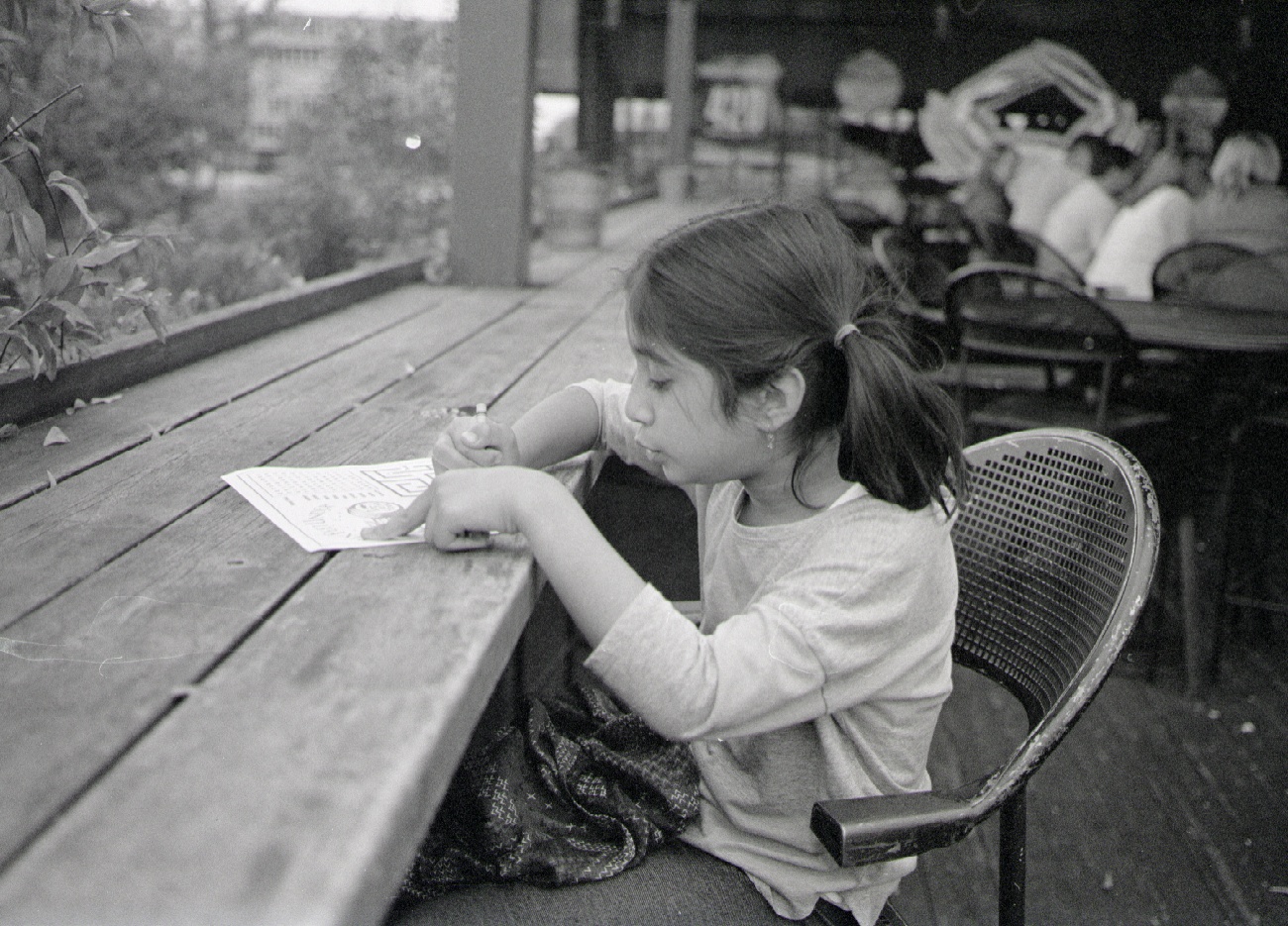
40mm_full.jpg


Here is an example of how I'd really like my files to look:

http://mattalofs.com/2009/05/11/i-cant-pass-up-shooting-into-the-sun-05740027/

For my example, I use TMAX 400, in HC-110 (1:50/8 min/recommended agitation). Scanned on a Reflecta RPS7200 film scanner.

I'm not exactly sure of all the issues the made my photo look different from the one I linked, but I would say the grain is a bit intrusive, shadows look bad, etc. Should I focus my efforts on cleaning up my development with my existing method, or try something like XTOL? (I've never tried another developer). Give up and just get good at using Silver Efex on my 5Dii?

Thanks for the help!
 
Youe final image is only as good as the weakest link in your workflow -- from capture (exposure, composition, etc...), darkroom processing and scanning.

The image you referenced as your objective was scanned in with a Nikon 9000. I'm not sayaing that is the cause for the difference, but it may be one factor.
 
OK, so we know from the caption what Matt is doing. Tell us what you are doing: lens, film, developer, time and temp, agitation, etc.


TMAX 400, in HC-110; 1:50/8 min/67F
Agitate 1 minute to start, and then 10 seconds every minute. Water for stop bath.

Equipment is a Canon 650 and a 40mm/2.8 pancake lens

thanks
 
Looks a bit grainy to me, especially in shadows. I'm not familiar with that scanner, nor have I used HC110 with Tmax, but I can tell you that with Xtol and a DiMAGE scanner I get nice grain. Much like enlargers, different scanners handle grain differently because of the optical setup.

How is your temp control?
 
Looks a bit grainy to me, especially in shadows. I'm not familiar with that scanner, nor have I used HC110 with Tmax, but I can tell you that with Xtol and a DiMAGE scanner I get nice grain. Much like enlargers, different scanners handle grain differently because of the optical setup.

How is your temp control?


Rolfe: it was a 40mm lens, wide open f/2.8.
I agree this may not be the sharpest photo, but my issues are more around the unattractive grain.

Takkun: I believe my temp control is pretty good. I develop at 67F, and am able to nail that pretty well at the time of start of development. (I guess I should now check to see final temp, to see if it may be increasing during dev?)

FrankS and Billie: I'll evaluate the negatives on a light table and report back. At cursory glance, they look OK. If under-developed, could this be the source of the graininess? (i.e. the scanner is automatically applying levels to bring it up?)

Regarding the scanner- I have both an Epson V700 and this Reflecta film scanner. My best efforts (adjust height, use ANR glass to flatten, etc), I get pretty equal results to the Reflecta... but the scanning may well be the worst part of the workflow.
 
Your scan/edit is too flat. Try pulling down the lows and bumping the mids/highs a little. Clip the blacks a bit too. With that flatness you are trying to get detail where there isn't any in the negative (in the dark areas). Thats why its super grainy.
 
Even with a Coolscan 5000 or 9000 (I have both), I will see visible coarse grain without putting some grain reduction in through Nikon Scan or Vuescan. Using vuescan (as Nikon Scan is limited to Windows XP and earlier), in the File tab there is a grain reduction setting. Normally I scan the film as a RAW file (64 bit RGB+IR if C-41 or E6). When processing the RAW file in Viewscan, you can play with the grain reductions settings until you get the desired amount of "smoothness" you want. That's the benefit of scanning RAW - the original scan contains all of the information without any modifications. You can then modify to your heart's content afterwards.
 
It's more to do with the Photoshop work - or lack of it - in post. The pix don't adjust - or clean - themselves.

It looks like you have focus but you're getting blur from your subject's and your own movement. Faster shutter speed.

The grain is fine, if you aren't printing then the grain will look different at each different size jpg and you'll go nuts trying to make "grain" consistent. Don't worry about it unless you want to be a fuss-budget and get a drum scanner or Coolscan 9000 or something better than what your current scanner is. But you should be able to make even a low end film scanner work OK and I sure wouldn't bother throwing more money at it until I had some amazing work and wanted to sell large fine art prints. Otherwise it's just a waste of time and money.

Just adjust the image curves so you get a solid black and a near empty white, then play with the middle.
 
Zeiss lens, correct exposure and xTol...

To me negative film is not the final image.
If I want it looking good for web, I have to edit the scan for the web.
 
35mm film is so difficult to scan unless you have a dedicated and most often expensive scanner for small format negatives.
I don't think the lens you used will give you a real sharp image at 2,8, better to stop it down just one stop from fully open. It also looks like the focus is a little bit behind your subject, if you look at the chair behind it looks like it is a little sharper at least the way i see it.
I have applied a little curve and some sharpening and a little tone to this, the grain is still there but i think the slightly improved contrast makes it look a little cleaner?
 

Attachments

  • 40mm_full.jpg
    40mm_full.jpg
    44.9 KB · Views: 0
1/ As gavinlg says, sharpening is a definite no-no--all it does is sharpen and enlarge grain.

2/ Certain grain sizes interface with scanning resolution in bad ways, resulting in a type of interpolation that makes artificial large grain that isn't the real grain of your film. It's the luck of the draw between your film and the scanner as to whether this will happen. Try scanning at a different resolution--sometimes lower res looks a lot better. Here's the definitive article on that topic: http://www.photoscientia.co.uk/Grain.htm
 
For me, there are 4 things to be aware of:
1 - the focus is off - check lens alignment
2 - the lens resolution appears so and so - in fact, it appears , it was shot wide open, unlike the photo of Matt
3 - the shot is underexposed
4 - the scanner is inferior
5 - there is no tone adjustment

Tmax 400 in HC 110 will give better quality if shot at EI 250 and developed slightly shorter. If you are after better acutance, go to dilution H.

Here's an example of a Tri X 35mm negative ( much less sharp than Tmax 400), shot at f 2.8 with a not particularly sharp lens (SIGMA 50/1.4), developed in HC 110 1+45 and scanned on Nikon CS 9000:


20131006 by mfogiel, on Flickr
 
May be the small device I am on ( iPhone retina) but I do not think your comparison photo looks that much better than yours - also lot of noise and grain in the shadows .

Maybe you are expecting too much of your scanner ?

Randy
 
I think your photo is underexposed/underdeveloped.

This makes a huge result difference when scanning (the difference would be less visible in case of wet printing) because of the electronic noise you get then.

Look at the following pics, shot at a few seconds one from the other : I stupidly and unintentionally goofed with the speeds selector between the two shots, underexposing the "conventional" portrait by two f-stops.

Properly exposed :

k_fingers.jpg


Underexposed :

k_champ.jpg


As you can see it by yourself the underexposed shot, in spite of a very careful post-processing, exhibits much electronic noise and doesn't look "clean" on a computer screen.

The two photos are contiguous on the same film strip (Tri-X at 400, properly developed), which was scanned with a very good dedicated 35mm film scanner.
 
This forum is FULL of very helpful people. Find those whose work you like and whose images have the aesthetic you are after and PM them individually instead of asking for anyone and everyone's advice. Good luck!
To the OP : wise advice - unless you'd end-up with hearing about Rodinal eventually ! 😀

😉

More seriously : there is no particular aesthetic to be after in this case. Expose properly, develop properly, scan as a TIFF file so that you get headroom enough to adjust the levels and curves properly, perform a small amount of dodging/burning, remove the few dust spots, downsize, "save for the web" and you're done.

Keep it simple !

The best explanations I've found so far are on Markus Hartel's website. They are from the early 2000's but I never found any better and easier recommendations yet.

http://www.markushartel.com/blog/category/learn-from-markus/page/2
 
Back
Top Bottom