Film streaks - cause?

LazyHammock

Well-known
Local time
11:46 PM
Joined
Mar 27, 2005
Messages
296
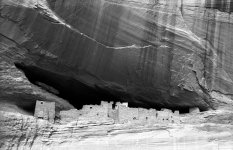
I've just developed a roll of Acros (my first for 35mm) and I have strange streaks parallel with the length of the film and equally spaced on each side. This is a preloaded cartridge, not bulk loaded. The film was in the plastic box until use and the films used before and after this in the same camera look fine. Therefore I'm assuming the camera is clean.
The film was developed in a Paterson tank (plastic reels) but the reels do not impinge on the film area in question.
I'd be a lot more ticked but I also had my G@ loaded with Pro 160S and a 1938 Voigtlander TLR loaded with Acros (negs look fine) on the trip.

I'm assuming there was an issue with the film or cartridge - any other ideas?
Cheers,
Nick
 

Attachments

  • Canyon-de-Chelly-1.jpg
    Canyon-de-Chelly-1.jpg
    144.2 KB · Views: 0
Strange streaks. What do they look like on the negative? Can you tell if it's a scratch? It seems too diffuse to be a scratch. Of course, scratches can occur if you wipe down your negatives after the final wash with a squeegee or anything like that. Seems too symmetrically placed for that to be the reason though.

Have you ever had problems developing before? The fact that they're close to the edges would have me thinking that they somehow got streaked in developement. Like the reels somehow interfered. You'd have to look at the full negative to really tell.
 
I didn't squeegee the negs, I used photoflo in the last rinse then just hung them to dry. I'll take one in to work tomorrow to look under the scope. If the streaks are light in the scan they can't be scratches right?
This is the first I've seen - normally I bulk load Neopan 400 and process the same way - haven't seen this issue before.
Cheers,
Nick
 
Yeah, I was just thinking of that. If it's light in the print, they shouldn't be scratches. So it could be that the developer didn't.. 'catch' that area for some reason. You'll need to loupe it to describe it more accurately. Sorry I couldn't be more helpful 🙁
 
I've been looking at your streaks for the past several minutes and I'm drawing blanks.

Like Crasis I have a hunch it's chemical. Maybe developer contamination on the sides of the reel, or agitation surge marks.

...but I bet it's the photo-flo. I've had white streaks and deposits before from using photo-flo at too great a concentration, though never that regular.
 
tetrisattack said:
...but I bet it's the photo-flo. I've had white streaks and deposits before from using photo-flo at too great a concentration, though never that regular.

I was wondering; Do you do rinses after you photo-flo? I generally do a good distilled water cycle of a random number of inversions depending on how I'm feeling that day before putting it in a wetting agent mix. I'm asking because I'd imagine that anything from the photo-flo would wash off if you do a rinse after.

The streaks seem to indicate some sort of developement issue. LazyHammock, I'd be interested in hearing your agitation techniques.
 
Crasis said:
I was wondering; Do you do rinses after you photo-flo? I generally do a good distilled water cycle of a random number of inversions depending on how I'm feeling that day before putting it in a wetting agent mix. I'm asking because I'd imagine that anything from the photo-flo would wash off if you do a rinse after.

Rinse after the photo flo? No, that would be silly, for just the reason you've specified. 🙂

The deposits I'm talking about just seem to come about when either myself or the darkroom aide gets lazy and dumps too many suds into too little water. It's not like a normal calcified water spot, it looks more like runny streaks of greasy residue. I've also seen it if I dunk my film into the photo flo before it's properly stirred up. I've been able to sort of remove the gunk from certain negatives with lens tissue but generally the only recourse is to re-rinse and mix my own photo flo, properly this time. 🙂
 
I'm quite stumped. I have learned to be quite gentle with my development agitation - I have found overaggresive agitation usually highlights the film perforations rather than produce streaks.
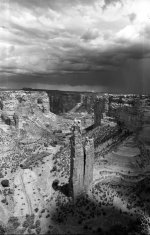
I do not rinse after using the photo-flo, that may be the cause , but to add further confusion; frames toward the end of the film seem to be ok - see below. If you are wondering the later frames were toward the bottom when the film was hung to dry.
Huh?
Nick
 

Attachments

  • Canyon-de-Chelly-2.jpg
    Canyon-de-Chelly-2.jpg
    166 KB · Views: 0
tetrisattack said:
Rinse after the photo flo? No, that would be silly, for just the reason you've specified. 🙂

The deposits I'm talking about just seem to come about when either myself or the darkroom aide gets lazy and dumps too many suds into too little water. It's not like a normal calcified water spot, it looks more like runny streaks of greasy residue. I've also seen it if I dunk my film into the photo flo before it's properly stirred up. I've been able to sort of remove the gunk from certain negatives with lens tissue but generally the only recourse is to re-rinse and mix my own photo flo, properly this time. 🙂

Ahaha, sorry, I was thinking of hypo agent, not photo flo. My bad. Anyways, yeah too much photo-flo ****s the **** out of **** **** ****. The streaks should be runnier and less .. perfectly straight like our friend here.

I'm just wondering if he uses a rotational agitation method, which could account for the streaks.
 
It is the curse of Spider woman who lives in Spider rock. What you need is a Deneh (Navajo) medicine man.

If that does not seem to convince you, then could it be that you shot this with a red filter? It was in a Contax G? And does the Contax G use infrared sensors in the film advance? Perhaps this film would be sensitive to the infrared film advance sensors. My gut reaction is no, but I can't think of anything else, except my first reason of devine retribution.

Does the tank agitation involve spinning the reels or inverting the tank? If you spin the reels, could the reel rotation cause an eddy to cause uneven development? But that seems to be highly unlikely.

The truth is out there.
 
LazyHammock said:
I'm quite stumped. I have learned to be quite gentle with my development agitation - I have found overaggresive agitation usually highlights the film perforations rather than produce streaks.
I do not rinse after using the photo-flo, that may be the cause , but to add further confusion; frames toward the end of the film seem to be ok - see below. If you are wondering the later frames were toward the bottom when the film was hung to dry.
Huh?
Nick

How do you agitate though? And what do you mean about highlights the film perforations?

I can throw my developing tank around the room like a football and not get any strange effects.. If you don't count destroying highlights as an effect 🙂
 
No, this was my Leica M6 with an orange filter (I had colour in the G2). I do spin the reels in the tank but it doesn't show on later frames. It could be divine retribution, I've lead a good life but could have been better!
I have just re-washed the earlier frames, hopefully that might make a difference. Thanks for all the suggestions.
Nick
 
Photo flo marks

Photo flo marks

Again, this may or may not be the problem, but I'm going to throw this one out there.

Here's a crop from a larger photograph with the curves cranked to make the mark stand out better. You can see the path this particular drip took as it dried, leaving the greasy residue behind on the emulsion. And we mix photo flo with pure h2o from the distillery across campus, so water deposits in our pristine washington rainforest aquifers likely isn't the case here. It was just too much surfactant.
 

Attachments

  • photoflo.jpg
    photoflo.jpg
    130.2 KB · Views: 0
I see your photoflo marks Conor, I have rinsed my earlier negs to see how they come out - it will be another 30mins or so until I can scan them. Did rinsing help your negs? Great shot by the way.
Nick
 
tetrisattack said:
Again, this may or may not be the problem, but I'm going to throw this one out there.

Here's a crop from a larger photograph with the curves cranked to make the mark stand out better. You can see the path this particular drip took as it dried, leaving the greasy residue behind on the emulsion. And we mix photo flo with pure h2o from the distillery across campus, so water deposits in our pristine washington rainforest aquifers likely isn't the case here. It was just too much surfactant.


I seriously want to keep that photo on my HDD because of the comments on it. I almost spit my late night chicken salad sandwich snack out! 😛
 
Finder- I'm sure you've nailed it. Similar streaks appear in stainless tanks with certain dev./ film combinations if agitated too heavily OR too little... 120 size
HP5, Rodinal is an example. They're just oriented 90 degrees from these.
Conor- What are you thinking!!??! Don't tell people we've still got clean groundwater here, they'll move in. Isn't the Northwest crowded enough?
 
I think Conor hit the nail on the head. I re-rinsed the affected negatives in very dilute photoflo and the marks disappeared. Thank you all for your input.
Nick
 
Nick- Nice to hear the problem is (dis?) solved. Especially considering you haven't lost images. I'll add this one to my notebook.
 
Man! I'm impressed, I've never been able to get my streaking that straight and consistent before. 🙂

...not even with the red-tide-contaminated, canadian-sewage-containing, overfertilized, underoxygenated, salmon-offal slurry we like to call "washington state water." You know why Olympia beer is so bad?

Yeah. It's the water.

😉

(Psst. Bryce, think that'll keep people away?)
 
Back
Top Bottom