My brother released a photobook

antiquark

Derek Ross
Local time
4:14 AM
Joined
Nov 11, 2006
Messages
1,494
Location
Winnipeg
Hello All,

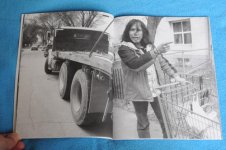
My brother (Kirby) and I put together a photobook and released it via CreateSpace. Basically he took all the pictures, and I did everything else. He's not an RFF member, but he does seem to have a knack or natural gift for photography. Here's the description:

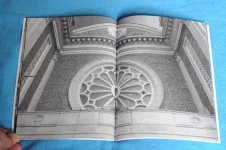
Kirby Ross wanders the streets and neighbourhoods of Winnipeg by day and night. He takes photographs with a smartphone, thus proving the adage that "the best camera is the one you have with you." He visits friends and talks to strangers, sometimes buying a beer, sometimes helping someone collect cig butts. On occasion he also notices that Winnipeg contains the odd architectural wonder. This book contains 32 photographs across 48 pages, in black-and-white.
In my editing and design of the book, I was inspired by Daido Moriyama's "Record" series. So it's black-and-white (of course), but I also wanted to make a book that was as cheap as possible. My goal was under $10 Canadian, which works out to $7 USD.

If anybody has any questions about using CreateSpace, I'd be happy to answer them. Here are some links if you're interested in buying the book:

Amazon.ca -> http://a.co/cBJD3h5
Amazon.com -> http://a.co/gXMLBj1
Createspace -> https://www.createspace.com/7147979

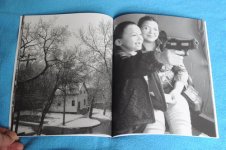
I've attached a few images of the book, let me know if you want to see more.

Finally, if you want to ask him any questions, his facebook link is: https://www.facebook.com/kirbyrosswinnipeg . But be warned that his internet connection is "spotty" to say the least, so it might take a while to get a response.

Thanks,
Derek
 

Attachments

  • DSC_8309.jpg
    DSC_8309.jpg
    34.5 KB · Views: 0
  • DSC_8303.jpg
    DSC_8303.jpg
    32 KB · Views: 0
  • DSC_8310.jpg
    DSC_8310.jpg
    34.5 KB · Views: 0
Good for him. How did he get it printed for $7.00 US?

I'm interested too. I suppose you can get the costs down if you make a large order?

It's a "print on demand" scheme. So it's printed one-by-one whenever someone orders it. I think that's a good idea, because you don't have to pre-order a pile of books to get the price down.

The books are cheap because they're small (48 pages) and in B&W. I set the royalty to $2.00 per book... so it definitely won't be a cash cow! Actually I probably did this more for fun than for money.

The visual quality isn't the "greatest", in that the blacks aren't jet black, but more like a dark grey. Pages are matte not glossy too. So all those things reduce the price too.
 
I'm surprised. I've had pretty bad luck with photos on CreateSpace. They look OK to you? The price sure is good.

John

I'm a big fan of Daido Moriyama, so when I edited the pictures, I tried to maximize the contrast as much as possible. So many of the pictures have pure blown areas, and pure black areas. But they actually look OK in the book.

Actually that was discussed in the CreateSpace forums, people complained about low contrast or "flat" photos. The remedy is... crank up the contrast!

But yeah, I don't think this book format would be good if your pictures relied on subtle shades of grey, the pictures wouldn't work too well in the book.

The price sure is good.

Actually I was amazed it was so cheap. Because a lot of the other self-publishing sites are pretty expensive in comparison.
 
I actually looked into CreateSpace while back, but not close enough to explore cost reduction options. Boosting contrast is also a great tip! I might look into it again.

Thanks!
 
I'm a big fan of Daido Moriyama, so when I edited the pictures, I tried to maximize the contrast as much as possible. So many of the pictures have pure blown areas, and pure black areas. But they actually look OK in the book.

Actually that was discussed in the CreateSpace forums, people complained about low contrast or "flat" photos. The remedy is... crank up the contrast!

But yeah, I don't think this book format would be good if your pictures relied on subtle shades of grey, the pictures wouldn't work too well in the book.


Actually I was amazed it was so cheap. Because a lot of the other self-publishing sites are pretty expensive in comparison.

Part of the problem, I think, is the paper, which is basically trade book stock meant for text. I wish they would add real photo book capability because it's a good service and nicely integrated with Amazon.

John
 
Looks cool! Nice work. I've ordered a copy via UK Amazon.

I recently put together my own photobook based on the coastal chalets in Humberston Fitties, near to Cleethorpes on the North-East coast of the UK.

https://www.amazon.com/dp/138986014...00383343&sr=8-1&keywords=home+from+home+lewis

I tried to keep my book under £10, which was doable though the paper isn't the greatest. Still, I was pleased with the results.

tumblr_otafk5eJ1W1v61u3qo1_540.jpg

tumblr_otafk5eJ1W1v61u3qo3_400.jpg

tumblr_otafk5eJ1W1v61u3qo4_400.jpg

tumblr_otafk5eJ1W1v61u3qo5_400.jpg
 
I'm prepping my photos right now, but I do have a question for those who have tried this via Create Space:

The most popular book sizes are vertically-oriented, e.g., 6x9 (WxH).

However, many of mine are horizontally-oriented and feature a subject at the center of the photo.

That leaves me with two options for those photos:

1) lay it out across 2 pages, which won't be good for those with subjects in the middle of the photo (they book's gutter), or

2) lay it out on 1 page, but that leaves a lot of white space.

Any suggestions?

I could lay it out across two pages but that would put the central image in the book's gutter. OTOH, printing a 6x4 image on a single page leaves a lot of white space.

Any thoughts or ideas?

-Keith
 
Looks cool! Nice work. I've ordered a copy via UK Amazon.

I recently put together my own photobook based on the coastal chalets in Humberston Fitties, near to Cleethorpes on the North-East coast of the UK.

https://www.amazon.com/dp/138986014...00383343&sr=8-1&keywords=home+from+home+lewis

I tried to keep my book under £10, which was doable though the paper isn't the greatest. Still, I was pleased with the results.

tumblr_otafk5eJ1W1v61u3qo1_540.jpg

tumblr_otafk5eJ1W1v61u3qo3_400.jpg

tumblr_otafk5eJ1W1v61u3qo4_400.jpg

tumblr_otafk5eJ1W1v61u3qo5_400.jpg

Thanks, I added a copy of you book to my shopping cart, but Amazon says "Temporarily out of stock..." ... but I'm sure it will be in stock at some point!
 
I'm prepping my photos right now, but I do have a question for those who have tried this via Create Space:

The most popular book sizes are vertically-oriented, e.g., 6x9 (WxH).

However, many of mine are horizontally-oriented and feature a subject at the center of the photo.

That leaves me with two options for those photos:

1) lay it out across 2 pages, which won't be good for those with subjects in the middle of the photo (they book's gutter), or

2) lay it out on 1 page, but that leaves a lot of white space.

Any suggestions?

I could lay it out across two pages but that would put the central image in the book's gutter. OTOH, printing a 6x4 image on a single page leaves a lot of white space.

Any thoughts or ideas?

-Keith

I layed the horizontals across two pages. So the "gutter" part would hide a central strip of the image. So I tried to compensate by duplicating some of the right image on the left image, and some of the left image in the right image (if that makes any sense). That way it could compensate for the gutter eating up some of the image. My precise ratio was 2% of the image width, but I had to print three proof copies until I got that right.

Also there''s another way of dealing with the gutter: you can "creatively crop" the picture so that the point of interest is off to one side a bit. That way it won't be in the gutter. I actually do that as a habit now.

Here's an example from the book: below are two images for the left and right pages. You can see the overlap at the circular mirror, if you situate the two images side by side.


36101150576_032fb3ed26_b.jpg
36101154556_99fa44cc7b_b.jpg
 
Thanks, I added a copy of you book to my shopping cart, but Amazon says "Temporarily out of stock..." ... but I'm sure it will be in stock at some point!
Thanks. I hope you like it 🙂

1) lay it out across 2 pages, which won't be good for those with subjects in the middle of the photo (they book's gutter), or

2) lay it out on 1 page, but that leaves a lot of white space.

Any suggestions?

I could lay it out across two pages but that would put the central image in the book's gutter. OTOH, printing a 6x4 image on a single page leaves a lot of white space.

Any thoughts or ideas?

-Keith
Depending on the image, I think laying it across two pages but reducing the size to keep it off-centre, and thus moving the primary focal point out of the gutter between the two pages, is sometimes the best option.

Personally, I also don't see a problem with rotating the image by 90 degrees, which requires the reader to rotate the book too. Some of Thames & Hudson's Photofile books do this with 'landscape' images, and I think it works - but again, I think the decision has to be made on an image-by-image basis (ie, deciding what 'works' for a specific image or group of images).
 
Back
Top Bottom