Nikon D800 as a "Scanner"

Please forgive my very basic question: if you shoot a "negative" how much effort/ time is involved to change that to a "positive " It this done afterwards in Photo shop?

A reply will be much appreciated.


Eugene

Image > Adjustments > Invert.
Done.

If you're lazy, you can use a keystroke combo (cmd+I) instead.

😀
 
Hi Michel, thanks for sharing your method with us, looks like you're getting some great results with it. I think more here should consider the dslr over flatbed scanning. Really, any decent dlsr will do and be faster and sharper than a low-end scanner like the v500. Highly recommended for 35mm. If I may, I'll share a cheaper alternative:

Using an Olympus e510 and 35mm macro at around 1:2 magnification, I set up a tripod, small light box and film holder. After my film dries, but before I cut it, I feed the whole roll through the film holder, taking a shot of each frame along the way. Live view is helpful for focus. This takes about 15 minutes to setup and carry out.

Many used 4/3 bodies go for close to $100 these days. The lens goes for another $160. If a dedicated scanner did this for less than $300, people would flip. As far as I'm concerned, the look and feel of film is all there, and without the frustration of crummy flatbed scans.

It seems blasphemous, but if you go the "hybrid" route on a budget, I bet it gives the V700 a run for its money for much less than what one costs. And you get a decent camera out of the deal.

Disadvantages - The dslr stinks for color negative, and medium format would be a joke. There is also the inversion, crop, and tone post-process work. Biggest disadvantage, though, I'd rather just print a photo in darkroom if I had one...
 
Thank you for heads up about the ease of going for negative to positive jtm6 and pkr. ( I was so looking forward to the Plustek 120 scanner, but now I may just invest that dosh in a D800!)
 
hi the workflow is simple , set white balance before inserting the negative ,
frame in Live-view ,focus only once,take photo ,TIFF for me ,
import in Bridge invert in Photoshop (command +i) adjust to levels or curves ,and save

as for the price yes it is 3000 but so is a used coolscan ,
for 35mm this is great plus you can take photos
 
here is a sample of Slide Film Kodak E100
photostream
 
Hi Michel

It's good to know that this solution exists too.
could you tell us which coolscan you are comparing the D800 to?
Maybe a comparison (same neg) would be nice too...
 
D800E would be better for this purpose.

I have been doing this with a 55/3.5 micro nikkor stopped down with wonderful results.

NOTE: for slides and b&w it has been perfect, for colour negatives I often have trouble removing the color cast. This may be solved by a good preset. I don't have many colour negatives so I did not look into it.
 
colour slides are actually very simple, the colour negatives are more work ,
i think that with the D800 the results are IMHO way better that my V700 "not wet mounted"
and a bit better than the Coolscan ,for B&W and Slide
compared to the V700 i see greys that i did not see before
 
hi the workflow is simple , set white balance before inserting the negative

Depending on which software you are using for RAW conversion, be aware that Adobe software (lightroom, ACR, etc) hasn't read the actual white balance in NEFs since the D2X (unless something has changed in the last year or two).
 
Bowens Illumitran. Quick, easy, contrast controllable.

But I'd still back a good scanner if you want anything more than web images or modest-sized prints.

Cheers,

R.
 
I've been using flat-art macro copying techniques to capture Minox to medium format negatives into digital for a long time. My current setup for this is with the Ricoh GXR fitted with a Micro-Nikkor 55mm f/3.5 lens, a copy stand, and a flat panel light box.

In general, it works well. I do continue to use flatbed and film scanners, however, as there is a difference in quality to my eye. The advantage of the copy setup is speed: I can snatch a whole roll of 6x6 in a couple of minutes where the same roll with the scanner will take me 2-3 hours to capture.
 
D800E would be better for this purpose.

I have been doing this with a 55/3.5 micro nikkor stopped down with wonderful results.

NOTE: for slides and b&w it has been perfect, for colour negatives I often have trouble removing the color cast. This may be solved by a good preset. I don't have many colour negatives so I did not look into it.

I've been exploring the route the OP took myself recently, since funding the Plustek would simply eat all my gear :bang: and I've thought up a solution to this.

Simply shoot one frame 'blank' in a color roll, of a totally and evenly white wall or a bright light. That negative will only show the base color and if you set the white balance of the D800 to that, you're done with one simple action.
 
DSLR as Scanner for Color Neg

DSLR as Scanner for Color Neg

Image > Adjustments > Invert.
Done.

This got me thinking about how to do color negatives. I have a Besseler Dual Mode (holds 6x6 or 6x7 directly, or use its 4x5 illuminator for bigger negatives). With the Besseler, I can dial in quite a bit of color filtration. The dichroic head from a color enlarger could do the same thing.

In particular, I want to scan 6x9 Ektar color negatives. I'll be using a D300 and 55mm Micro Nikkor at roughly 1:3, right in the sweet spot for this lens.

The big question is the orange mask in color negatives.

First about resolution: With this camera/lens at this magnification, the resolution is close to what I get from my V500. Should be fine for prints up to, say, 12x18. For more resolution, I can use a different body or just shoot in pieces and assemble as a panorama.

How about dynamic range and color correction?

Shooting with white light, the histogram looks awful and the results are poor. Shoot in RAW, convert, invert to a positive, and start adjusting. Here's where the histogram is awful: red is way to the right, green OK, and there is hardly any blue. With the curves tool in photoshop, I can restore neutral grays, but this is not good color.

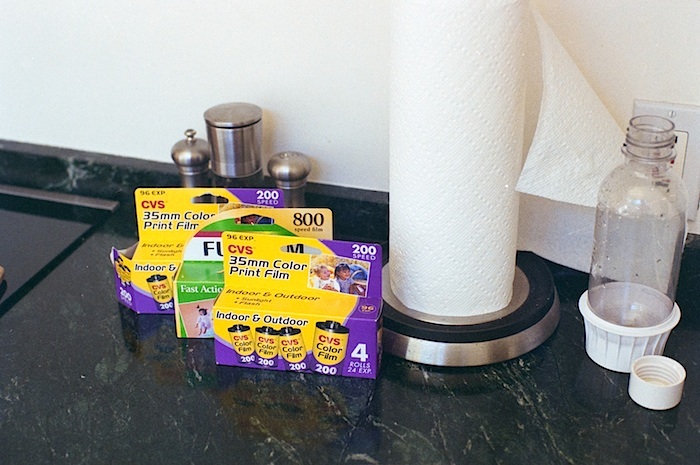
Second try: dial up the color filtration to push more blue through the orange mask. I found a setting of 0 Y, 60 M, and 110 Cyan on the Besseler filtration gave a fairly neutral set of color histograms on my D300. This RAW file was easier to process, I could restore neutral grays, highlights, and shadows, and the color seems about right. Here's a sample, from a 35mm frame of Fuji 200:

121020-D034486-0R-60G-110B-Color-Scr-An.jpg


Colors look about right to me in the film boxes, the wall, and the marble counter top. Magenta in the bottle is probably not right.

Anyone else doing this:
- DSLR as scanner
- Color filter on light source to put more blue into the RAW file
- Invert and color correct in Photoshop.

 
For C-41 - shoot RAW, convert to 48bit tiff, invert with Vuescan/ColorPerfect/NegFix...

Never tried it (not even scanning with DSLR), but don't see why it wouldn't work.
 
Simply shoot one frame 'blank' in a color roll, of a totally and evenly white wall or a bright light. That negative will only show the base color and if you set the white balance of the D800 to that, you're done with one simple action.

Why shoot the frame? You can take a white balance reading from blank film.
 
Back
Top Bottom