j j
Well-known
(can you find bad wet-mounting bubbles 😀)
No. Only a couple of good ones. After digital became so (potentially) perfect I came to appreciate process imperfections that would have annoyed me retro en diem.

(can you find bad wet-mounting bubbles 😀)
I'd actually recommend installing OS9 in the same machine and the correct OS9 SCSI drivers for your Adaptec card.

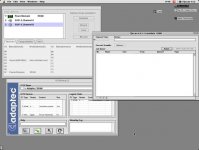
Scanner is visible under OS 9 ! Now don't know what to do - my drum has no bar code. I did preview scan but lamps does not work.
If it does rotate during boot it's a major sign it still at least partly lives. I'd try Adaptec under OS9 to be sure.
Yes, "ScanMate 11000" should show in System Profiler under SCSI/ Parallel SCSI / Power Domain XXX (XXX - your SCSI card model).
Since OSX can have its quirks with SCSI hardware I'd actually recommend installing OS9 in the same machine and the correct OS9 SCSI drivers for your Adaptec card. I've found OS9 can solve many questions about things running or not since it's a "simpler" OS so to speak. Under OS9 Adaptec drivers create "SCSI Probe" program - with this you can see the card you have connected and if you have the scanner connected onto this particular card. I.e. if it shows the correct SCSI card but no scanner then start messing with the SCSI cables, ID and terminators. If no card then it's the card issue. Etc etc, much better for fault-finding analysis than OSX.
You can keep OSX as well - just use Startup Disk function to boot into one or another.
Hope this helps,
Margus
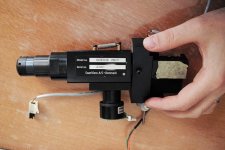
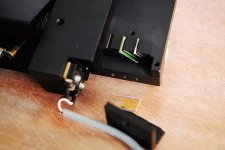
Can preview be stopped? How? I probably lost one of the dichroic filter (green) during opening - must double check. Two lamps looks ok but doesn't work. Will check power supply board.
For all 3 of my scanners, I am either using OSX in its various flavor due to software legacy that doesn't go beyond certain point.
At least for the latest software that was written for OS10.4.12 Tiger and Leopard for my Scitex & Imacon. Eventually most will become obsolete as scanners are no longer made.
Can I touch them?
Ten years ago I was interested in colorimetry, writing Photoshop plugins for inverting negatives etc. Do you remember that old discussion about image manipulation in linear vs. logarithmic domain? 😉
Lamps not working - contact were dirty 🙂 Have you tried install LEDs?
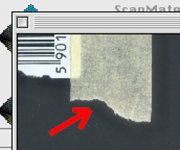
Two questions - do you have below shown halos around edges and how do you set focus on non barcoded drums?
I also have problem with preview - reflective original placed in the middle of a drum but preview shows one half on left and another half on right side.
First scan - Superia 200:
https://docs.google.com/file/d/0ByP8kkW_h00uN1pQRWRTTHQwWWs/edit?usp=sharing
http://www.youtube.com/watch?v=WZiBTWFDB0A
Will check focus later today.
Ok so come one day to Szczecin for a beer - this year we had Tall Ships' Races 2013 🙂
I've scanned in 16 bit TIFF and inverted in PS. 16 bit linear TIFF was written as 8 bit - don't know why 🙂 Negative has gamma 0.6 if I remember corectly so I inverted that but log curve is probably best (from linear RAW):
1) Linear RAW
2) White point on non exposed part
3) Log curve
4) Invert
5) White point (levels) manually
6) ICC profile for particular CCT (correlated color temperature) made on reflective target
Example:
https://docs.google.com/file/d/0ByP8kkW_h00udFc1ZDNVdVhhZFU/edit?usp=sharing
I have no focus target so what can I do?
Agree with all of this 🙂 When I first did negative scan in CQ image wasn't inverted and when I saved TIFF it was inverted and washed out. Don't know how to save pure linear raw file without power function applied.
I unlocked the file - this is a scan from Epson:
https://docs.google.com/file/d/0ByP8kkW_h00udFc1ZDNVdVhhZFU/edit?usp=sharing