IMO it's better in that way :
1) Convert RAW files in Epson Photo RAW
2) Save them as TIFF, Adobe RGB, 16bit, 6MP, 300 dpi
3) import it in Aperture to do any post-processing you might want
4) export it as TIFF, Adobe RGB, 16bit, 6MP, 300 dpi
5) Open them on Photoshop Elements 9
6) Use Perfect Resize 7 and set the desired printing size and the resolution to 200dpi
7) Send to lab for printing
+1
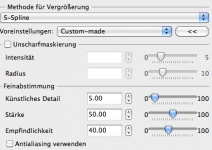
As an alternative you could use Photo Zoom Pro from Benvista. The most important key to get good results when upsizing is to choose the correct algorithm. I once had the chance to use a demo version of Photo Zoom. I tried a lot of settings and found one which, to my eyes, gave the most natural look (in fact, they were quite stunning). At first sight, all other tools I tried produced very good results at first sight. But looking closer they were a little bit too clinical and artificial with smooth lines, sharp edges etc. Attached is a screen shot with these settings (in german, sorry).
I'd use an enlargement of 200%, that helps the algorithm a bit. The correct scaling for the output is better done by Aperture, Lightroom or whatever. Also it's worth trying to do sharpening
after the re-import in Aperture. Sharpening introduces artifacts which would also be up upsized if it's done before.
And remember that optimal sharpening for print output is different from sharpening for screens. There are a lot of articles and tools with regard to sharpening for print in the web. Adding a little bit of grain (sic!) with for example Alien Exposure can also help to produce a good look.
The biggest size I can print is 13x19in. With ISO 200 it gives very good results, I'd say it's very usable for exhibition. Higher ISOs especially in BW can look beautiful too; probably due to the fact that many of us are still used to seeing grain in prints. Printing bigger touches the limits of the R-D1, the biggest one I have (made on a big Epson device) is 60x40cm, but it's still OK.
But the most important aspect is that you are exposing your pictures and the stories they tell, not megapixels. Most of the visitors won't be aware of the how-big-can-i-print-problem and if they are, I think they won't be interested. They come to see your pictures which are fantastic IMO and well deserve exposition, good luck!
PS:
Personl opinion: I'd stay away from the Epson RAW converter. It may produce nice and unique colors, but todays software like Aperture, Capture One and LR (which I use) are really ahead in all aspects (start the flamewars!
😉 ). As an example, I could never reproduce the claim that the Epson software reveals more details. Instead it tends to just look a little crispier by applying a default sharpening or higher contrast. Stay as long as you can in your favourite RAW converter and only escape to special tools if the converter hasn't a builtin equivalent at the same quality level.