Retina IIa problem ...

fredus

Well-known
Local time
10:37 AM
Joined
Apr 15, 2005
Messages
204
Location
San Jose, CA
Hi there,

I'm having some problem with the focusing mechanism of my Retina IIa. The lens move back and forth when I focus but when I look in the viewfinder, I don't have the double image anymore. It uses to work fine 1 week ago ... What could be wrong ? It actually focus and I can scale focus but I can't use the patch help anymore ...

Any clue?

Thanks !

Fred
 
Fred,

Make sure that you finger is not covering the small window on the front of your camera. Also look through the viewfinder at a dimly lit wall. Do you see the patch when you do.?

Tom
 
Is anything loose in the camera? Look around in the finder, at angles, to see if it drifted.

I'm going to open my IIa up soon, and will take pictures. The RF is off. I have to work myself up to getting the lever advance back on without it "popping" open. But there are online instructions. Make sure I have Dental Floss.

Always remember on the folding Retina's to move the lens to infinity before closing.
 
The lubricant around the actuating mechanism can get very stiff and slow or even stop the mechanism from working. Try to find Chris Sherlock's site. He has really good information about Retinas and repairs.
 
Brian Sweeney said:
I'm going to open my IIa up soon, and will take pictures.

You may want to channel George Mrus before you start... :angel:

I pretty much retired my Retinas from daily carry and use when George died. They still get used, but I don't want to risk breaking anything.
 
I was waiting to hear back from George Mrus and got the Email from his daughter of his passing. That was a few years back. I have a box of spare Retina Parts, so I keep mine going.

On the IIa: Do you mean that the image stopped moving with the focus, or that the secondary image disappeared completely. The former, not moving, can be fixed by removing the top and cleaning/lubing the mechanism. I've done that. The image completely vanishing: the RF prism is WAY off.
 
Brian Sweeney said:
I was waiting to hear back from George Mrus and got the Email from his daughter of his passing. That was a few years back. I have a box of spare Retina Parts, so I keep mine going.

On the IIa: Do you mean that the image stopped moving with the focus, or that the secondary image disappeared completely. The former, not moving, can be fixed by removing the top and cleaning/lubing the mechanism. I've done that. The image completely vanishing: the RF prism is WAY off.

Yup first case for me. The image stopped moving with the focus. I'm trying to remove the top but I have difficulty removing the lever. .. I don't have the right tool to unscrew the pin-head screw in the center of the rewind lever ! Any suggestions as what I could use ?

Fred
 
Use very stiff tweezers or needle-node pliers that have fine enough tips to fit into the holes. File if you need to. I put some tape over the counter mechanism to keep it together. There are a bunch of parts, and they are no fun to get back together. When you put it back on, I use dental floss to hold the pin back while you put the film advance lever back on. If you do not do it right, the mechanism that prevents it from winding at "1" will engage and not let go.
 
Ok, it's been removed ... what kind of grease could you recommand ? I'm going to long drug in about an hour ... Or I could head home depot ...

Thanks for your help ! This is fun !

fred
 
Ok, my rangefinder problem is solved !! Lubricated everything and adjusted the rangefinder. Great.

Now some other problem ... I want to lubricate the focus mechanism, following thse instruction: http://homepages.ihug.co.nz/~Srawhiti/retinafocusmechanism.html

First, I don't know how to remove the rear element. Second I don't know what knotch is is talking about, even with the pictures ... I know, I'm hopeless .. 🙂

Could someone help ?? How to I remove the rear element ? Does it unscrew ? Should I turn it with something ?

Thanks 1

Fred
 
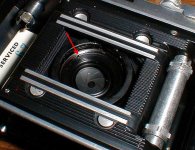
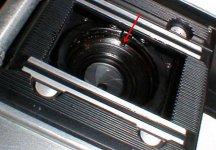
Open the back of the camera. The rear element is removed by rotating counter clockwise using the two notches in the metal collar. the first picture has a red arrow pointing to one of the notches. The unscrew the retaining ring the same way. The second picture has a red arrow pointing to one of the notches in the retaining ring.
 

Attachments

  • P1010002.JPG
    P1010002.JPG
    83.7 KB · Views: 0
  • P1010001.JPG
    P1010001.JPG
    73 KB · Views: 0
Last edited:
Well I was able to remove the retaining ring and the rear element. But the focus mechanism doesn't budge ... How do I remove it ? On the link it says from the front of the camera ... But it doesn't budge :-(
 
Back
Top Bottom