
Scanner Issue

W

wlewisiii

Guest
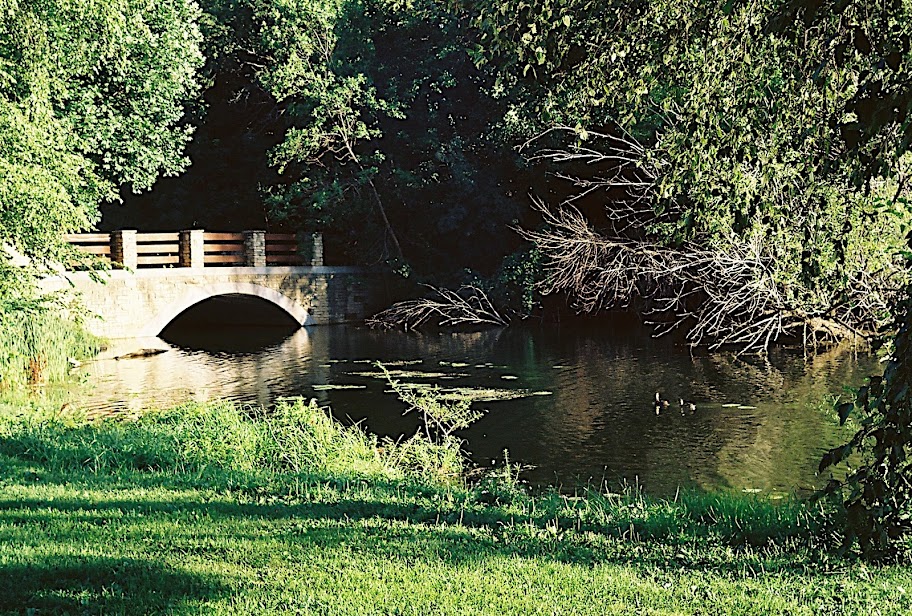
I've been having problems with oversharpening in my Walgreen scans. OTOH I've also been wondering about possible cause of the problem. Without going into detail yet, would you tell me which image version looks better to you?

1)
R1-36A.jpg


2)
R1-36A.jpg


There's a distinct difference to my eyes but is it real?

Thanks,

William
 
Hard to see a difference. Something doesn't look right with both of them though.

Never got good scans from Walgreens. Do it myself with my $175 Epson V500. I think its paid for itself by now.
 
The 2nd image is obviously less over-sharpened.

But both have over-exposed highlights around the stone bridge area; I'm not certain if this is related to the scan, or if the film was over-exposed (or related to C-41 developement?)

A home scanner might not be a bad investment.

~Joe
 
The second image seems to have less sharpening applied and looks better. Both images seem too bright which, at least in my experience, is common with automatic scans done at places like Walgreens, CVS, Walmart, Costco, etc.
 
William, two things.

First you can seldom have it both ways so you take your pick; expose for the lights or expose for the darks. Middle ground will always punish the shot. I'm thinking you exposed for the darks so it looks good to me.

Second, the lower image looks better. I'm assuming it's not sharpened. I might try and set a grey point here to see if I could manage the light/dark dilemma but the image is fine.

Since you haven't really disclosed your motive, only the question I can't go much further.
 
Jan, the hightlights issues is more a matter of exposure than anything. I was trying to bring more of the darks out when I made the image.

The question to me tonight is about the sharpening. I have been having trouble with the cheap cd from the drug store but do not have the finances right now to buy a scanner. It isn't going to happen so I need to make the best of what I can get. That said, both of these images are the same file on my computer. The first one was uploaded by iPhoto using it's "scale for better quality option" the second is using the "acutal size" option. It appears that the scaling compression is causing the degradation of the images that I have been blaming solely on the scanning.

Now, neither my exposure technique or their scanners are going to be 100% to put it nicely, but the images don't need the additional misfortune of added compression artifacts as well.

Thank you for taking the time to look, I appreciate it.

William
 
William ask around for an old copy of PSE2, it's usually free with scanners for the last 4-5 years. It has just about all the basic 'tools' that you need for manipulation of the drug store scans. Then check out youtube for a few demos on using PS.
 
Thanks for the pointer - I'll look for a copy. Also I have a line on a 2nd hand Epson 3170 which would be a step in the right direction as well.

William
 
I agree that the second is less {vulgar term for child of unwed parents}-ized. 🙂

I've had similar issues on shots of greenery scanned at Walgreens. I've found that the Walgreens which use the Fuji Frontier appear to have less oversharpening than the Walgreens which use the Noritsu, but YMMV.
 
Back
Top Bottom