cbass
Nutmegger
(Not sure if this should be posted in "Repair Notes"; Joe & moderators -- feel free to move this post).
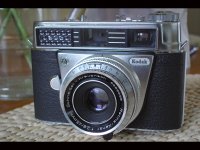
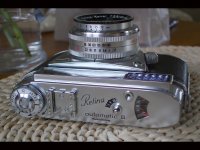
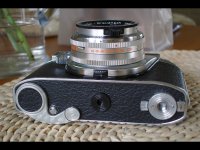
Yesterday I was given a Kodak Retina III Automatic rangefinder that once belonged to a close family friend. All the mechanicals work (even the selenium meter) and she's a real beauty on the outside.
The only flaw I can find is that the aperture blades do not stop down properly. For example, with the camera back opened and the aperture set to 8.0 and shutter to "B" I can see the blades hesitate a moment before stopping down. I'm guessing this problem is due to dust and grit gumming up the blades; likely from prolonged storage.
My questions are: can I use a point spanner to unscrew any of the lens elements? If so, how do I know how far to re-insert them? I think I could get this old chrome sweetheart working properly if only I could swab the blades with a little Ronsonol.
I'm a Bessa man myself so I went to Google turned up some info about the Retina Automatic III. It was built in Germany by Nagel Camerawerks between 1960-1963. Over 77,000 units were made, making it the most common non-folding Retina. Shutter-priority AE with manual override. Several quirky features like front shutter release, bottom wind and easily the most awful frame counter I have ever seen 😱 !
I realize this isn't a high-value camera but it's still nicely built and attractive and I'd hate to see her relegated to Shelf Queen status. Any help from RFF members greatly appreciated. Thanks in advance!
Yesterday I was given a Kodak Retina III Automatic rangefinder that once belonged to a close family friend. All the mechanicals work (even the selenium meter) and she's a real beauty on the outside.
The only flaw I can find is that the aperture blades do not stop down properly. For example, with the camera back opened and the aperture set to 8.0 and shutter to "B" I can see the blades hesitate a moment before stopping down. I'm guessing this problem is due to dust and grit gumming up the blades; likely from prolonged storage.
My questions are: can I use a point spanner to unscrew any of the lens elements? If so, how do I know how far to re-insert them? I think I could get this old chrome sweetheart working properly if only I could swab the blades with a little Ronsonol.
I'm a Bessa man myself so I went to Google turned up some info about the Retina Automatic III. It was built in Germany by Nagel Camerawerks between 1960-1963. Over 77,000 units were made, making it the most common non-folding Retina. Shutter-priority AE with manual override. Several quirky features like front shutter release, bottom wind and easily the most awful frame counter I have ever seen 😱 !
I realize this isn't a high-value camera but it's still nicely built and attractive and I'd hate to see her relegated to Shelf Queen status. Any help from RFF members greatly appreciated. Thanks in advance!