Show us your digital M black and white conversions.

Choice of B+W method depends, sometimes direct C1 conversion works:
4163624885_60cf77df45.jpg


C1 and then Silver Efex is nice, too:
4448005489_fe75e3e31e.jpg


4274222485_66e683427a.jpg


Because color variation translates into tonal quality, LAB color mode in PS can be very useful. Dan Margulis wrote an excellent book on this topic. For this one, I used LAB color curves treatment, then B+W from RGB channels
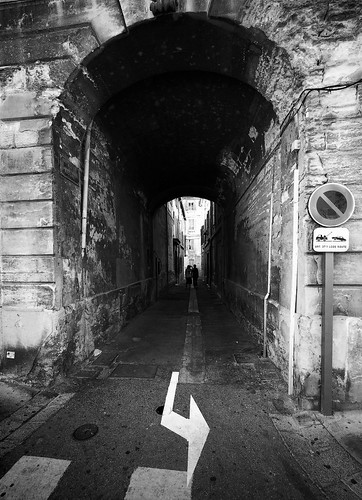
4191052804_94599a38bf.jpg


Time consuming, but very powerful is working with channels, masking, for perfect control of tonality. See http://www.thelightsrightstudio.com/TLRSplitChannels.htm

http://www.carstenranke.com
 
I really like Silver Efex Pro, after basic processing in Lightroom. Good control of shadows and highlights, and excellent dodge and burn controls. Lots of film simulations, which I primarily use to experiment with a 'look.' One example from London with Delta 100:

U1632I1269300468.SEQ.0.jpg


Kirk
 
Thanks for all the images so far and good if we can keep them coming.

It's quite a useful resource to be able to look at a particular black and white conversion and know how it was processed! 🙂
 
Last edited:
An interesting thread, especially for me as I tend to convert my DNG files in Lightroom and simply dodge and burn the resulting 16bit Tiff in PS.

It looks like there is so much more that I could do to bring my b/w conversions to life. If I may add a request it would be that any additional info around the programmes used would be hugely helpful.

When I'm back at home I'll try and add some of mine, perhaps I could benefit from the advice, knowledge and experience of others on this issue.

Some lovely images in this thread too!
 
Here are two completly different post processed B/W by me :

Pushed for the contrat, highlighting the proesters :

4374339966_3d194fbb65_o.jpg


Quite different very gritty, half toned, dark looking post processing :

4168859365_f0575e3315_o.jpg


And a BIG panorama taken with my M8 : original file is around 24,000 pixels long, just desaturated, adjusted contrast and then joined the files in CS4 :

4169574678_cf54336322_o.jpg


I've tried lot of converters, plug ins, B/W this and that but in the end I love the simplicity of Lightroom and its channel mixxer : 99% of my black and white conversions are made there ( all three above were ) and I see no reason to change. Hope you like it
 
Before getting into "Raw Photo Processor", which does very delicate conversions, I was using the PShop colour channels as a filter. This is an M8.2/24Elmarit shot which relies on tweaking the yellows.

lemonsDarker.jpg
 
Just to compare with conversion above, here are the same two lemons shot on 8x10 TMY with 85B filter. (I use 8x10 as back-up for the Leica, just incase I need to do an 'alt' contact print)
twolemons02.jpg
 
Last edited:
...It's quite a useful resource to be able to look at a particular black and white conversion and know how it was processed! 🙂
It seems to me that there are many ways to get to the result that one wants. First is the choice of raw convertor, which can provide different results for sharpening, clarity and highlight and shadow recovery. Then, there's the conversion from colour to B&W, for which one can achieve the same results in many different ways. For example, I used to use LightZone and now use Silver Efex. There isn't really a Silver Efex "look": one can start with any of the various "film presets", but then customize the parameters of that preset for the colour sensitivity, contrast or gradation, brightness and grain simulation that one wants in a very wide range to get almost any look that one wants.

—Mitch/Manila
Barrier Series
 
real good images in this thread and something to think about:if I'll go to M9 from my M7 and desire to make B&W there is a lot to learn and try and make experience about ....
robert
 
real good images in this thread and something to think about:if I'll go to M9 from my M7 and desire to make B&W there is a lot to learn and try and make experience about ....
robert

Do you think these images look different from those you would get with your M7 and, if so, in what way?
 
@ lawrence: good question, I think the hybrid process I use (m7-5000ed-hp9180b) can give satisfying results. If my pictures are not so good as the ones in this post it is my fault not related to the gear itself. But I'm concern for the future of this process: the weak point is for me scanning: new operative systems not supported by nikon could make difficult to scan. Film I can easily find (untill now) but chemicals are already more difficult and the choice is more limited. For this reason I start to look into digital alternative, at least trying to learn something. I love film (and m7) but I have some doubts. Anyway at the end I print a digital file, so maybe time to learn something more...
robert
PS (post scriptum, not PhotoShop!) = just to mention, in my fotoclub I'm the only one still shooting film (the ratio is 1:50 people!).
 
Last edited:
Back
Top Bottom