Skin tones in b&w

Stu W

Well-known
Local time
10:26 AM
Joined
Sep 18, 2005
Messages
680
Location
Brooklyn, New York
I can't seem to get really contrasty skin tones. I love pics that I've seen where every wrinkle and shadow are so well defined. I'm sure some are studio shots, with tight control of lighting, but many have been street shots. My worse attempts have been on people of color. It seems that everything just comes out grey, and light skin people all look pasty. Landscapes are no problem with me-a green or red filter and beautiful contrasty skies and clouds. I shoot c41 b&w and tmax400. What am I doing wrong. Stu
 
Last edited:
Stu,

I am not exactly sure what you are wanting your photos to look like. Can you post samples of your "grey" shots? Are you printing out on B&W paper from an enlarger or looking at scans of your work?

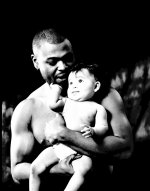
Here are two people shots that I have done. The first one of mother daughter is on XP-2 which is a C-41 film and the second of the father daughter is on T-Max 100.

Do these shots have the contrast that you are looking for?

Wayne
 

Attachments

  • Jackie 14.jpg
    Jackie 14.jpg
    169.3 KB · Views: 0
  • Lester Washington 1 rff.jpg
    Lester Washington 1 rff.jpg
    177.6 KB · Views: 0
Last edited:
I am without scanner right now, but I'll try to use my neighbors. For example, I shot a roll at a jazz club, using available light and a fast lens. The pics looked nothing like I expected them to. Skin looked pasty, shadow details gone, and no blacks. I'm sorry if I'm not giving an accurate enough description. I know posting the pics would help. Stu
 
use a contrast filter on your enlarger. Problem solved. I normally go as harsh as a factor 5 magenta filter! Alternatively, use curves and levels on photoshop. I'm all for low contrast high detail negs. Allows me to control the contrast and have an option of the details i want to retain
 
The roll at the Jazz club sounds like you did not give it enough exposure. Usually shadows with no detail and an overall grey look means an underexposed neg.
 
At a club, meter on the face and open up 1 stop, maybe 1-1/3. If there is no detail in the skin, then it is either film processing (or filtration) for b&w, or printing if it is colour.

If b&w, how are you developing the film.
 
That's the trouble with shooting people, is that to get smooth skin, you need lighting that washes out tone and character, and to get tone and character, you need lighting that kills the smoothness.

Using point source lighting helps. So does shooting with films like plus-x. More than anything, it takes careful development of the negs (most labs are pretty innaccurate in my area) and careful lighting to get lots of character in the skin. All I've ever worked with are young girls with perfect skin. Except my friend's mom, but hey.
 
Stu W said:
I can't seem to get really contrasty skin tones. I love pics that I've seen where every wrinkle and shadow are so well defined. . Stu

Not sure if I understand you right. Sounds like lost details in a too bright face ?An example would help indeed. Especially the C41 B&W tend to blown out details in the face, if you shoot portrait in bright and direct light.
Try to shoot in the shade or half shade ( under a tree for example) with more diffuse light, or under a covered sky as a test, and meter on the face, or better, take an incident reading !

This is Kodak C41B&W, click on "view original" below the pic to see a better quality, the scan is poor.

http://www.pgallery.net/image-download/bertram/i_k_f_portrait-48257.jpg?view
 
A lot of older books on photography recommend using a blue [on camera] filter to emphasise skin texture, irregularities and so on. Yet I assume this would only work on lighter skinned people. The same sources recommend a green filter for people of colour. It could be worth an experiment or two.

Cheers, Ian
 
Last edited:
Well, just use the filter principles...a blue filter will make red things darker, so that big zit on the tip of the teenagers nose will be dark and noticeable with a blue filter, while a red filter will lighten it, making it less apparent. One of the best filters for portraiture is yellow-green.
 
I have both B+W and Heliopan booklets. Their filters only describe skin tones for white people.

I have a similar problem with shooting darker skinned Iranians. I usually avoid these German filters altogether.
 
When I did my own developing and used XP5 and TMax I kept yellow filters constantly on the lenses -- seemed to improve dark-skinned people, light-skinned people and just about everything else, such as bringing out details in the sky, even European overcast.
 
In available light situations it might be an idea trying different films.

Skin tones can become somewhat flattened if susceptibility in the red part of the spectrum is high - that is the case in most films recommended for available light as both the sun in the evening and the bulbs at night are lying in the red part. These films are flat curved and tend to be low in contrast.

In clubs, I have nevertheless made good shots with such a film, (cheap) Classic Pan 400 by J&C / Fotoimpex.

http://www.jandcphoto.com/index.asp?PageAction=VIEWCATS&Category=54

First (at ISO 400), I was disappointed by the flat skin tones and the overall low contrast. When I pushed the film to ISO 800, the results were good and not too grainy at all, rather with a "vintage" touch.

I know that this is somewhat contradictory to FrankS's recommendation, and I have no darkroom experience, but for an amateur my results seemed ok.

Filters do not seem an alternative to me as too much light gets lost for available light situations, IMHO.

So try different films, perhaps in one situation with two camera bodies in order to have direct comparison.

Jesko

______________

Minox 35 GL, Leica III: 2/5 Summar, Contax II: 1.5/5 Sonnar + 2.8/3.5 Biogon + Tessar 4/13.5, Taxona, Ikoflex I, ICA Ideal 111, Nettar 515/2, Contessa LKE

2006 AD
800 yrs Dresden
80 yrs Zeiss Ikon

...and Frauenkirche rebuilt
http://www.frauenkirche-dresden.org/

 
StuartR said:
Well, just use the filter principles...a blue filter will make red things darker, so that big zit on the tip of the teenagers nose will be dark and noticeable with a blue filter, while a red filter will lighten it, making it less apparent. One of the best filters for portraiture is yellow-green.

I agree - yellow-green filters are really good for skin tones. As for capturing detail - I spot meter skin and open 1 stop if I want to keep detail and go +2 to get creamy skin tones (for white folks).
 
Another vote here for yellow-green. It's a great filter all around -
More natural skin tones, foliage and increased contrast in skies.

X0 is my favorite filter; I have one in every size my cameras use.

"Excelsior, you fathead!"
-Chris-
 
Maybe worth mentioning that shooting in yellowish artificial light is rather like shooting with a yellow filter in daylight, and will have a similar smoothing effect on skin tones light and dark. Lipstick will look lighter and eye-shadow darker.

Also, a film with higher red-sensitivity emphasizes this effect in any light... For example Ilford XP2 has noticeably higher red-sensitivity than Tri-X. Films with very low red-sensitivity such as the old orthorchromatic films have just the opposite effect.

Green filters have traditionally been suggested for portraiture of men, to lend a more "rugged" look to the skin tones.
 
I have some Ilford Ortho film in 4x5 in my freezer that I am holding out to use when I can get some woman to sit down in front of the camera and put on some red lipstick. I really want to try the old hollywood black lipstick look that came from the old ortho films.
 
That could be fun, Stuart! And that reminds me black makeup products seem to be popular among the "gothic" crowd these days... might be some interesting uses photographically.
 
Back
Top Bottom