dear Ajishc,
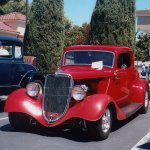
what I applied to your photo is rather basic. I'm using GIMP which is a kind of free Photoshop.
First the graphs : with any photo software, you can have a graph with curves for light/shadows, red blue and green. The upper part of the curve is for high lights and the lower part is for the shadows.
You can tune the overall brightness of the picture by moving the center of the picture till you like the result. Then you click on a part of the image and you'll have a line on the graph showing what part of the curve is concerned. For example if you click on the tyre of the car, you'll have a line on the lower part of the curve indicated where you have to move it so that you can brighten or darken that part.
What I did for the hot rod is that I slightly moved down the middle of the curve and the picture got a bit darker
As I said before you also have curves for red blue and green.
At last, you have an option for "brightness/saturation of the colours". You can tune the brightness of each principal colour, and its saturation : I made the red a bit darker and more saturated, as well as the blue.
Of course it takes time before you manage correctly with the curves and I'm far from being an expert. Try at first with b&w pictures since of course it's easier than with colour (different in any case), try everything you can, move all the curves to see the effects, erase and start again!
Good luck and (most important) have fun!
Stéphane