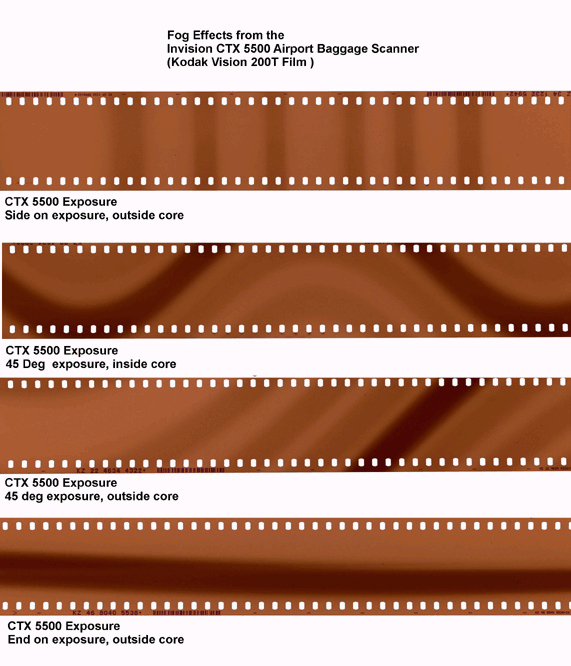
the ugly effect airports have on film

ElectroWNED

Well-known
Local time
12:49 AM
Joined
Jan 15, 2007
Messages
485
Location
New York
http://www.flickr.com/photos/82365188@N00/

the first five are the photos I spoke about before. The one with the mirrors was also screwed up (as you can tell from the corners), but I cropped it to be somewhat acceptable.

Although the xray or Ritz screwed up the shots, you can tell that the camera is very sharp.

I have another roll of Superia about to be developed, and then I will start with the XP2 I have.

turned out it was the camera, not Ritz or the x-rays.
 
Last edited:
okay, here are some of the photos:

270156780f1b23f2f639fe27a465bee5a46f420.jpg


27015659251ebae11cc75edf005ba0f6ab473d9.jpg


2701564f7c130ab2cc9999d7381257ffc661ee6.jpg
 
nope, they were interspersed throughout the roll. The only puzzling thing is: about 5 of the 24 shots can out 100% perfect.

Could it be that Ritz f'ed it up? And I'm assuming this can't be fixed, as the negatives show all these defects as well.
 
Eek, that looks horrible. Are those frames at the beginning/end of the roll(s) by chance? I've seen that happen on those frames especially, due to developing errors. X-ray machines shouldn't do that (unless maybe it was in your checked luggage?)

that could have been x-ray fogging, depending out what kind of x-ray device was used...but it could have easily been ritz especially if those frames were at the beginning or end of the roll (they tend to pull the leader out too far on occasion)
 

Attachments

  • tib5201h.jpg
    tib5201h.jpg
    12.5 KB · Views: 0
I recently had what I'm supposing was x-ray damage to some HP5, from the carry-on scanner (scanned 2x, Boston MA & Oakland CA). Appeared only on the tail of the films near the spool. I can't put it down to anything else- only the films I brought on the trip were affected, others from the same brick are fine- various bodies, several developing tanks, same fog at the end.
(yeah, I'm that anal about my film- I keep track of it that much)
 
That could be X-ray damage. Did you put the film through checked luggage or carry it on the plane? What kind of film was it, and what was the camera?

It could also be a faulty light seal in the camera. Worn light seals will produce intermittent fog, because it depends on how long the film stayed in one position before being advanced and how much light fell on the area where the light leak is and what the angle of the light was.
 
I had my film from a recent trip to Europe go through 7 carry on luggage scanners. But I had my film in X-Ray bags which I think really helped out as there was no discernible damage to the negatives after development.
 
camera: Electro 35, film Superia, carried on through Newark and Hamburg airports.

I have shot other rolls and had them developed at Walmart and they all come out perfect. No light leaks, nothing.

I don't really have the option of having somebody else (locally) develop the 3 other rolls that were shot in Europe. Only Ritz develops HP5.
 
I have run film through airport scanners without getting any problems in the exposures. These marks look like light leaks in the camera, or gross carelessness in the developing of the film.

Now... what ISO was this film? Supposedly, you shouldn't run anything faster than ISO 400 through a scanner. And the ones used to scan luggage DO cause fogging in film. Did you leave them in your luggage or carried them in your hand piece?
 
these two color shots were developed at walmart (the entire roll came out perfect, but it didn't travel overseas. these shots were taken AFTER the Europe trip):

270192806b9be6e1f7138d29f16544d06b77c6b.jpg


27019271a692ba2b04ca9fb526c576fb53ffff3.jpg


This shot came from a roll of HP5 developed at Ritz (90% of the roll had what looked like light leaks, but it never passed through the airports. this shot was from BEFORE the Europe trip):
2701926110ee4616f449264aa4b0e02bd65fc3c.jpg
 
Electro, take your HP5 film to Walmart and put it in the envelopes of the film they send out for developing. Just write in the "Special Instructions" section that this is Black and White film, not C-41. They send it out and it takes forever, but it's far preferable than giving it to the Ritz people.

That, or visit Dwayne's Lab and click on the Services tab. That'll allow you to download and print the order form to send them your B&W film. Pricy, yes, but it's a professional lab and they won't mess up with the negs. If these are photos from a trip, I'd handle them carefully.

BTW, I have always sent them my travel photos.

Good luck! 🙂
 
Electro, take your HP5 film to Walmart and put it in the envelopes of the film they send out for developing. Just write in the "Special Instructions" section that this is Black and White film, not C-41. They send it out and it takes forever, but it's far preferable than giving it to the Ritz people.

That, or visit Dwayne's Lab and click on the Services tab. That'll allow you to download and print the order form to send them your B&W film. Pricy, yes, but it's a professional lab and they won't mess up with the negs. If these are photos from a trip, I'd handle them carefully.

BTW, I have always sent them my travel photos.

Good luck! 🙂

I didn't know that Walmart could do HP5 (even sending it out). I might give them one roll and see how it comes out. Nevertheless, I'm never going back to Ritz (moved to XP2 for Walmart C-41).
 
If that's the case, give your roll of C-41 to the Walmart people in the Photo section (if they still do film in the house). Leave your B&W in the envelope. Now, if they no longer develop film in one hour, then send it out. They have contracts with large professional labs that won't foul up your film, and the cost is very reasonable.
 
Back
Top Bottom