dufffader
Leicanaut/Nikonaut...
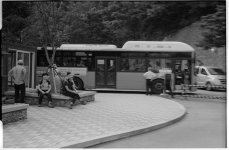
Processed a roll from a newly purchased Canon F1 (old) SLR and I've got about 3 frames out of 36 with this look. The left side of the frame looks ok, while the right half has double exposure.
Its not the scanner, I first scanned this with a KM5400II and later with a Epson X970 and I get the same image.
Now, the F1 has a metal shutter that slides sideways, like a Leica M. It goes from right to left when I'm looking at the shutter with the back opened. Since the double image appears on the right half of the image, physically it should be on the left when the film is still in the camera, which brings me to think that it has to do with vibration when the shutter is closing. Or poor technique on my part. The second image always shifts sideways, never vertically. By the way, I don't have this issue with rangefinders.
I'm just wondering if I'm shooting at 1/125s on a 50mm lens most of the time, if it is possible to have a coincidental 3 frames where double image appears only one half of the image. Any speculation on what could have happened?
Sorry but the forum doesn't seem to allow me to upload images more than 600px across.

Its not the scanner, I first scanned this with a KM5400II and later with a Epson X970 and I get the same image.
Now, the F1 has a metal shutter that slides sideways, like a Leica M. It goes from right to left when I'm looking at the shutter with the back opened. Since the double image appears on the right half of the image, physically it should be on the left when the film is still in the camera, which brings me to think that it has to do with vibration when the shutter is closing. Or poor technique on my part. The second image always shifts sideways, never vertically. By the way, I don't have this issue with rangefinders.
I'm just wondering if I'm shooting at 1/125s on a 50mm lens most of the time, if it is possible to have a coincidental 3 frames where double image appears only one half of the image. Any speculation on what could have happened?
Sorry but the forum doesn't seem to allow me to upload images more than 600px across.