mfogiel
Veteran
I had to upgrade my old IMac to a Mac Mini with Yosemite. I was nervous about the compatibility of my scanner (CS 9000), photoshop (CS3) and printer (R2400 substituted now by 3880). Here are the results:
- the scanner works - I have installed the last version of Vuescan, and everything went more or less smoothly on that side
- CS3 works - I am not a PS maverick, but all the basic functions work as before
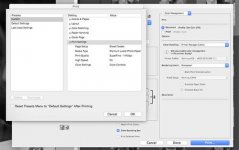
- the printers don't work - or better: I only print in B&W in ABW mode, and for this you need to be able to set things correctly in the print settings dialog box. The problem is, that I cannot access the menus where you select ABW and all that is necessary do the fine tuning of other parameters like toning, amount of ink, etc.
At first I thought it was the problem with R2400 being too old, but now with the brand new 3880 the problem repeats itself. Now, I need to understand where is the obstacle: in the Epson drivers, or in incompatibility of Yosemite with CS3?
I would be most grateful for ideas on how to solve this.
Thanks
Marek
- the scanner works - I have installed the last version of Vuescan, and everything went more or less smoothly on that side
- CS3 works - I am not a PS maverick, but all the basic functions work as before
- the printers don't work - or better: I only print in B&W in ABW mode, and for this you need to be able to set things correctly in the print settings dialog box. The problem is, that I cannot access the menus where you select ABW and all that is necessary do the fine tuning of other parameters like toning, amount of ink, etc.
At first I thought it was the problem with R2400 being too old, but now with the brand new 3880 the problem repeats itself. Now, I need to understand where is the obstacle: in the Epson drivers, or in incompatibility of Yosemite with CS3?
I would be most grateful for ideas on how to solve this.
Thanks
Marek