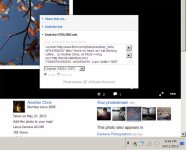
Flickr HTML/BBCode

tomtofa

Well-known
Local time
4:38 AM
Joined
Nov 12, 2009
Messages
1,162
They seem to have changed the BB/HTML code for posting images, at least on my account tonight.

It used to be a url]
[/url phrase, now it's an <a href>xxx</a> link, which doesn't imbed the picture here, but rather just presents the code.

I changed it to the old version on a couple I just posted to the X100 forum, and that works, but I wonder what's going on there.
 
My account defaulted to a different code yesterday too.
Later on all uploads were disabled.
I checked on Flickrs help site and it seemed to be a universal problem.
Maybe maintenance , who knows.
Seems to be back to normal today.
 
My account defaulted to a different code yesterday too.
Later on all uploads were disabled.
I checked on Flickrs help site and it seemed to be a universal problem.
Maybe maintenance , who knows.
Seems to be back to normal today.

Ditto and today the entire site was offline for a while
 
I can't find the BBCode anymore on flickr. I do have the option for a link which begins http, and another sharing option that begins <a href="http://www. etc etc but neither works. I tried the http link in between the square bracket IMG codes but still nothing. There are no radio buttons any more. I used to be able to grab the BBcode and just paste it here. What's the way to get a picture from flickr now?
 
I'm using Mozilla, but I think this works in other browsers too. Display the flickr image you want (click once on the image in the multi-image panel). Right click over the image - select the size you want to display. That should display the image on the "Photo / All Sizes" page. Then right click again and select "Copy image location". That copies the URL into the copy/paste buffer.

Then inside the post, type [ i m g ] (without the spaces) right click and select "Paste", the type [ / i m g ] again without the spaces.

eg [ i m g ] h t t p://farm8.staticflickr.com/7296/8764392633_a853ec46ed_z.jpg [ / i m g ]

gives

8764392633_a853ec46ed_z.jpg


There is a way to get to the old BB code (with the attribution and photo name) but the link icon doesn't display in Firefox for me! It is there however if I click in the right place! In IE the link icon is a small square with an arrow pointing out of it (just to the right of the thought bubble, at bottom right).
 

Attachments

  • Untitled-1.jpg
    Untitled-1.jpg
    78 KB · Views: 0
This is technically an option but you should know that this is against the flickr terms of use. If you embed a photo from the flickr site you have to provide a backlink to the photo on flickr. This is easily done with the flickr bbcode.


Agreed - but why have they made it so hard to find this lately? The BB code was missing from this "Share" link the last time I tried several days ago. It just gave a bunch of links to other social media sites. And why won't the link icon display at all in Firefox, when the other link icons display ok?
 
I read somewhere else that an active ad-blocker is the reason why this icon is black on black on firefox.

Flickr is somehow in a constant beta-state at the moment so maybe the link wasn't there at that time. When I looked at it, I found the right share options in my photo stream but not for other photos. Now I find all share options on every photo again.

OK - disabled my ad-blocker and I can see the share icon again. Thanks! Is that Flickr's way of punishing people who use an ad-blocker?
 
I use Safari (7.0) and share button doesn't work (with or without adblock). If I change to new flickr style, share button works but the popup with sharing options is partially obstructed by the picture on the left so it's basically nonfunctional (I can't see and select different sharing options).

I thought flickr would fix large majority of bugs in a month after a redesign, but half a year later they are just introducing new bugs. I don't think I've ever seen a web site with more bugs.
 
I think this is a browser issue or possibly an aggressive ad blocker, it works just as it always did in Safari 5, Omniweb and Firefox on my Mac so I doubt it's a Flickr issue.


overstrand2 by Photo Utopia, on Flickr

I can't see any changes to the way it works so it's probably not Flickr–have there been browser updates recently?
I know some people have reported problems with IE10 and 11 and have to use compatibility view.

Most issues here sound like browser rendering, both IE and the new versions of Safari (Mavericks) seem to be the worst.
 
Most issues here sound like browser rendering, both IE and the new versions of Safari (Mavericks) seem to be the worst.

Negative. It used to work in Mavericks (Safari 7.0). Chrome also has a problem with the new (for the moment still optional) picture view layout. Sharing popup menu is obstructed, a bit less than in Safari, but still...
 
Its the new trial flicker photoviewer that is the problem, just revert back to the old version. They hadn't enabled bbcode on the new version yet last time I checked.
 
Its the new trial flicker photoviewer that is the problem, just revert back to the old version. They hadn't enabled bbcode on the new version yet last time I checked.

Yeah, I wish that would work...

I use Safari (7.0) and share button doesn't work (with or without adblock). If I change to new flickr style, share button works but the popup with sharing options is partially obstructed by the picture on the left so it's basically nonfunctional (I can't see and select different sharing options).
 
What I get from flickr Share on an iPad with iOS 7 and Safari appears to be a back link, photo name, and attribution. HTML and BBcode radio buttons and photo size drop down show in the Grab HTML/BBcode window. Did no editing of the BBcode, just Select All, Copy, and then Paste to the RFf image post window. Photo does not display, just the link. I assume this meets flickr's terms.

With no mouse or external keyboard on the iPad, editing the code would be awkward but probably doable.

The links, which I have edited out now, are more than I'm comfortable listing.
 
Last edited:
Here is the new dialog

Here is the new dialog

8Capture.JPG


with Firefox 25x

Get to same place with Flickr Preview that had the options under the photo... (now on the Right Sidebar)

Here is the new look, on the right sidebar is the SAME share symbol as before (box with an arrow)

Click on it
now click on the </> for HTML Code
Click one the Thumb Tack for BBC code
Pick you size you want to embed. (this will also select the embed info to copy)
Copy/Paste code in a Replay.

Hope this helps.
 
Back
Top Bottom