mercury battery adaptors

Thank you for this, Chris!

So to recap, there are 2 dodes in series, with the black stripe ends towards the battery?

EDIT: this recap is incorrect. See Chris' explanation below.
 
Last edited:
FrankS said:
Thank you for this, Chris!

So to recap, there are 2 dodes in series, with the black stripe ends towards the battery?


That depends on which diode you get. Your meter has two batteries. To reduce two batteries to the required voltage, you need either two of the BAT83 Schottky diodes, or one of the 1N4148 silicon diodes.

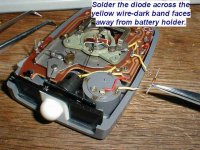
And in mine the black stripe is at the end away from the battery.
 
John Robertson said:
I was advised by local camera store that the equivalent battery to the recommended 386 was the SR 44. IT IS NOT!!! the SR44 battery is 1.1mm thicker than a 386. the correct equivalent is a SR43W.
John thanks and duly noted.
 
ChrisN,

You are... THE MAN! Thanks for posting the helpful instructions. I need to make a quick trip to Radio Shack where I can pick up the SR44 batteries, 1N4148 silicon diode, and small heat shrink tubing for a few dollars.

How did you adapt your Silver Oxide batteries to fit in the large diameter chamber of the Luna Six?

I will try and post photos as well once I my Luna Pro arrives. I should be completing this project during the weekend.
 
Last edited:
I wasn't sure why this thread had so many posts until I read it through to ChrisN's diode installation instructions. Then I ran out and bought a few diodes. Next I'll install one in my Luni 3. Thanks Chris!
 
A great pity i'm not so DIY gifted as other folks in this thread.
 
OK, Chris, I've opened my Luna 3. There's a red wire coming from the centre of the battery holder and a yellow wire coming from the edge of the battery holder. Neither wire is very long nor goes under the circuit board. Is the red wire in your meter the one attached to the centre of the battery holder?
 
VictorM. said:
OK, Chris, I've opened my Luna 3. There's a red wire coming from the centre of the battery holder and a yellow wire coming from the edge of the battery holder. Neither wire is very long nor goes under the circuit board. Is the red wire in your meter the one attached to the centre of the battery holder?

Ah, doesn't matter which wire-just read Section 5, Page 3 of: http://www.buhla.de/Foto/batt-adapt-US.pdf. What counts is the orientation of the diode cathode.
 
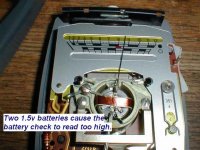
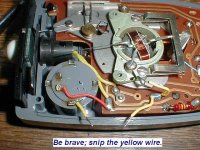
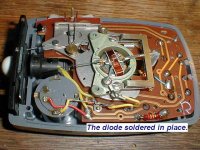
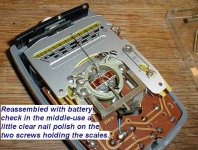
Finished! Because my meter's innards were slightly different than Chris', I had to remove the scales (only two more screws) to access the battery wires. Be careful not to bend or even touch the pointer. While I had the cover (top) off, I also used a little Lemon Pledge to gently polish the clear plexi on both sides. The pictures aren't the best or the most logical.
 

Attachments

  • Luna1.jpg
    Luna1.jpg
    40.8 KB · Views: 0
  • Luna2.jpg
    Luna2.jpg
    45 KB · Views: 0
  • Luna3.jpg
    Luna3.jpg
    49.1 KB · Views: 0
A few more snaps. The first 'battery test' picture, above, is without the diode. The last picture, below, shows it with the same batteries and with the diode.

Because my soldering skills are crude at best, I bought 4 extra diodes. PM me if you would like a free diode.
 

Attachments

  • Luna4.jpg
    Luna4.jpg
    49.8 KB · Views: 0
  • Luna5.jpg
    Luna5.jpg
    49.3 KB · Views: 0
  • Luna6.jpg
    Luna6.jpg
    53.3 KB · Views: 0
Last edited:
Victor,

Beautiful stuff! You guys are making this too easy for me. Victor looks like you placed the diode on the negative side (yellow wire seem to ground eventually to chassis), and Chris did his on the positive lead side. You just have to orient the diode properly depending upon the side you solder into.

One more thing, are you using SR44 batteries now or something else?
 
Finishing Touches

Finishing Touches

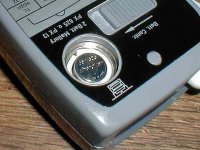
With the Lunasix 3 reassembled, I put in new silver oxide batteries. I used 2mm thick 'craft' foam to compensate for the smaller diameter batteries. The battery test went to the high side of the red zone, indicating fresh batteries. Comparing the readings, in all kinds of light, to those from my Calcu Light X shows the Luna3 is accurate under all conditions. The two meters actually give the same reading from bright sun (Sunny 16) to very dim room light (40W bulb in a lamp). They were both set to EI400 and read from 1/500@f/16 down to 1/15@f/1.4, with room to read in lower light.
 

Attachments

  • SR43W.jpg
    SR43W.jpg
    57.2 KB · Views: 0
  • P6140001.jpg
    P6140001.jpg
    30.5 KB · Views: 0
  • P6140003.jpg
    P6140003.jpg
    31.2 KB · Views: 0
Last edited:
My dirt cheap gossen luna pro ($12.50 + shipping) arrived via Ebay and today I gathered up the material for conversion to 1.5v silver oxide batteries.

At Radio Shack I purchased these items for $12:

1 pkg of 10 Switching Diodes 1N148 Radio Shack no. 276-1122
1 pkg of Heat Shrink Tubing in various sizes no. 278-1627B
2 pkgs of 303 Silver Oxide battery, no. 23-104 (listed as SR44 replacement on back of pkg)

Prior to doing the conversion, I needed to determine if the meter worked. Put in the silver oxide batteries (+ faces up) and then nothing! Meter was dead. At that moment I felt as if I had a big SUCKER stamped on my forehead for buying a non-returnable "appears to work" Ebay light meter. :bang:

So I proceeded to open the unit up per Victor's instructions and pulled out my Multi-meter. I was relieved to find out my batteries were putting out ZERO voltage when I checked battery positive to ground inside the meter. No wonder the meter didn't work.

I troubleshooted the problem to my hasty battery install with some of the packaging cardboard around the batteries. I also bent upwards the negative battery tab at the bottom of the battery holder for better contact. I reinstalled the batteries with a proper foam adapter installed per Victor's picture above and viola! Meter works but voltage too high.

I installed my 1N4148 diode exactly like Victor did except I did not feel the need to remove the scale face plate as he did. The Yellow wire is easily accessable from the side without scale face plate removal (see picture below).

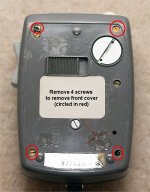
The other tip I have as that when you remove the back aluminum plate you will see several screws. You only need to remove the corner four as highlighted in the attached picture.

I did use heat shrink tubing to insulate my diode splice. I reassembled my unit, installed batteries with my foam adapter and the battery voltage checked out perfectly. A did a quick check against the meter in my Canon 300D and so far so good.

I think I have a working Gossen Luna Pro now with a fabulous leather case! 😀


P.S. if anyone the USA wants a 1N4148 diode and an inch of heat shrink tubing please just PM me and I can drop it in the mail for you. I have 9 diodes left and I don't need that many.
 

Attachments

  • luna-pro1.jpg
    luna-pro1.jpg
    108 KB · Views: 0
  • luna-pro2.jpg
    luna-pro2.jpg
    134.3 KB · Views: 0
Last edited:
Victor kindly mailed me a diode and printed intructions - thank you! I was talking to my brother-in-law, an electronics and computer guy, who told me that he has some conductive epoxy which would be easier than soldering the diode in place. I'll be visiting him in a couple of weeks to do the job!

BTW, I got a quote from a camera shop of $60 to 100 for their tech guy to convert this meter.
 
Back
Top Bottom