dadsm3
Well-known
I'm hoping that some will take a few minutes to help me out here.
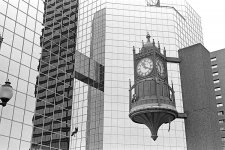
The Hamilton Spectator has an "Eye on the Area" spot on the front page of the classifieds that gives amateurs a chance to post a shot. They liked the following because it includes a popular Hamilton landmark, the Birk's Clock.
They asked me to resend a higher res file of this shot, saying "...we need it to be at least 200dpi and 8" wide for best print quality." It must be a jpeg. This was posted in the gallery here a few days back, and is a 336KB file.
FYI, I scanned the neg with a KM Scan Dual IV at 3200dpi as a colour neg ay 16bits, uploaded to PS, greyscaled & tweaked, then under the "Help" header hit 'Resize'.
-Popup "What will this image be used for?" Print/Online, I hit "online"
-Popup "What is the desired size?" For gallery posting here, I just make the width 650-750 pixels.
- Then I go to "Image", and change it from 16bits to 8bits (it won't allow me to jpeg in 16bits).
I save the changes and always (almost) end up with a file of 250-350KB, good for gallery posting here.
If someone could walk me through a method to get the Spec the quality they require to print this I'd be eternally grateful....
Thanks,
Mike
The Hamilton Spectator has an "Eye on the Area" spot on the front page of the classifieds that gives amateurs a chance to post a shot. They liked the following because it includes a popular Hamilton landmark, the Birk's Clock.
They asked me to resend a higher res file of this shot, saying "...we need it to be at least 200dpi and 8" wide for best print quality." It must be a jpeg. This was posted in the gallery here a few days back, and is a 336KB file.
FYI, I scanned the neg with a KM Scan Dual IV at 3200dpi as a colour neg ay 16bits, uploaded to PS, greyscaled & tweaked, then under the "Help" header hit 'Resize'.
-Popup "What will this image be used for?" Print/Online, I hit "online"
-Popup "What is the desired size?" For gallery posting here, I just make the width 650-750 pixels.
- Then I go to "Image", and change it from 16bits to 8bits (it won't allow me to jpeg in 16bits).
I save the changes and always (almost) end up with a file of 250-350KB, good for gallery posting here.
If someone could walk me through a method to get the Spec the quality they require to print this I'd be eternally grateful....
Thanks,
Mike