Sharing images electronically with family and friends

froyd

Veteran
Local time
11:10 AM
Joined
Aug 14, 2006
Messages
2,324
I'm looking for suggestions for photo services that allow me to load some pictures, keep them invisible to the unwashed masses, share them with friends and family, and allow the chosen few to download full resolution copies. I also would use the service to link images to post on RFF that I do not want to post in the gallery.

Currently, I use Flickr for this purpose, but has suffered in the past two years. I have a paid Pro account (to avoid ads) and I'm using 2 GB of space. My biggest beef right now is that posting Flickr images on RFF results on crispy-fried photos with an unpleasant amount of sharpening, so that in may cases I end up uploading to the RFF gallery and then linking from there.

The second objection to Flickr is that the user experience is less than ideal at the viewers' end. When I send private invites for photo albums to relatives there are always people who struggle with the navigation and downloading the full size images of which they wish to keep copies. In truth, the process is not so impossible, but we are talking about older relatives with basic computer skills.

...so, my requirements for a photo sharing site are:

- Free or up to $25 / year for storage of 5GB or greater
- No social aspect or social aspect easy to ignore (unlike Flickr)
- Default PRIVATE setting for uploaded material with easy sharing on RFF and to family and friends
- "Delicate" approach to image display enhancements (no super-sharpening)
- Easy to download full albums for people invited to view them
- Pleasant display of pictures (lightbox or other clean format)

Anything that fits my bill?

I looked at Dropbox, but it seemed more expensive. Photobucket seems to be a possibility, but I wonder how's the user experience.

Any recommendations...or any tricks to avoid Flickr's ultra-sharpening?
 
You can keep posts at facebook private. Check it out first.
Photobucket visits may get you computer viruses or malwares.
I like using smugmug. It is a very good website for image storage.
Roland directed me to it.
 
I second smugmug. Though they are $40/year for their cheapest plan.

You can make password protected albums, or just unviewable (to the public) albums that anyone can see that has the direct link. I use one of these albums for baby pictures of my son, that are viewable only to whoever I send the link to and not searchable.
 
Um, GOOGLEDRIVE? Not sure. You can simplify it- You could set up a directory "Aunt Martha" for example, or inatall GOOGLEDRIVE on their computer and share a directory.
 
Or mail them a few prints. My daughter was delighted with the ones I gave to her for Christmas, and I'm about to send another batch to my father. Makes no demands whatsoever on his computer skills.

Cheers,

R.
 
Dropbox is the easiest and it's not searchable by anyone you do not give the link to.

With just a few changes in the URL field of my browser I can access restricted albums on Flickr and Smugmug. Not very secure IMO. I can even download full size Flickr images with a FF plugin. Again not very secure.
 
I use dropbox. You can have different folders that are only accessable via link.
It's also easy to download seperate pictures from an album/folder or the whole as a zip-file.
+ You can also take direct links and post them anywhere you want.

-Click for one of my small folders as an example-

It's easy to have about 6gb of storage completly for free.

No enhancements to pictures, no social aspect
 
I use dropbox. You can have different folders that are only accessable via link.
It's also easy to download seperate pictures from an album/folder or the whole as a zip-file.
+ You can also take direct links and post them anywhere you want.

-Click for one of my small folders as an example-

It's easy to have about 6gb of storage completly for free.

No enhancements to pictures, no social aspect

ditto. But Photobucket also works although its interface is crud and looks like cr#p.
 
I use dropbox. You can have different folders that are only accessable via link.
It's also easy to download seperate pictures from an album/folder or the whole as a zip-file.
+ You can also take direct links and post them anywhere you want.

-Click for one of my small folders as an example-

It's easy to have about 6gb of storage completly for free.

No enhancements to pictures, no social aspect

When I was researching options, Dropbox looked pretty good, but the limited plans were a problem :2Gb for free or 1 TB for $99 and nothing in between.

How can you go up to 6GB on the free plan?
 
I second smugmug. Though they are $40/year for their cheapest plan.

You can make password protected albums, or just unviewable (to the public) albums that anyone can see that has the direct link. I use one of these albums for baby pictures of my son, that are viewable only to whoever I send the link to and not searchable.

I just clicked on the smugmug link in your signature (nice pics by the way), but I noticed that even as a guest I was given the option of sharing via various social media services. Any way to block those options if desired?
 
I use a seperate flickr account for family only. They have the flickr-App on their smartphones and tablets, so access is easy and some of them share their pictures as well. I switch off any output sharpening, other than that i don't bother with the image quality on flickr.
Regards, Klaus
 
It does not really make a difference whether you use Dropbox, Google Drive, Skydrive, iCloud or some similar service - all of them allow for non-public areas. Just beware that they are not suitable for storing really private matters (as quite a few nudie-selfie celebrities recently discovered). If any, dedicated photo sharing services are a bit more risky in that these tend to have a business model leaning more towards public sharing.

But so what - as soon as you give access to your relatives, at least one of them will be computer illiterate enough to forward the access link or the pictures themselves to Facebook, or to run a malware infested computer. Just don't publish what you do not want to be public, even if the supposed audience appears to be small!
 
I use a seperate flickr account for family only. They have the flickr-App on their smartphones and tablets, so access is easy and some of them share their pictures as well. I switch off any output sharpening, other than that i don't bother with the image quality on flickr.
Regards, Klaus

Within Flickr? Or do you mean from LR when you export to Flickr?

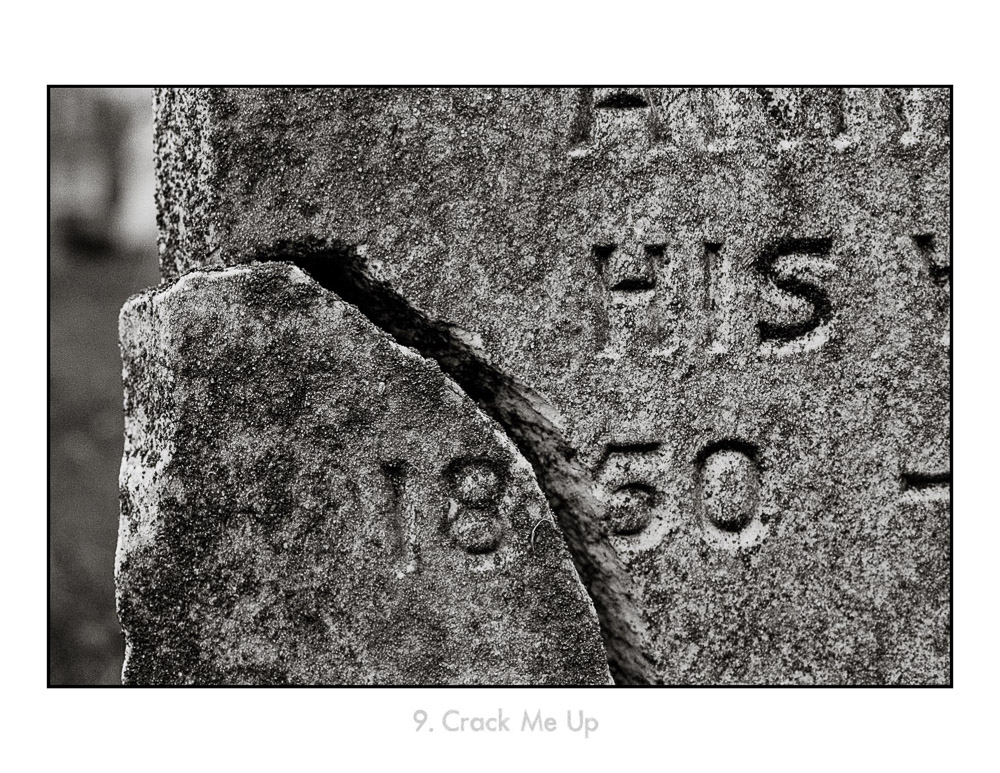
Here is a photo from the RFF gallery
U6408I1420155201.SEQ.0.jpg


Here is the nasty version spat out by Flickr
09 - Crack Me Up.jpg by kafe-pic, on Flickr
 
Dropbox is something which looks like gateway to your computer for intruders, IMO.
You have to install it and receiving also have it installed...

I have paid storage with Google. The Google Drive is not social, but crappy one.
All I do is uploading full res JPEG1 to picasa web, here is no social activity, but easy to create folders from Picasa on computer at upload.
Or from any computer without Picasa installed once you are log into Google.
Each folder might have different permissions. Only to you, only for those who have link, anyone.
12-16 MP files are shown as icons very quick to show and full size on click, doesn't take long, download allowed if they have link, which you have to provide once.
 
Dropbox is something which looks like gateway to your computer for intruders, IMO.
You have to install it and receiving also have it installed...

No, you don't. They, just like Google, Apple and Microsoft, frequently advertise their cloud storage apps and applications as absolutely essential. But all of them work perfectly well using just the browser interface.
 
Back
Top Bottom