tyrone.s
Well-known
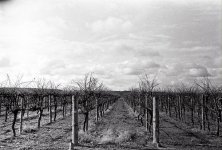
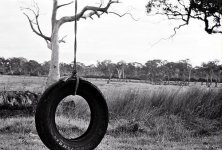
After a break of some years I'm back into developing my own film and scanning to either upload to Flikr or print via inkjet or a photolab. I look at my images on the screen and I'm having trouble getting the sort of results that I'm looking for - a little less grain maybe but definately truer, more contrasty blacks that sort of 'peak' up out of a nicely balanced, smooth (?) grayscale range.
Could people please give me some ideas as to where to start to improve my images which I feel are lacking a bit of punch and are a little bit grainy after post processing.
Here's my workflow:
In a nutshell: I stand develop in Rodinal because I believe it brings as much detail as possible into shadow areas and helps even out the overall development of the negative in the first place. I then try for the lowest contrast 'flat' scan and then adjust levels and curves in post + correcting dust spots and scratches with the clone tool.
In detail
Wet develop:
I stand Develop in Rodinal 1+100 (either 6+600 for two rolls or 4+400 for 1 roll @ 20 degrees C. I agitate gently for 30 seconds, 2 bangs on counter and once more at 30 minutes. I get consistent results and can't see difference between 1 roll or 2. I Dump developer at 60 minutes (+/- a minute or 2 extra, then wash (no stop bath), fix for 5 - 6 minutes (Ilford fixer) based on how long a clipping of the negative takes to clear and then + 3 minutes. I wash and then final rinse with a drop of Kodak photoflow and hang dry. I've stopped using my fingers as a squeegee and let the roll hang (with weights) till dry. I live in the country and use (unfiltered) rainwater.
Scan:
Plustek Optifilm 7200. Running Vuescan in a Virtual Machine on XP with Chris Crawford's settings as best as I can with my scanner (set at 3600 dpi). These are Chris' settings that I've based mine on.

I scan to Tiff (16 bit) and get files that are about 30MB in size.
Post process:
This is where I have most problems. I use Linux for this (I run the scanner in a virtual machine on XP) and Gimp is 8 Bit for Tiffs. I open in Gimp and usually adjust Levels and then tweak the levels as a curve for fine tuning highs/lows/blacks. I then usually run unsharp mask at the default setting and use clone to fix up the numerous dust spots and scratches that I seem to get.
If I've stuffed up the initial exposure (i.e. sky is overexposed = no detail) I might duplicate the layer, adjust the curves to bring out underexposed section and then apply a mask and then create a graduated filter. This will bring out a lot of grain but it works much like lightroom's graduated filters.
At the moment I can't spend on Photoshop and / or Lightroom or a better scanner. I need some help using what I've got or free alternatives to help me. Frankly I'm not sure if I'm running down the wrong street with Rodinal in the first place. I should add that the Legacy Pro that I'm currently using is expired and hasn't been stored in any special way for the last couple of years when it wasn't being used.
A couple of samples:
These are Jupiter J8 on Contax II and taken yesterday:

2015-07-01-0014 by BigDragon, on Flickr

2015-07-01-0004 by BigDragon, on Flickr

2015-07-01-0003 by BigDragon, on Flickr
Voigtlander Vitomatic Ultron 2 and taken about a month ago:

Scan-150605-0002 by BigDragon, on Flickr
Yashica FXD, ML 50/1.4 and also taken about 4 weeks ago:

2015-06-20-0008 by BigDragon, on Flickr
And for reference taken maybe 3-4 years ago on the same film, developed in Rodinal (either 1:25 or 1+100) - scanned with same equipment and probably processed with the same sort of software.

img_0001 by BigDragon, on Flickr
So, any and all advice / opinions would be greatly appreciated. I feel that I've got consistency down but I'm just not developing and getting better at this and I'm not sure where best to start making changes.
Thanks!
Could people please give me some ideas as to where to start to improve my images which I feel are lacking a bit of punch and are a little bit grainy after post processing.
Here's my workflow:
In a nutshell: I stand develop in Rodinal because I believe it brings as much detail as possible into shadow areas and helps even out the overall development of the negative in the first place. I then try for the lowest contrast 'flat' scan and then adjust levels and curves in post + correcting dust spots and scratches with the clone tool.
In detail
Wet develop:
I stand Develop in Rodinal 1+100 (either 6+600 for two rolls or 4+400 for 1 roll @ 20 degrees C. I agitate gently for 30 seconds, 2 bangs on counter and once more at 30 minutes. I get consistent results and can't see difference between 1 roll or 2. I Dump developer at 60 minutes (+/- a minute or 2 extra, then wash (no stop bath), fix for 5 - 6 minutes (Ilford fixer) based on how long a clipping of the negative takes to clear and then + 3 minutes. I wash and then final rinse with a drop of Kodak photoflow and hang dry. I've stopped using my fingers as a squeegee and let the roll hang (with weights) till dry. I live in the country and use (unfiltered) rainwater.
Scan:
Plustek Optifilm 7200. Running Vuescan in a Virtual Machine on XP with Chris Crawford's settings as best as I can with my scanner (set at 3600 dpi). These are Chris' settings that I've based mine on.
I scan to Tiff (16 bit) and get files that are about 30MB in size.
Post process:
This is where I have most problems. I use Linux for this (I run the scanner in a virtual machine on XP) and Gimp is 8 Bit for Tiffs. I open in Gimp and usually adjust Levels and then tweak the levels as a curve for fine tuning highs/lows/blacks. I then usually run unsharp mask at the default setting and use clone to fix up the numerous dust spots and scratches that I seem to get.
If I've stuffed up the initial exposure (i.e. sky is overexposed = no detail) I might duplicate the layer, adjust the curves to bring out underexposed section and then apply a mask and then create a graduated filter. This will bring out a lot of grain but it works much like lightroom's graduated filters.
At the moment I can't spend on Photoshop and / or Lightroom or a better scanner. I need some help using what I've got or free alternatives to help me. Frankly I'm not sure if I'm running down the wrong street with Rodinal in the first place. I should add that the Legacy Pro that I'm currently using is expired and hasn't been stored in any special way for the last couple of years when it wasn't being used.
A couple of samples:
These are Jupiter J8 on Contax II and taken yesterday:
2015-07-01-0014 by BigDragon, on Flickr
2015-07-01-0004 by BigDragon, on Flickr
2015-07-01-0003 by BigDragon, on Flickr
Voigtlander Vitomatic Ultron 2 and taken about a month ago:
Scan-150605-0002 by BigDragon, on Flickr
Yashica FXD, ML 50/1.4 and also taken about 4 weeks ago:
2015-06-20-0008 by BigDragon, on Flickr
And for reference taken maybe 3-4 years ago on the same film, developed in Rodinal (either 1:25 or 1+100) - scanned with same equipment and probably processed with the same sort of software.
img_0001 by BigDragon, on Flickr
So, any and all advice / opinions would be greatly appreciated. I feel that I've got consistency down but I'm just not developing and getting better at this and I'm not sure where best to start making changes.
Thanks!