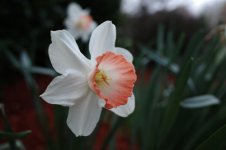
Beautiful image.
Seems maybe a little improved over the GR II but it might be RPP64.
I assume this refers to Raw Photo Processor.
Wondering if you can share your workflow. I've played with it a little but never worked it into my process.
Thanks, I like how that one turned out.
The camera created JPEG is attached to show the differences in color and tone from RPP64.
I import everything into Lightroom. If I have a file I want to check out in RPP64 I either use the RPP64 Plugin to Export -> Open in RPP (original DNG) or I just right click on the DNG in LR and "Show In Finder" and drag and drop the DNG onto my RPP64 icon.
From there it is just editing the DNG as I want and then saving the file. I have RPP64 set to save in the original files location.
Back in Lightroom in the Library view I just right click on the folder I was working in and "Synchronize Folder" and LR will see the RPP64 created file and add it to the library. Pretty easy for occasional use with RPP64.
If I had a bunch of files I might batch them all before LR but haven't really done much of that with RPP64.
For this image I didn't do much.
Set the TrueFilm Simulation to LF (Ektar)
WB Auto
Exposure +0.20
unchecked Blur Chroma
Sharpness +5
Local Contrast +5
Interp = VCDMF (if you don't click this you get half size files)
I think everything else was at default.
If you haven't used the Truefilm simulations in RPP64 you should spend some time with them. LF is my favorite but V50 (Velvia) and K64 (Kodachrome) can be really nice too.
BTW, the developers of RPP64 *never* update their website. The download link there is to a very old version of the software. They link the
newest version on their support forum.
Hope this helps,
Shawn