What have you just BOUGHT?

Well, I just re-bought Leica Monochrom (v1) after missing the one I had before for several months. This time the silver edition.

And I just scored a full kit of Leitz BEOON copy stand in mint condition. This way I can scan the films from M4-P using Monochrom and keep the entire workflow purely black and white. 😉
 
I'm mostly selling off my excess gear these days, but a few bits came my way recently that I couldn't resist:

Nikon F6 body
Nikon TC-16A AF 1.6x teleconverter (converts AI-S lenses to AF for the F6)
Epson SureColor P600 printer
Leica M Monochrom typ 246 (ordered, delivery by Xmas I hope)

G
 
Well, I just re-bought Leica Monochrom (v1) after missing the one I had before for several months. This time the silver edition.

And I just scored a full kit of Leitz BEOON copy stand in mint condition. This way I can scan the films from M4-P using Monochrom and keep the entire workflow purely black and white. 😉

I obtained one of those a couple of months back. Very neat device, and it sure takes up a lot less space to store than the old copystand. I've captured a few medium format negatives with it using a Color Skopar 50mm f/2.5 lens and the M-P ... it works well!

G
 
I obtained one of those a couple of months back. Very neat device, and it sure takes up a lot less space to store than the old copystand. I've captured a few medium format negatives with it using a Color Skopar 50mm f/2.5 lens and the M-P ... it works well!

G

Great to hear you had good results. I'm just not a big fan of conventional desktop scanning process and I've been using my X-E1 and Micro-Nikkor to scan, but with very unscientific setup with eyeballing the angles and using iPad as lightbox (or just asking the lab to do the scan and I'm usually not happy with the results). I hope this will improve my process and prompt me to shoot more film. 🙂
 
Great to hear you had good results. I'm just not a big fan of conventional desktop scanning process and I've been using my X-E1 and Micro-Nikkor to scan, but with very unscientific setup with eyeballing the angles and using iPad as lightbox (or just asking the lab to do the scan and I'm usually not happy with the results). I hope this will improve my process and prompt me to shoot more film. 🙂

It speeds things up and helps make the quality more consistent. I have an excellent scanner (Nikon 9000) that does a better job, but it's a lot slower to set up and use, not worth the trouble if I only have a single frame or two to work on.

I'd recommend getting a flat panel light box rather than using the iPad. It will do a better job on evenness of illumination and color consistency (yes I know you prefer B&W..).
 
..... a bit of gas .......

just ordered a Leica Monochrome M version 1, a great price on the Silver version. The black version listed for several hundred dollars more.

Leica Certified, less than 100 actuations, and full 2 year warranty.
 
It speeds things up and helps make the quality more consistent. I have an excellent scanner (Nikon 9000) that does a better job, but it's a lot slower to set up and use, not worth the trouble if I only have a single frame or two to work on.

I'd recommend getting a flat panel light box rather than using the iPad. It will do a better job on evenness of illumination and color consistency (yes I know you prefer B&W..).

I agree about iPad/light box. I do have a small light box but I just can't find it's power adapter. Decided to get a 17" super thin panel with USB power from Amazon.

seakayaker1,
I basically did the same. Very happy with what I received. My digital Leica body purchase scheme is pretty much set to "buy a certified pre-owned with warranty after the successor comes out."
 
Aki-Asahi leather skins for my MdA and M3 DS. The vulcanite had started to flake off so it was time.
I previously had bought from cameraleather.com - and was very happy with the product - but seeing that their site has an error message from August 2014, and most of it no longer seems to work, I was not going to trust that route.
There's an operation in HK on ebay, but looking closely at their pictures their skins do not seem to fit well. Then there's Art de Mano , but their skins are over $200...
 
I kinda went nutty over the past three weeks:

• Mamiya RZ67 Pro II, 110mm, 120+220+Pola.
• Mamiya RZ L-Grip.
• Mamiya RZ AE Prism.
• Pentax LX.
• Pentax-A 50mm 1.4.
• Contax T2.

The RZ and T2 are 're-buys.' I had both, twice but sold them.... The Pentax experience will be entirely new.
 
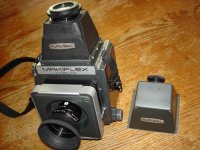
For years I have been planning to finish this homemade Plaubel Makiflex Stovepipe Viewfinder.
I scrounged a broken Mamiya RB-67 CdS Magifying Hood, took it apart, recovered it with leather,
and painted it. Then I put it on my studio shelf.

Today I spent several enjoyable hours in my workshop, finishing this project. First I took an old Makiflex
Waist Level Hood that wouldn't quite popup, and stripped it completely, to get the base frame, which goes in the camera.
Then I carefully placed the RB-67 Hood, and drilled and screwed it together. Finally I cut strips of adhesive
foam to fill the void in the Makiflex frame and eliminate light leaks. The Mamiya ocular is fantastic and I can
easily really crisply focus on the grain of the Makiflex groundglass. I really prefer this type of finder to waist level, especially working outside. The finder covers the full 9x9 Makiflex groundglass. I can see no downsides.

I think Plaubel made something like this, although I have only seen one in thirty years, and that was part of a package for sale. I am tired of waiting :bang:

To competely finish it off, I am going to attach some adhesive Rollei SL66 "Anniversary Diamond Rubber" around the eyepiece, so I don't scratch my eyeglasses. A friend in Germany helped me acquire sheets of this stuff from the Rollei factory years ago.

New finder shown below with the Maikiflex Porrofinder. And the 150 Symmar-S is now on a recessed Plaubel Peco-Jr board. I have a 240mm Symmar-S in barrel coming from the UK, due in tommorrow. Been using the 150mm Symmar-S quite a bit recently. Will be good to have the matching 240mm.
 

Attachments

  • 001.jpg
    001.jpg
    42 KB · Views: 0
After shooting a number of rolls through my M2 so far, I decided to get a rewind crank for it. I ordered one of the Photo-Equip ones. Hopefully it'll reduce the amount of time it takes to rewind a roll of film. (usually I can rewind a full roll fairly quickly, but today when I walked up a few flights of stairs while rewinding, I still wasn't done by the time I got to my hotel room.)
 
How do you like it?

So far, so good. I just set it up last night; I'll be doing test prints with it this weekend.

It's a nice printer, however, with some intelligent improvements over the old r2400.

I made some prints today to test it out after updating its firmware, drivers, and getting a couple of the Hahnemühle paper profiles and such installed.

Only glitch is the usual ... Hahnemühle Bamboo paper in 8.5x11 inch sheets refuses to load, it has too strong a curl for the mechanism to cope with. The 13x19 sheets of Bamboo work perfectly.

I made prints on Exhibition Fiber, Bamboo, Hot Press Natural, and Velvet Fine Art—my usual paper repertoire. All came out beautifully, both color and B&W, and match the on-screen rendering with high fidelity using my usual color-managed print workflow.

Happy happy.

G
 

Thread viewers

Back
Top Bottom